Repository navigation


|
Hello everyone, I'm working on this folder and I don't see any way to deploy my JS code without rebuild Docker. But this command creates a new docker image cache and it's too big (3,5G per image) Please help me to solve this issue. Thanks ! |
Replies: 3 comments 3 replies

|
Hello, @Nhagg! I'm here to help you with any bugs, questions, or contributions you have. Let's work together to solve the issue you're facing. To update or develop your JavaScript code in the
To continue talking to Dosu, mention @dosu. Help Dosu learn! Give it feedback: Great Response | Irrelevant Answer | Incorrect Sources | Too Verbose | Hallucination | Bug Report | Other |

|
I get an error when install npm: npm ERR! A complete log of this run can be found in: C:\Users\nha.le\AppData\Local\npm-cache_logs\2025-02-18T06_19_30_243Z-debug-0.log
|
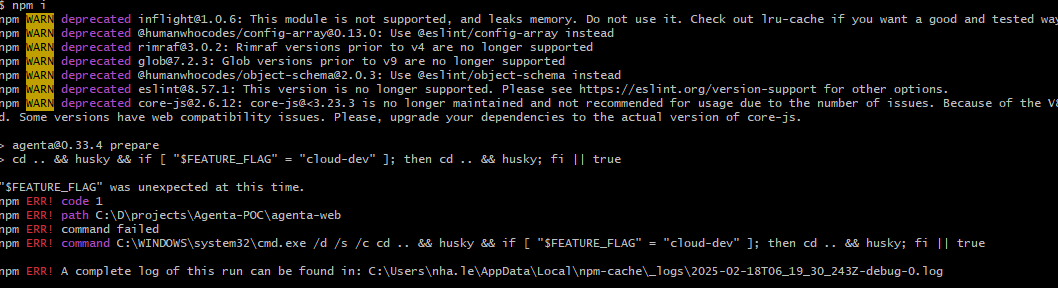

|
Hello @Nhagg I am not sure I understood your question. Are you trying to develop in Agenta and have live preview (each time you make a change you see what happens)? Or are you trying to deploy agenta locally and do not want to use docker? Or something else? Can you please provide more information about what are you trying to achieve (modify agenta? just deploy it?..) A couple of things though:
|
|
Hi @mmabrouk Thank you for your support! |

|
Here are your options for updating the web interface without rebuilding the entire container:
Choose option 2 if development mode meets your needs, or option 3 for a production-ready external frontend. |
|
This has been resolved starting v0.43.1 |


Here are your options for updating the web interface without rebuilding the entire container:
Default approach: Rebuild the web image and restart the container when making changes.
Development mode: Run the frontend outside Docker using the
run_oss.shscript. This works only in development mode but avoids rebuilds.Modified approach: Adapt the
run_oss.shscript for production by:npm run startinstead of the dev commandChoose option 2 if development mode meets your needs, or option 3 for a production-ready external frontend.