


Unified NIRS Analysis Desktop Application
A modern desktop application for Near-Infrared Spectroscopy (NIRS) data analysis, with a Rust-owned product control plane, React UI, native Methods execution, and bounded CPython stdio interoperability for explicit libraries/plugins.



Historical 0.10.1 downloads • User Guide • nirs4all Library • Website
Release status: the Phase 2/R4/V1 Rust-only product is a local, unpublished candidate. There is currently no candidate installer, portable archive, container image, or update channel to download. The public
0.10.1release is retained for historical rollback/support only and does not attest the architecture or platform support described for the candidate below.
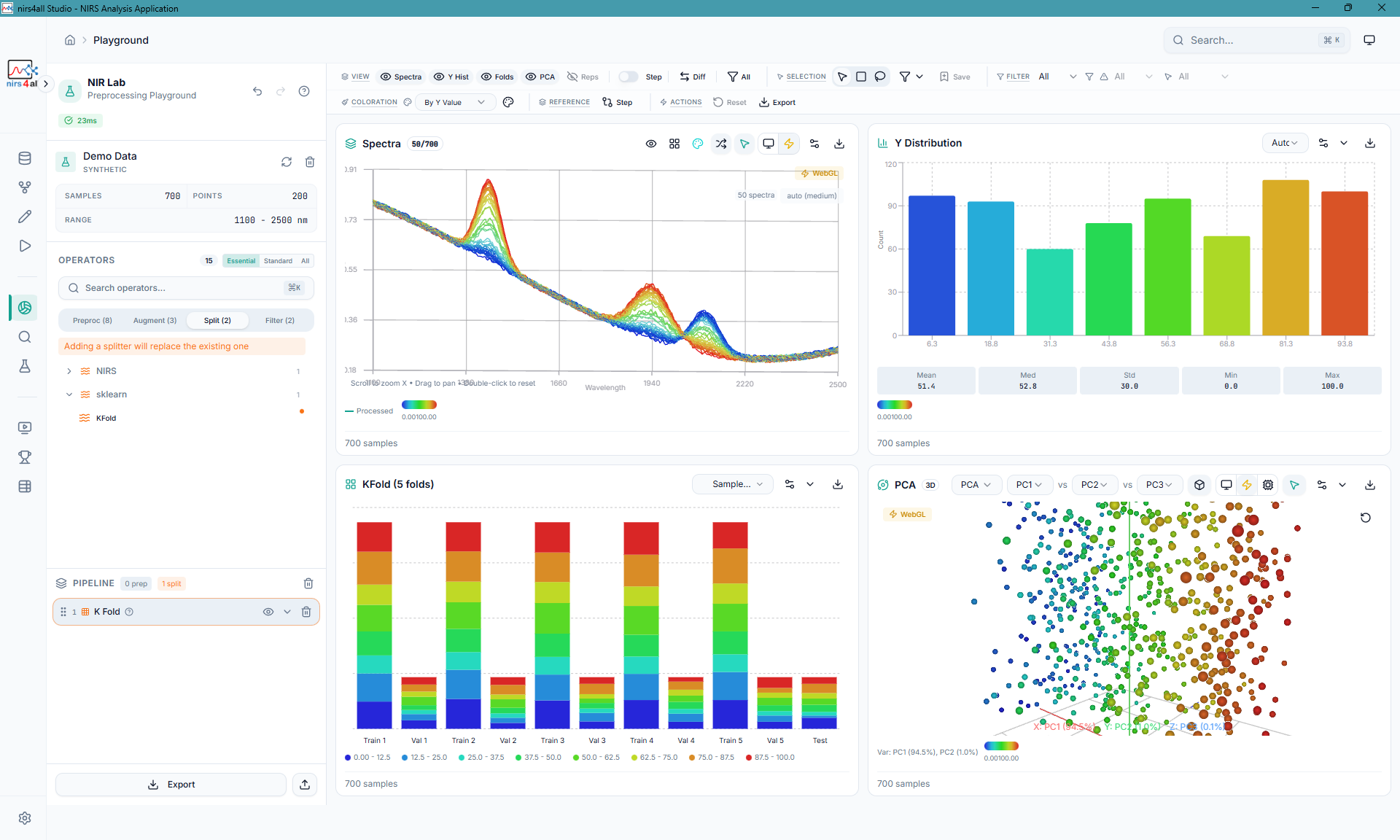
Playground — Interactive spectral exploration with PCA, distributions, and preprocessing preview
nirs4all comes in two flavors — pick the one that fits your workflow:
| nirs4all Studio (Desktop App) | nirs4all (Python Library) | |
|---|---|---|
| Best for | Researchers, technicians, and anyone who prefers a visual interface | Developers, data scientists, and anyone who writes Python scripts |
| What it is | A Rust-owned desktop product with drag-and-drop pipelines, interactive charts, and bounded native training; CPython is a stdio library/plugin host only | A pip install Python package with a declarative API for building NIRS pipelines in code |
| Install | Candidate unavailable; historical 0.10.1 assets remain available for rollback/support | pip install nirs4all |
| Repository | You are here | GBeurier/nirs4all |
Not sure? If you've never written Python code, start here with nirs4all Studio. Studio exposes a deliberately bounded product surface rather than mirroring every Python-library capability.
The following formats describe the intended candidate distribution contract. They are not download links and do not claim that the candidate has been published or qualified on every platform.
| Target platform | Candidate file contract | Availability |
|---|---|---|
| Windows x64 | .exe installer |
Unpublished; installation qualification pending |
| macOS (Intel & Apple Silicon) | .dmg disk image |
Unpublished; installation qualification pending |
| Linux x64 | .AppImage or .deb package |
Unpublished; local evidence is not a public release |
The candidate installer embeds the Rust product backend and a fixed, content-addressed CPython library/plugin closure. It does not discover user environments or install packages at runtime. You don't need Python installed on your machine.
Candidate profile: the proposed desktop packages and native Docker image use the single CPU plugin profile. GPU plugin-host packaging remains separately scoped and is not a candidate download promise.
| Target platform | Candidate file contract | Availability |
|---|---|---|
| Windows x64 | nirs4all-Studio-*-all-in-one-win-x64.zip |
Unpublished; qualification pending |
| macOS x64/arm64 | nirs4all Studio-*-all-in-one-mac-*.zip |
Unpublished; qualification pending |
| Linux x64 | nirs4all-Studio-*-all-in-one-linux-x64.tar.gz |
Unpublished; local evidence only |
The candidate contract bundles Electron, the Rust product backend, and the fixed CPython plugin-host closure. It does not bundle a Python HTTP backend.
For contributors, or if you want to hack on the code. Requires Node.js 20+ and Python 3.11+.
git clone https://github.com/GBeurier/nirs4all-studio.git
cd nirs4all-studio
npm install
The optional Python commands in Getting Started start only the transitional web-development or explicit whole-session diagnostic server. Packaged desktop mode uses the Rust sidecar and can never select that Python HTTP process as a product route or fallback.
| Installer | Standalone | Developer | |
|---|---|---|---|
| Install required | Yes | No (extract & run) | Clone + npm install |
| Python required | No (bundled) | No (bundled) | Yes (3.11+) |
| Auto-updates | Candidate channel unavailable | Candidate archive unavailable | git pull |
| Desktop profile | CPU | CPU | Contributor-selected |
| Best for | End users | Portable / trial use | Contributors |
The product container serves the compiled frontend with nginx on port 8000.
Requests under /api and /ws are proxied to the Rust sidecar bound only to
127.0.0.1:8001 inside the container. The image contains no FastAPI/Uvicorn
runtime or Python backend source.
Startup requires a mounted password file or an explicit trusted-local-only
configuration; see Docker access. Do not
publish an unauthenticated container port on a shared network.
It does include the content-addressed nirs4all-methods ABI 2.14 library used by
the Rust/Core Archive V2 prediction path and the same fixed CPython
library/plugin closure used for bounded Rust-to-Python stdio interoperability.
No candidate container tag is published. Build and tag the image locally for
development; do not treat ghcr.io/...:latest or the historical 0.10.1
release as evidence for this Rust-only candidate.
The embedded CPython closure is selected only for bounded Rust-to-Python stdio calls. It never owns an HTTP port, scheduler, store, or fallback route. See Docker packaging for the exact boundary.
This section is strictly for developers running from source. Python and FastAPI commands below start the transitional browser-development or explicit diagnostic stack only. They are not installation instructions for the unpublished desktop candidate and cannot become its backend or fallback.
- Node.js 20+ (recommended: use
nvm+ the version in.nvmrc) - Python 3.11+
- nirs4all library (optional for UI development)
This project supports development on:
- Windows Native - PowerShell, cmd.exe, or Windows Terminal
- Linux - Any distribution with Node.js and Python
- macOS - Intel and Apple Silicon
- WSL2 - Windows Subsystem for Linux
-
Install Node dependencies:
npm install
-
Install Python dependencies:
python -m venv .venv
.venv\Scripts\activate
pip install -r requirements-cpu.txt
-
Check your environment:
npm run doctor
-
Start development servers (diagnostic web stack only):
Use the cross-platform launcher for the full web stack:
scripts\launcher.cmd start web:dev
scripts\launcher.cmd stop
Or run the frontend and the diagnostic-only FastAPI server separately:
npm run dev REM Frontend (Vite) at http://localhost:5173Terminal 2:
.venv\Scripts\activate
python -m uvicorn main:app --reload --port 8000
Desktop mode:
npm run start:desktop
-
Install Node dependencies:
npm install
-
Install Python dependencies:
python -m venv .venv
source .venv/bin/activate
pip install -r requirements-cpu.txt  # or requirements-gpu.txt for GPU
-
Check your environment:
npm run doctor
-
Start development servers (diagnostic web stack only):
Use the cross-platform launcher for the full web stack:
./scripts/launcher.sh start web:dev
./scripts/launcher.sh stop
Or run the frontend and the diagnostic-only FastAPI server separately:
npm run dev # Frontend (Vite) at http://localhost:5173Terminal 2:
source .venv/bin/activate
python -m uvicorn main:app --reload --port 8000
Desktop mode:
npm run start:desktop
If you prefer using WSL2, make sure you're using Linux node/npm (not the Windows ones mounted under /mnt/c).
-
One-time: permanently disable Windows PATH injection into WSL (prevents UNC/cmd.exe install failures):
sudo tee /etc/wsl.conf <<'EOF'
[interop]
appendWindowsPath=false
EOF
Then restart WSL from Windows:
wsl.exe --shutdown
-
Install/use Node via nvm (WSL-native):
npm run setup:wsl
nvm use
Quick check (should NOT point to /mnt/c/...):
which node
which npm
Then follow the Linux setup instructions above.
To run as a desktop application:
# Development mode (with hot reload)
npm run dev:electron

# Build and preview (production mode)
npm run electron:preview
Electron starts the Rust control-plane sidecar and creates the desktop window without starting a Python HTTP server. In the normal desktop product every renderer HTTP/WebSocket request is preselected for a qualified Rust route; unmigrated routes fail closed before Python acquisition. The bundled/configured CPython runtime remains available only as the bounded stdio library/plugin host invoked by Rust.
Phase 2 desktop has no Python HTTP activation flag, environment override, IPC acquisition path, or renderer target. Web-development server sources remain in the checkout, but they are outside the packaged Electron dependency graph and absent from product installers and all-in-one archives.
The native sidecar is the packaged product backend, not an opt-in hybrid. For
development, NIRS4ALL_NATIVE_SIDECAR_PATH may point to a specific built
studio-sidecar binary and NIRS4ALL_NATIVE_SIDECAR_PORT may select its
loopback port (default 0, an ephemeral port). Packaged Electron instead
verifies and starts the bundled content-addressed
resources/backend/native/studio-sidecar. It routes only explicitly migrated
UI calls through Rust; every other route family refuses before fetch in the
normal session. Electron accepts the embedded interpreter only from
STUDIO_RUNTIME_CONTRACT.json; environment values, managed/user venvs, PATH,
and source-sibling checkouts cannot replace it in a packaged product. The
contract content-addresses the executable and exact adjacent runtime inventory,
including its single explicit site-packages directory. Symlinks, special
files, extra files, missing files, and path substitution disable only the
plugin capability before request or job mutation. The worker starts with
-I -S -B, so .pth, user-site, and bytecode side effects are not acquisition
paths. The explicit preflight verifies the runtime and scientific callable
identities. The bounded stdio worker,
Rust-owned terminal callback, and native saved-input resolver are implemented.
On qualified Unix launches, the resolver accepts only one train-only numeric
regression dataset and an explicit saved KFold + PLS pipeline, delegates
assembly to nirs4all-io, and passes a path-free matrix payload to CPython.
Other scientific shapes fail before job/event/durable mutation; Windows stays
unavailable until process-tree termination is qualified. The first UI-backed native
routes are /api/health, /api/system/capabilities, /api/system/info, and
/api/system/env-coherence, /api/system/network, /api/updates/version,
/api/updates/runtime/status, /api/updates/settings, plus /api/app/settings,
/api/app/favorites, /api/app/config-path, the /api/workspaces catalogue,
and native workspace activation/unlink mutations. They are served by Rust and
do not fall back to FastAPI after sidecar selection. Run discovery is also
served natively for /api/workspaces/{workspace_id}/runs when its query is
empty or contains only one source=unified|manifests|parquet and one
refresh=true|false value (in either order); duplicate or unknown query
parameters are not native-qualified and therefore refuse in the normal desktop
session. Workspace creation/selection/reload and the current-workspace document
are now native, as are the dataset catalogue (link/list/edit/unlink) and saved
pipeline CRUD. Their existing JSON documents survive upgrades; unlinking never
deletes dataset files. Newly linked datasets remain explicitly unchecked until
the library validates their contents. Editor branches, generators and tuning
fields are preserved without reducing them to the PLS execution profile.
Pruning, scientific parsing/import previews, and scientific surfaces not listed
above remain unavailable until migrated (or while the explicit R2 diagnostic
owner is selected).
The separate native researcher route POST /api/training/native-archive-v2
does not invoke CPython. It resolves one persisted IO dataset and one selected
dense source, executes the exact
SNV(ddof=0) -> Savitzky-Golay(mode=interp) -> PLS profile through
IO/DAG-ML/Methods/Core, writes Archive V2, and registers the artifact in the
workspace Store. It supports named multi-target regression within the bounded
native limits; fusion, N-D payloads, HPO, and fallback are not part of this
route.
Note: The webapp can run without nirs4all installed for pure UI development. The backend will report missing capabilities but the frontend is fully functional.
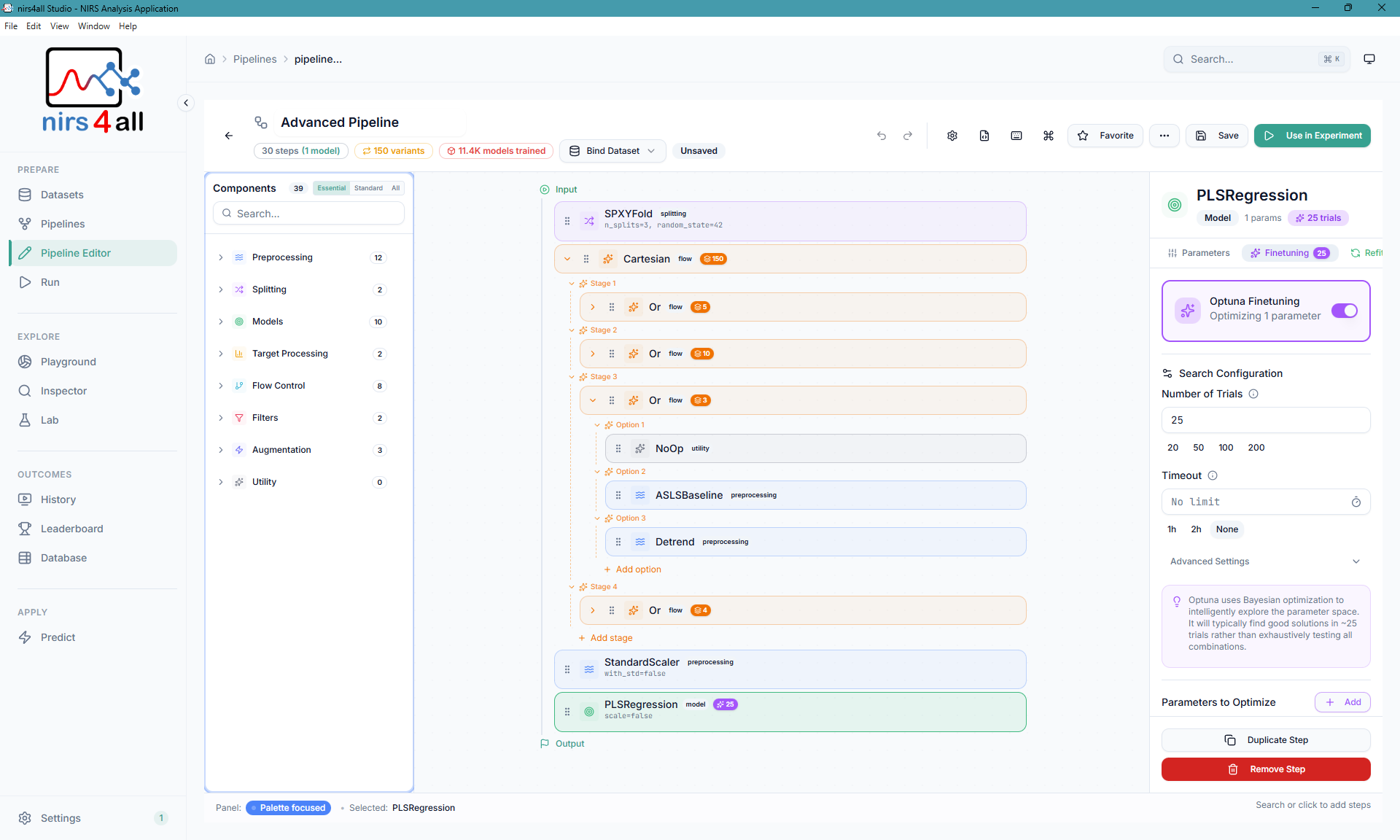
Pipeline Editor — Drag-and-drop builder with component library, validation, and hyperparameter tuning
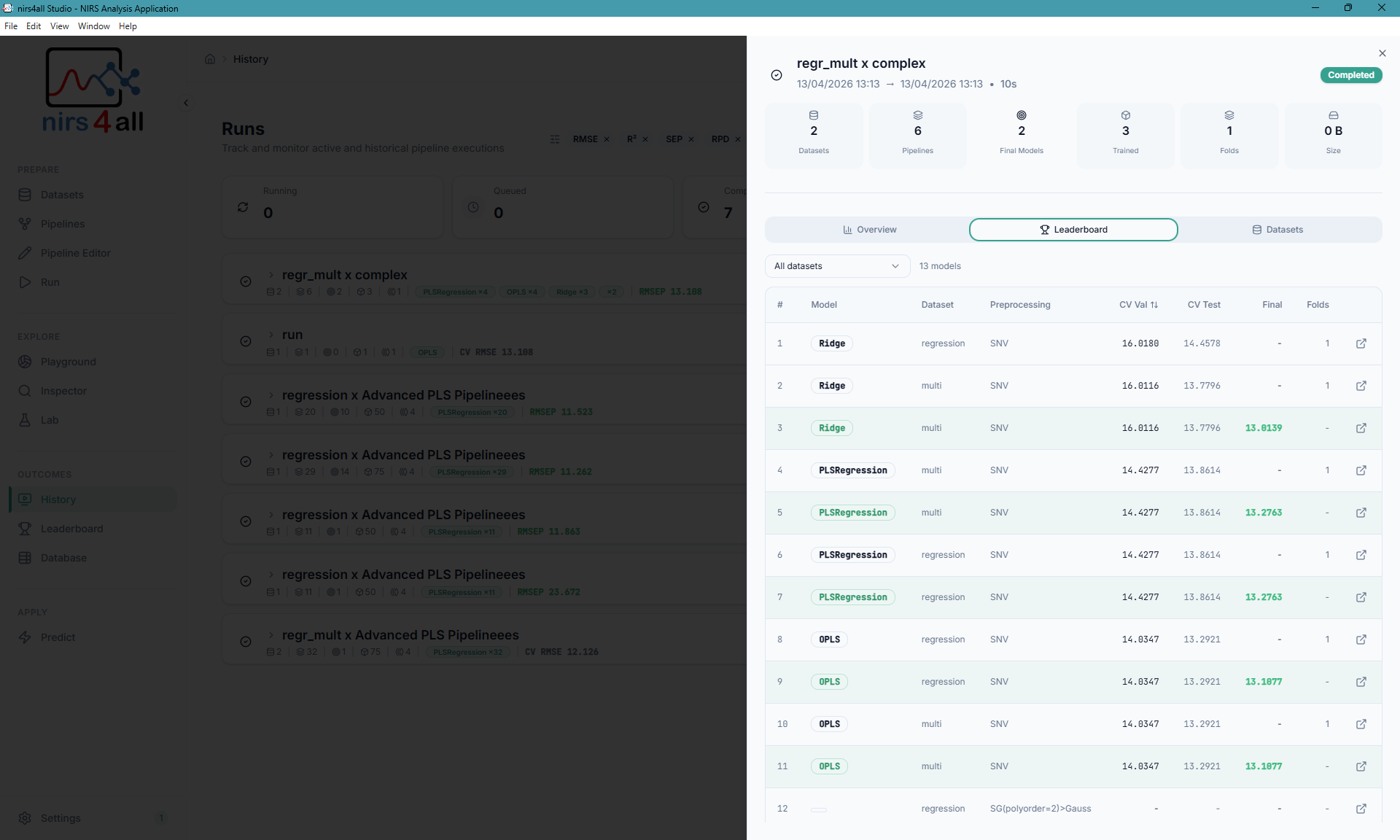
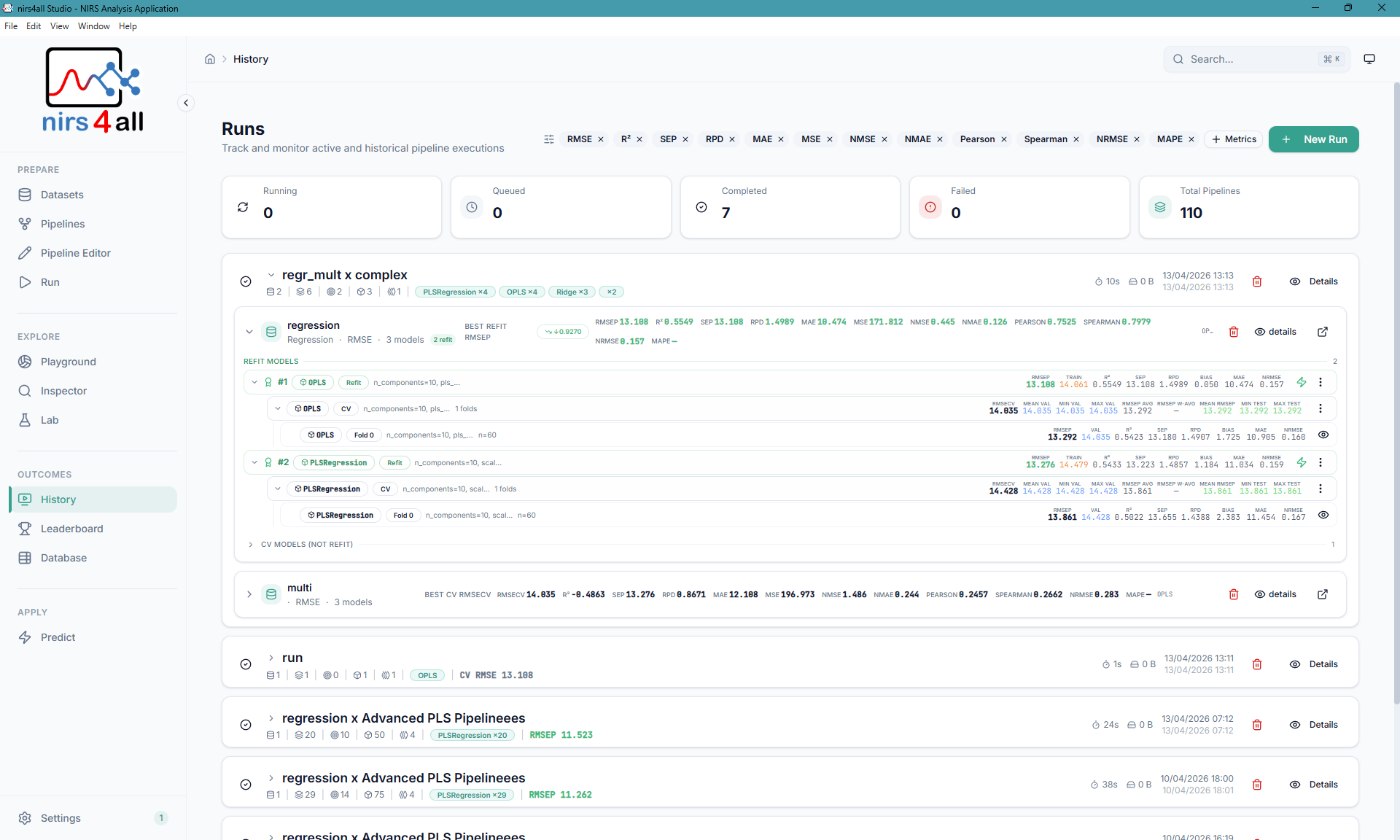
Left: Results with model ranking and CV scores — Right: Runs overview and monitoring
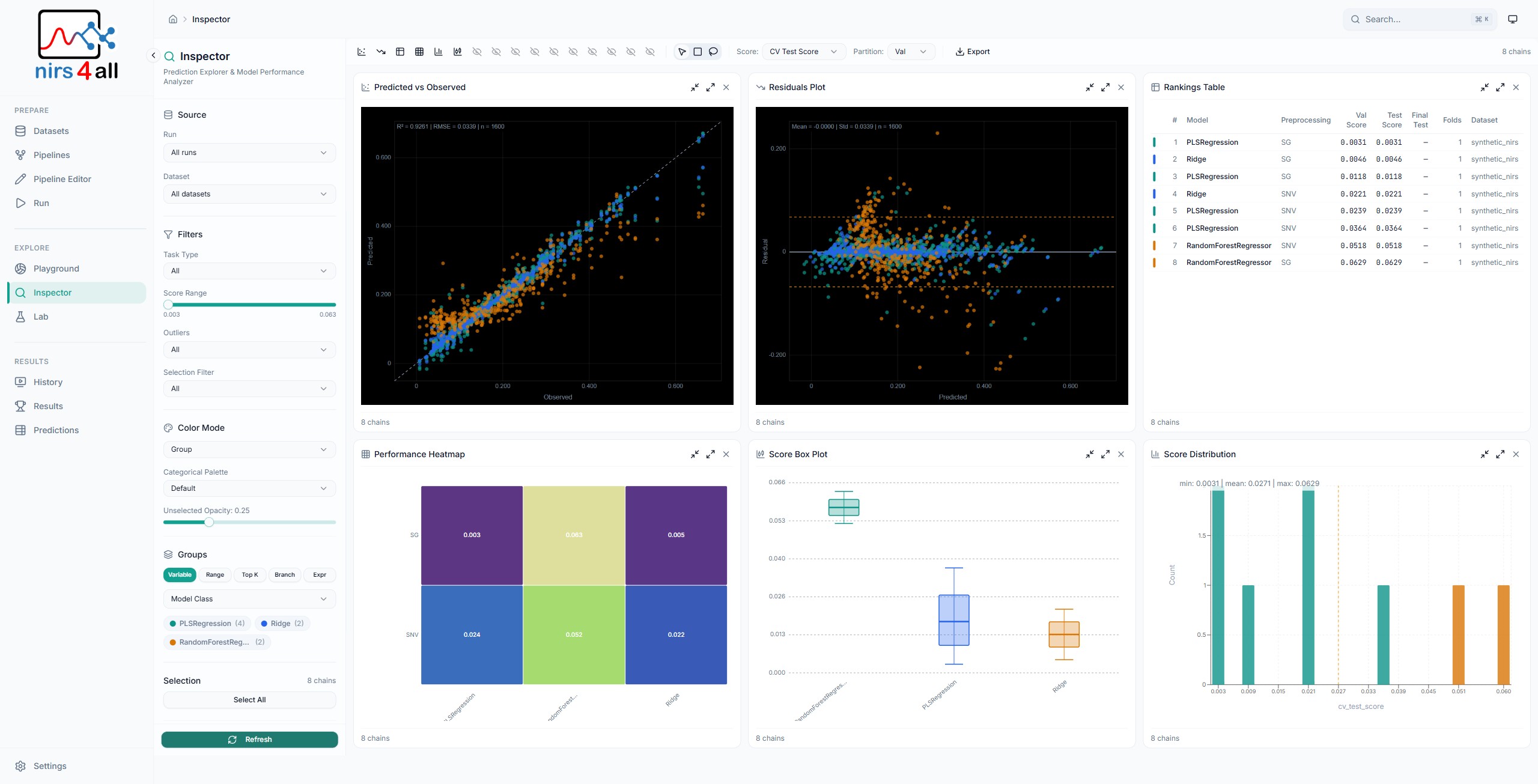
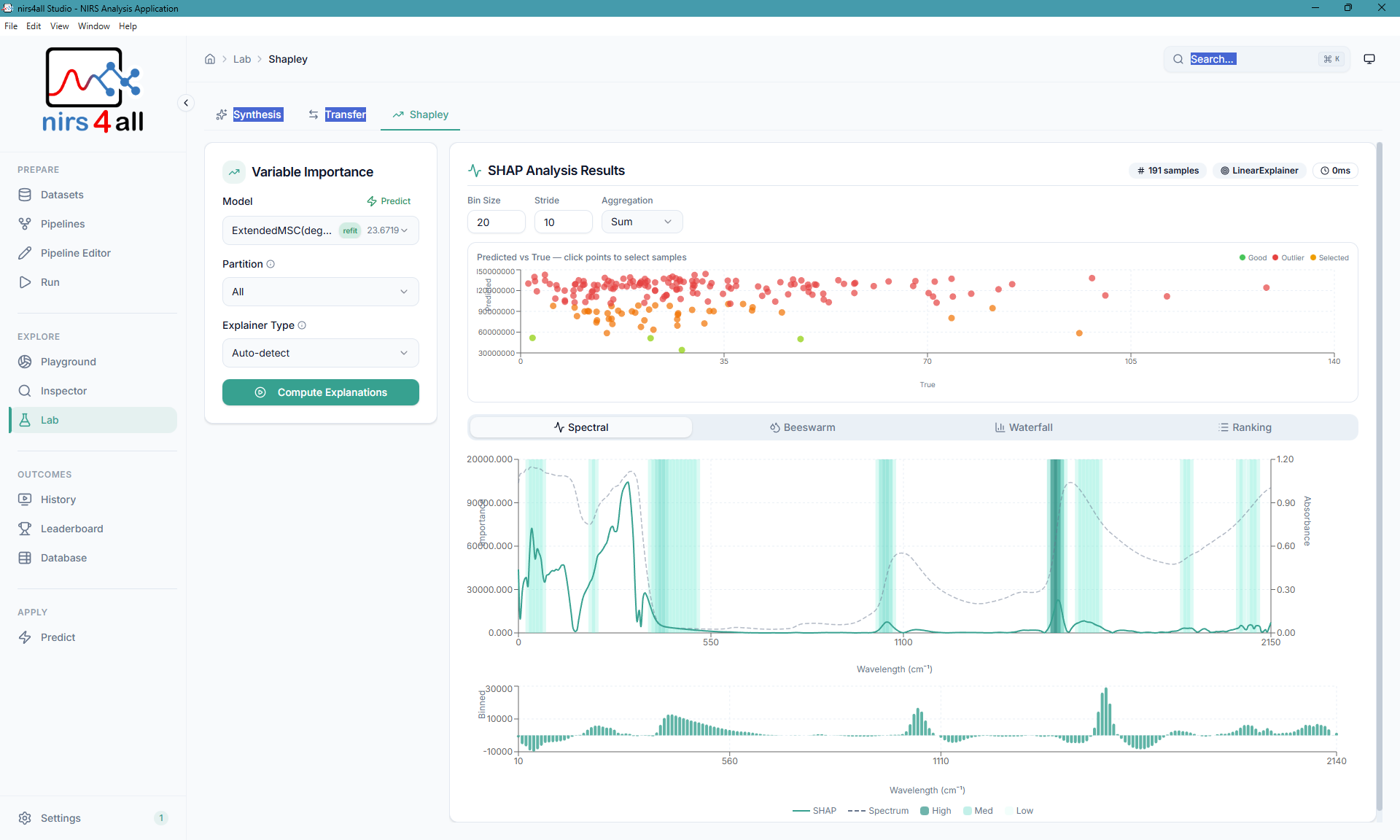
Left: Inspector — prediction analysis and model diagnostics — Right: SHAP variable importance
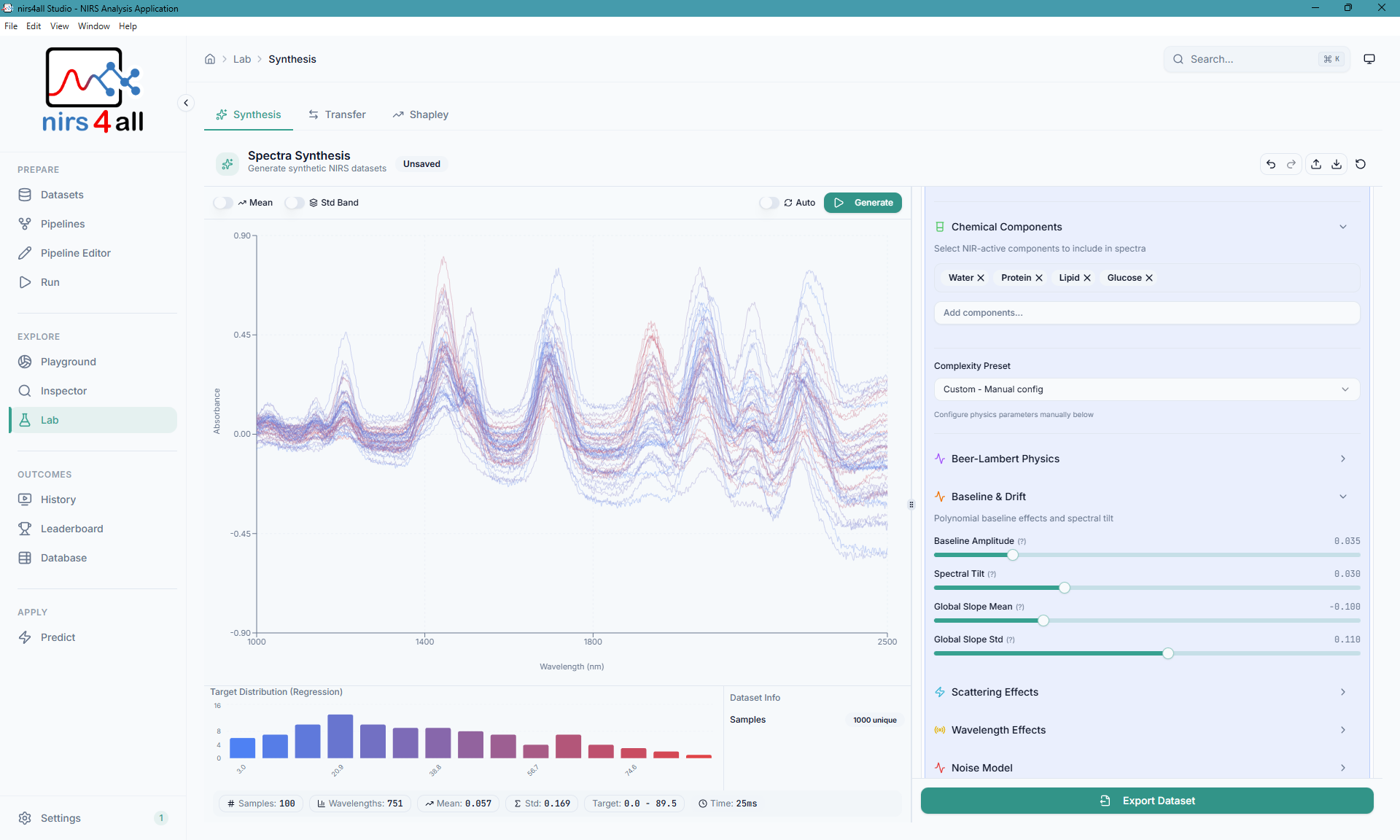
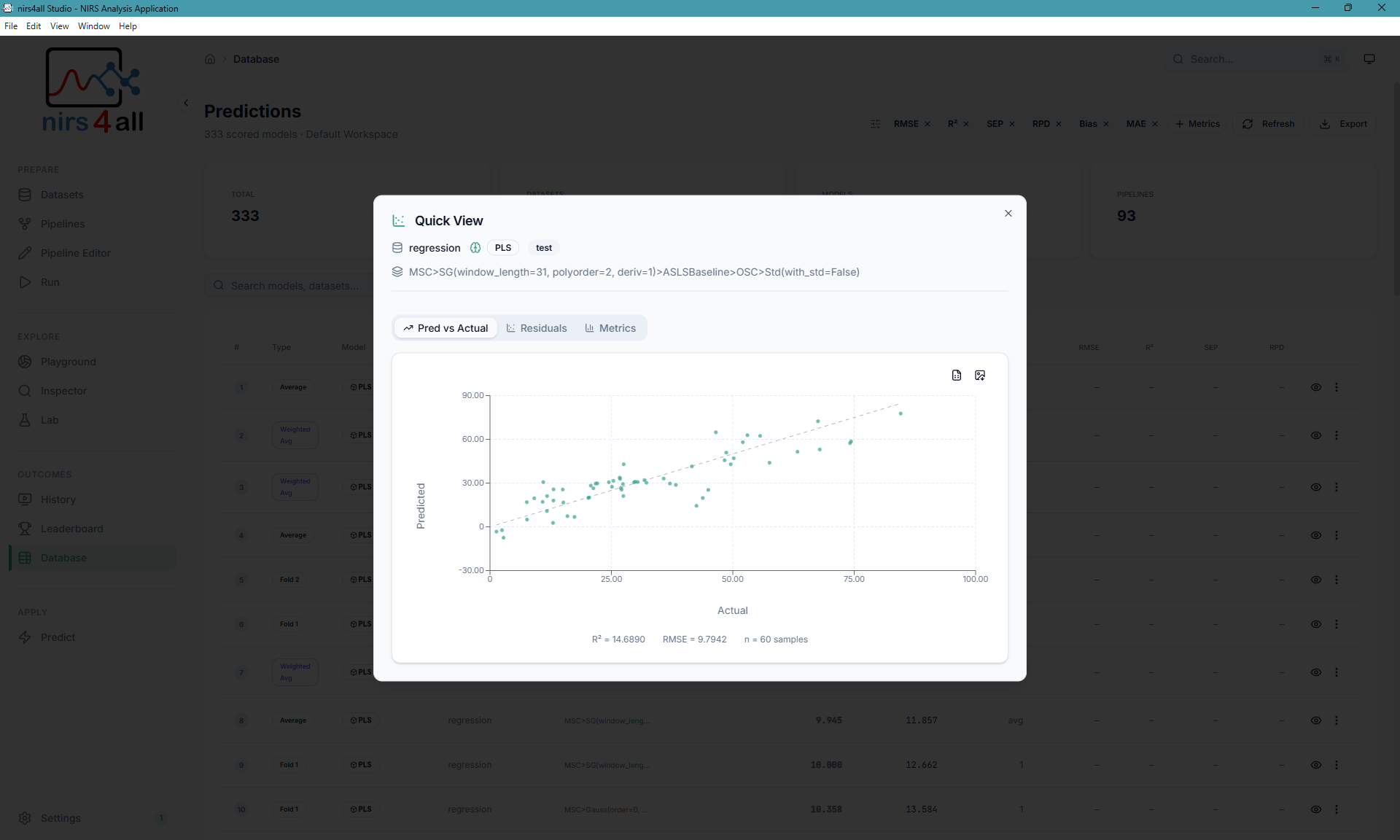
Left: Spectra Synthesis — realistic NIR data generation — Right: Predictions analysis
- Spectral Data Visualization — Interactive charts for exploring NIRS spectra
- Pipeline Builder — Visual drag-and-drop pipeline construction
- Experiment Wizard — Guided experiment setup with preset templates
- Prediction Engine — Run trained models on new samples
- SHAP Explainability — Variable importance and model interpretation
- Spectra Synthesis — Generate realistic synthetic NIR data
- Transfer Analysis — Instrument transfer and domain adaptation tools
- Workspace Management — Organize datasets, pipelines, and results
- Native Desktop Experience — Runs as a standalone desktop app via Electron
- GPU experimentation — available in contributor/diagnostic Python workflows; GPU packaging is not qualified for the unpublished product candidate
- React 19 with TypeScript (strict mode)
- Vite for fast development and optimized builds
- Tailwind CSS with custom scientific design system
- shadcn/ui component library
- TanStack Query for API state management
- Framer Motion for smooth animations
- Electron 40 for cross-platform desktop experience
- Chromium for consistent WebGL support across all platforms
- IPC Bridge for secure main/renderer communication
- Rust sidecar for packaged HTTP/WS orchestration, jobs, scheduling, and storage
- nirs4all in a bounded, content-addressed CPython library/plugin host over stdio
- FastAPI/WebSocket Python source retained only for web development and explicit whole-session diagnostics
- PyInstaller surfaces retained as legacy compatibility tooling, never selected by Phase 2 desktop releases
nirs4all_webapp/
├── src/                    # React frontend source
│   ├── components/         # UI components
│   │   ├── layout/         # App layout (sidebar, header)
│   │   ├── pipeline-editor/# Pipeline Editor (see Architecture)
│   │   └── ui/             # shadcn/ui components
│   ├── context/            # React context providers
│   ├── data/               # Data models and registries
│   │   └── nodes/          # Node registry system
│   ├── lib/                # Utilities and helpers
│   ├── api/                # API client
│   ├── types/              # TypeScript type definitions
│   │   └── electron.d.ts   # Electron IPC types
│   └── pages/              # Route components
├── electron/               # Electron main process
│   ├── main.ts             # Main entry point (window management)
│   ├── preload.ts          # Secure IPC bridge (contextBridge)
│   ├── backend-manager.ts  # Optional diagnostic Python backend lifecycle
│   ├── env-manager.ts      # Packaged CPython plugin-host resolution
│   └── logger.ts           # Persistent file logging
├── api/                    # Legacy web-dev/diagnostic FastAPI routes
│   ├── workspace.py        # Workspace management routes
│   ├── datasets.py         # Dataset operations
│   ├── pipelines.py        # Pipeline CRUD
│   ├── predictions.py      # Prediction storage
│   └── system.py           # Health, system info, and GPU detection
├── scripts/                # Build and utility scripts
│   ├── bake-python-plugin-runtime.cjs # Pinned plugin-only closure builder
│   └── build-release.cjs   # CPU installer build on the matching host
├── build/                  # Build configuration
│   └── entitlements.mac.plist  # macOS code signing entitlements
├── docs/                   # Documentation
│   └── _internals/         # Developer guides
├── public/                 # Static assets
├── main.py                 # Legacy web-dev/diagnostic FastAPI entry
├── backend.spec            # Legacy PyInstaller compatibility spec
├── electron-builder.installer.yml  # Electron packaging config (installer)
├── electron-builder.archive.yml    # Electron packaging config (portable archive)
└── package.json            # Node dependencies
Use the unified launcher for all modes:
| Windows | Linux/macOS | Description |
|---|---|---|
scripts\launcher.cmd start web:dev |
./scripts/launcher.sh start web:dev |
Start frontend + diagnostic FastAPI server for web development only |
scripts\launcher.cmd start desktop:dev |
./scripts/launcher.sh start desktop:dev |
Start Electron desktop (dev) |
scripts\launcher.cmd stop |
./scripts/launcher.sh stop |
Stop all servers |
scripts\launcher.cmd status |
./scripts/launcher.sh status |
Show server status |
Direct scripts are also available: npm run dev for Vite,
python -m uvicorn main:app --reload --port 8000 for the diagnostic-development
server only, and npm run start:desktop for the Rust-owned Electron product
session.
| Command | Description |
|---|---|
npm run doctor |
Check Node, npm, Python, lockfile, and requirement files |
npm run dev |
Start Vite dev server |
npm run dev:electron |
Start Electron with hot reload |
npm run start:desktop |
Alias for Electron development mode |
npm run lint:parallel |
Run ESLint, TypeScript, node registry, Ruff, and dependency checks |
npm run test:frontend |
Run Vitest tests |
npm run test:backend |
Run pytest backend tests |
npm run test:routes |
Check FastAPI route table uniqueness |
npm run test:parallel |
Run Vitest and pytest together |
npm run test:e2e |
Run Playwright web Chromium tests |
| Command | Description |
|---|---|
npm run build |
Build frontend for production |
npm run build:electron |
Build Electron app |
npm run electron:preview |
Preview Electron production build |
npm run release |
Build an unpublished installer candidate locally |
npm run release:clean |
Clean and rebuild an unpublished installer candidate |
npm run release builds an unpublished CPU installer candidate on the current
host only; it does not publish or qualify the target platform. The product
backend is Rust; the adjacent content-addressed CPython closure is restricted to
library/plugin interop and does not use a user venv, PATH discovery, or runtime
pip install.
npm run release -- --platform linux --flavor cpuPortable and all-in-one releases are disabled. Legacy --standalone, non-CPU
flavors, --platform all, and cross-host installer builds are rejected.
| Command | Description |
|---|---|
npm run release -- --platform win |
Package for Windows |
npm run release -- --platform mac |
Package for macOS |
npm run release -- --platform linux |
Package for Linux |
npm run release -- --platform <host> |
Package on the matching Linux, Windows, or macOS host |
In desktop mode, all main process logs are written to rotating log files:
| OS | Log location |
|---|---|
| Windows | %APPDATA%\nirs4all-webapp\logs\ |
| macOS | ~/Library/Application Support/nirs4all-webapp/logs/ |
| Linux | ~/.config/nirs4all-webapp/logs/ |
Automatic crash reporting via Sentry can be enabled by setting the SENTRY_DSN environment variable. This captures errors from the Electron main process and React frontend; the transitional diagnostic Python backend reports only when it is explicitly running.
# Set before launching the app
SENTRY_DSN=https://your-key@o123456.ingest.sentry.io/1234567

# For the React frontend (build-time), add to .env.production:
VITE_SENTRY_DSN=https://your-key@o123456.ingest.sentry.io/1234567
When SENTRY_DSN is not set, crash reporting is completely disabled with zero overhead. See docs/ELECTRON.md for details.
| Document | Description |
|---|---|
| docs/ELECTRON.md | Electron architecture, logging, and crash reporting |
| docs/PACKAGING.md | Build system, CI/CD, and release process |
| docs/UPDATE_SYSTEM.md | Auto-updater implementation |
| docs/sources/custom-nodes-guide.md | Custom node development |
This project is licensed under the CeCILL-2.1 License. Third-party notices are listed in THIRD_PARTY_NOTICES.md, and the corresponding license texts are bundled in LICENSES/.
- CIRAD for supporting this research
- The nirs4all library for the NIRS analysis engine
- The open-source scientific Python and React communities
Made for the spectroscopy community