



LLM Traces is a Grafana app plugin for reading LLM and agent traces stored in Grafana Tempo. Open a trace to see what was sent to the model, what came back, which tools ran, and how the agents called each other. It is for engineers who already send OpenTelemetry traces from an LLM application and want to debug them in Grafana.
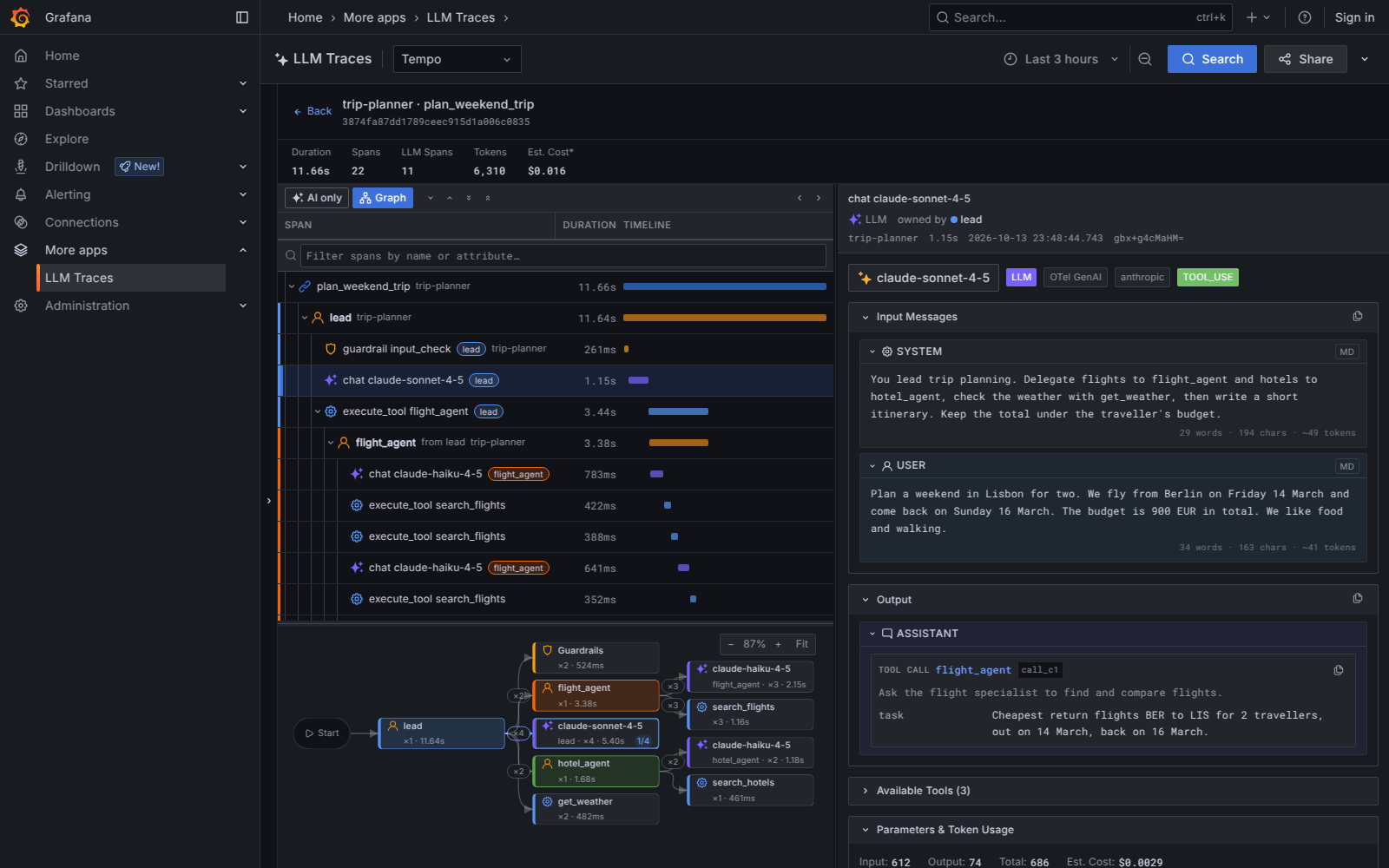
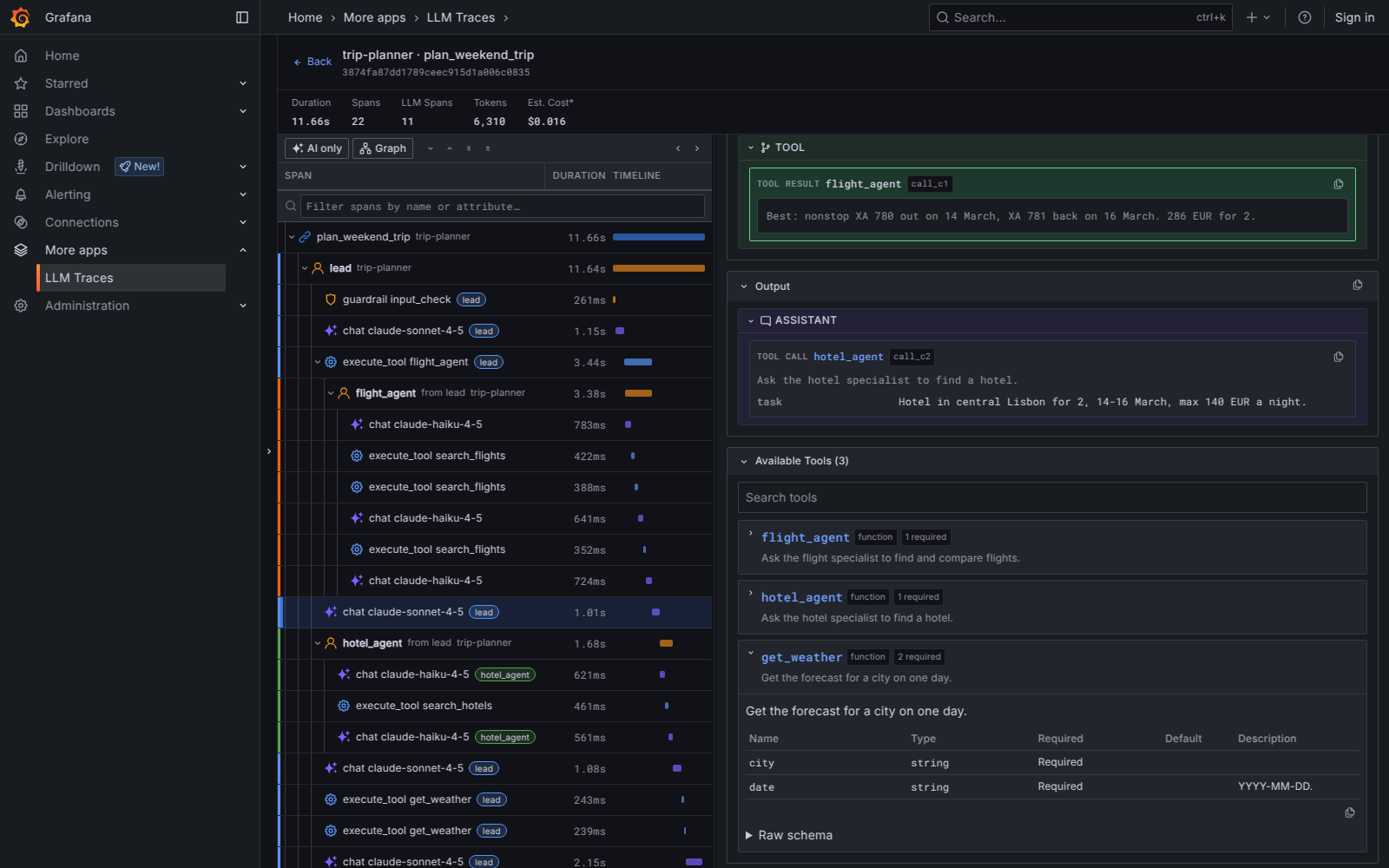
- Messages, tool calls and tool results in the order they happened, with Markdown.
- A searchable tool catalog for each request, down to the raw JSON schema.
- Agent identity in the span tree: a colour per agent, and who handed work to whom.
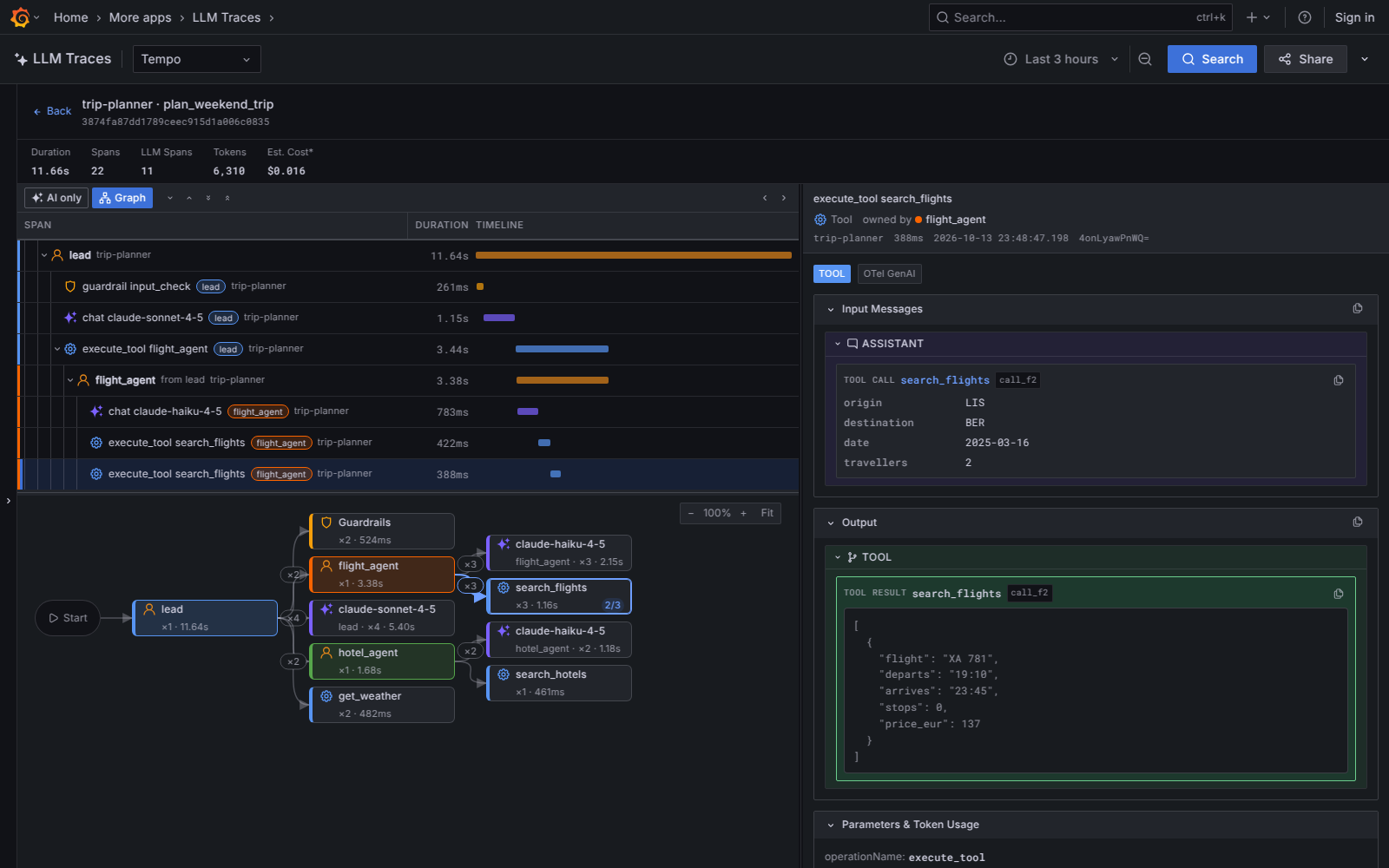
- An agent graph of agents, tools, models and guardrails, with click-through to the spans.
- Token usage and estimated cost for every span and for the whole trace.
- Traces with tens of thousands of spans stay responsive.
- Reads eight tracing conventions, including OpenInference and OTel GenAI.
- Grafana 11.3 or newer. The end-to-end tests run on 11.3, 12.0, 12.4 and 13.1.
- A Tempo data source with TraceQL search. The sample environment uses Tempo 2.7.2.
The menu entry uses the ai-sparkle icon, which exists only in Grafana 12.0 and newer.
On Grafana 11.x the entry has no icon.
Everything else works the same.
| Convention | Attributes it reads |
|---|---|
| OpenInference (for example Arize Phoenix) | openinference.span.kind, llm.*, input.value, output.value |
| OpenTelemetry GenAI | gen_ai.* attributes and span events |
| Google ADK and Vertex AI Agent Builder | gcp.vertex.agent.* |
| Vercel AI SDK | ai.* |
| Pydantic AI and Logfire | pydantic_ai.*, tool_arguments, tool_response, logfire.msg |
| Langfuse SDK | langfuse.* |
| Traceloop and OpenLLMetry | traceloop.* |
| MLflow | mlflow.* |
The agent graph is built from graph.node.id and graph.node.parent_id when spans declare them, from LangGraph metadata otherwise, and from span nesting when neither is present.
Once the plugin is published in the catalog, install it from the Grafana UI (Administration > Plugins and data > Plugins, search for "LLM Traces") or with the CLI:
grafana cli plugins install agoda-llmtraces-appRestart Grafana after a CLI install.
- Download
agoda-llmtraces-app-<version>.zipfrom the Releases page. - Extract it into the Grafana plugins directory:
unzip agoda-llmtraces-app-*.zip -d /var/lib/grafana/plugins/ - While the zip is unsigned, add the plugin to the allow list in
grafana.ini:[plugins] allow_loading_unsigned_plugins = agoda-llmtraces-app
- Restart Grafana.
Grafana app plugins must be enabled once per organization. Open Administration > Plugins and data > Plugins > LLM Traces and click Enable, or provision it:
# /etc/grafana/provisioning/plugins/llm-traces.yaml
apiVersion: 1
apps:
  - type: agoda-llmtraces-app
    org_id: 1
disabled: falseThe plugin has no settings of its own. It lists every Tempo data source in the organization and opens the first one. Pick another one in the selector at the top of the page. If there is no Tempo data source, the page asks you to add one (Connections > Data sources > Add data source > Tempo).
Viewer is enough to open the page.
- Select LLM Traces in the side menu, then choose a Tempo data source and a time range.
- Filter by service or span name on the Search tab, or write a query on the TraceQL tab. Click Search.
- Click a trace to open its span tree, then click a span to read its messages, tool calls, parameters and token usage.
- Click Graph to show the agent graph below the tree. Click a node to select its first call, and click it again to step to the next call (the node shows "2/4"). Selecting a span in the tree highlights its node.
- Click AI only to hide spans that carry no AI attributes, such as HTTP calls.
To open a trace from a link, use /a/agoda-llmtraces-app?llt-traceId=<trace id>.
The plugin asks Tempo for the trace within the selected time range, which is the last 3 hours by default.
For an older trace, add llt-from and llt-to, for example llt-from=now-24h&llt-to=now.
The Share button copies a link that also includes the data source (llt-ds) and the query (llt-query).
| Key | Action |
|---|---|
j or Down |
Select the next span |
k or Up |
Select the previous span |
Esc |
Clear the selected span |
] |
Collapse all spans |
[ |
Expand all spans |
p |
Collapse one level |
o |
Expand one level |
The shortcuts are ignored while a text field has focus.
Docker Compose v2 starts Grafana with the plugin built from source, Tempo, and a few sample traces. You do not need Node.js.
git clone https://github.com/agoda-com/llm-traces.git
cd llm-traces
docker compose up
The first start compiles the plugin inside Docker and takes a few minutes. Then:
- Open http://localhost:3000. Anonymous access with the Admin role is on, and the Tempo data source and the plugin are already set up.
- Select LLM Traces in the side menu.
- About 20 seconds after startup, a seeding container has sent five traces to Tempo. Click Search. The trace list fills and the newest trace opens. If the list is empty, wait a few seconds and click Search again.
- Open
plan_weekend_tripand click Graph. Theleadagent calls two specialist agents, one of them as a tool, and the graph shows the tools they run and how often. - Open
support_agent_runand click its secondllm claude-sonnet-4-5span to see a tool call card, a tool result card and the tool catalog under Available Tools.
The other three traces are single chat calls: two in OpenInference and one in OTel GenAI with a tool call.
Tempo also accepts your own traces on localhost:4317 (OTLP gRPC) and localhost:4318 (OTLP HTTP).
If a default host port is taken, set GRAFANA_PORT, TEMPO_OTLP_HTTP_PORT or TEMPO_OTLP_GRPC_PORT.
Stop the stack and delete its data with docker compose down -v.
# Install dependencies (also sets up the pre-commit hook via Husky)
npm install

# Build the plugin into dist/
npm run build

# Rebuild on every change
npm run dev

# Typecheck, lint and unit tests
npm run typecheck
npm run lint
npm test

# End-to-end tests against a running Grafana with the plugin installed
npm run e2e
Node.js 22.6 or newer is required, because the test runner and the build scripts use --experimental-strip-types.
See CONTRIBUTING.md for the full workflow.
Bug reports and feature requests go to GitHub Issues. Pull requests are welcome; read CONTRIBUTING.md first. Security issues are handled as described in SECURITY.md.
Copyright 2026 Agoda Services Co., Ltd.