
A lightweight desktop utility (built with Go + Fyne) to filter files and preview bulk renames before applying them.
- Website : https://renforgeapp.web.app
- Repo: https://github.com/blackarck/renforge
- Download : https://github.com/blackarck/RenForge/releases/tag/latest
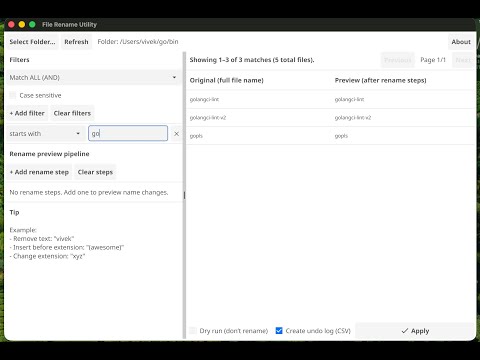

- Select a folder with the Select Folder… button or pick from the recent folders dropdown (last 5 folders remembered across sessions)
- Toggle Include subfolders to scan recursively into subdirectories
- Hit Refresh to reload the current folder after external changes
Add one or more filter rules to narrow down which files are shown:
| Mode | Example |
|---|---|
starts with |
The |
contains |
Whale |
ends with |
.mp3 |
extension |
png |
- Match ALL (AND) or Match ANY (OR)
- Case sensitive toggle
Add multiple rename steps — the preview updates live as you type:
| Step | Description |
|---|---|
| Remove text | Removes a substring from the filename |
| Replace text | Replaces one substring with another |
| Insert before extension | Inserts text just before the file extension |
| Append | Appends text before the extension |
| Prepend | Prepends text at the start of the filename |
| Change extension | Replaces the file extension |
Steps are applied in order, left to right.
- Every matched file has a checkbox in the preview — uncheck any file to exclude it from the rename
- Select All / Deselect All buttons for quick bulk toggling
- The header shows a live count:
Showing 1–10 of 42 matches · 38 selected · 100 total files
Browse matched files with Previous / Next (10 files per page).
Before renaming, RenForge validates every planned rename and warns about:
- Invalid names — empty names, invalid characters, Windows reserved names (CON, NUL, etc.)
- Duplicate conflicts — two selected files would become the same name
- Target exists on disk — the destination filename already exists
Problematic files are skipped; only safe renames proceed.
Renames are executed in two phases — files move to a temporary name first, then to the final name. This makes swap-style renames (a → b and b → a) safe without either file clobbering the other.
- Dry run (default) generates the rename plan and shows results without touching any files
- Apply executes the renames
Optional CSV export with one row per file:
old_path, new_path, old_name, new_name, status, reason
Tip: Save the undo log in the same folder as the renamed files for easy recovery.


Download a pre-built binary for your platform from the latest release: https://github.com/blackarck/RenForge/releases/tag/latest
- Go (recommended: latest stable)
- Fyne platform dependencies
Fyne setup: https://developer.fyne.io/started/
go run .go build -o renforge .- Regex filters and regex rename steps
- Step reordering via drag
- Save / load rename presets
- Export rename plan as shell script
RenForge is licensed under a dual-license model:
- Non-commercial use: Free under CC BY-NC 4.0
- Commercial use: Requires a paid commercial license
For commercial licensing, contact: blackarck@gmail.com