
a software controller for radio repeaters on raspberry pi
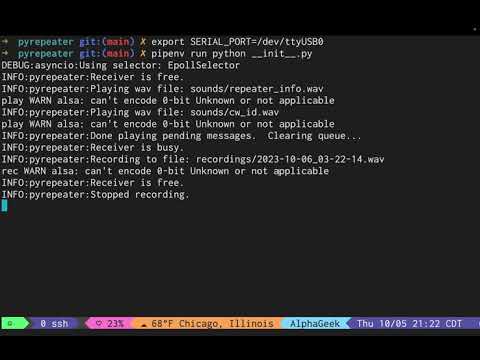
tested with:
- Raspberry GNU/Linux 12 (bookworm)
- serial interface board from gmrstwowayradio.com
- FTDI USB -> Serial cable
- Retevis 97S
-
Install Raspberry Pi OS 12 (Bookworm).
-
Install the system dependencies:
sudo apt update
sudo apt install --yes multimon-ng pipenv sox
-
Blacklist the HDMI drivers by editing
/boot/firmware/config.txtand commenting the following lines:# Enable DRM VC4 V3D driver #dtoverlay=vc4-kms-v3d #max_framebuffers=2
-
Blacklist the headphone driver by editing
/etc/modprobe.d/blacklist-alsa.confand adding:blacklist snd_bcm2835 -
Reboot:
sudo reboot
-
Clone the repository and install its Python dependencies:
mkdir -p ~/src
git clone https://github.com/emuehlstein/pyrepeater.git ~/src/pyrepeater
cd ~/src/pyrepeater
pipenv install
-
Replace the files in the
pyrepeater/soundsdirectory with WAV files crafted for your repeater. -
Copy the example environment file and edit it to reflect your preferences:
cd ~/src/pyrepeater
cp pyrepeater/.env.example pyrepeater/.env
$EDITOR pyrepeater/.env
Run the controller from the repository root:
cd ~/src/pyrepeater
pipenv run python -m pyrepeater
Press Ctrl+C to stop it.
When enabled, the repeater decodes DTMF digits from each completed recording. Transmit one of the configured sequences below to run a command:
| Sequence | Command | Behavior |
|---|---|---|
999 |
Toggle parrot mode | Enables or disables immediate playback of recorded transmissions. |
312 |
Force CW ID | Queues an immediate CW identification message. |
73 |
Toggle sleep | Forces the repeater into or out of sleep mode. |
311 |
Status | Queues the repeater information announcement. |
Recognized commands play sounds/command_ack.wav as an audible confirmation
before any command-specific result, and are not played back as recordings.
Toggling parrot mode follows the ack with sounds/parrot_mode_on.wav or
sounds/parrot_mode_off.wav to announce the new state. The default sequences
can be changed in .env; command matching is exact, and the current
implementation does not provide PIN protection.
The checked-in Ansible playbook targets repeaterpi.local and installs the application as a systemd service. Update ansible/inventory.yaml if your Raspberry Pi uses a different hostname or connection settings, then run:
cd ~/src/pyrepeater
ansible-playbook -i ansible/inventory.yaml ansible/site.yaml
After deployment, manage the service on the Raspberry Pi with:
sudo systemctl status pyrepeater
sudo systemctl restart pyrepeater
sudo journalctl -u pyrepeater -fthe following ENV variables should be set in the .env file prior to entering the pipenv virtual environment
-
SERIAL_PORT=/dev/ttyUSB0- the location of your serial device
-
PRE_TX_DELAY=1.0- the number of seconds (float) to wait between enabling the serial pins and beginning the transmission audio
-
POST_TX_DELAY=1.0- the number of seconds (float) to wait between ending the transmission and disabling the serial pins
-
FCC_ID=WRXC682- currently unused (future: CW ID generation)
-
SCHEDULE_TOH=False- currently unused (future: timed periods relative to top of hour or start time)
-
ID_MINS=15- period of CW ID announcements in minutes (int)
-
RPT_INFO_MINS=60- period of repeater info announcements in minutes (int)
-
ID_WHEN_ASLEEP=False- send CW IDs when repeater is idle for a prolonged period
-
RPT_INFO_WHEN_ASLEEP=False- send repeater info messages when repeater is idle for a prolonged period
-
SLEEP_AFTER_MINS=10- after this many minutes of inactivity, put the repeater in sleep mode
-
WAKE_AFTER_SEC=2- if repeater is asleep and becomes busy, wait this many seconds (int) before transitioning back to active state (prevents short key ups from disrupting sleep)
-
MIN_REC_SEC=2- minimum seconds for a valid recording (WAV file will be deleted if it does not exceed this length)
-
PARROT_MODE=False- when enabled, the repeater plays back each recorded transmission immediately after it ends, useful for range testing while mobile
-
DTMF_COMMANDS_ENABLED=True- decode configured DTMF sequences from recordings for remote control
-
CMD_PARROT_TOGGLE=911- DTMF sequence for toggling parrot mode
-
CMD_FORCE_ID=912- DTMF sequence for forcing an immediate CW ID
-
CMD_SLEEP_TOGGLE=913- DTMF sequence for forcing a sleep/wake toggle
-
CMD_STATUS=914- DTMF sequence for playing the repeater status announcement
- repeater modes (day/night/net)
- ansible
- systemd service
- blacklist headphone jack modules
- single command install (ie. homebrew/ohmyzsh curl .....)