Repository navigation
feat(mcp): Tell the model about chart range changes and add fullscreen - #2456
Conversation


The chart view's range picker redraws the chart, but the model only ever
saw the first result, so it answered about a range the user no longer saw.
After a range change the view now sends ui/update-model-context with a short
summary, the chart, and the arguments that reproduce it.

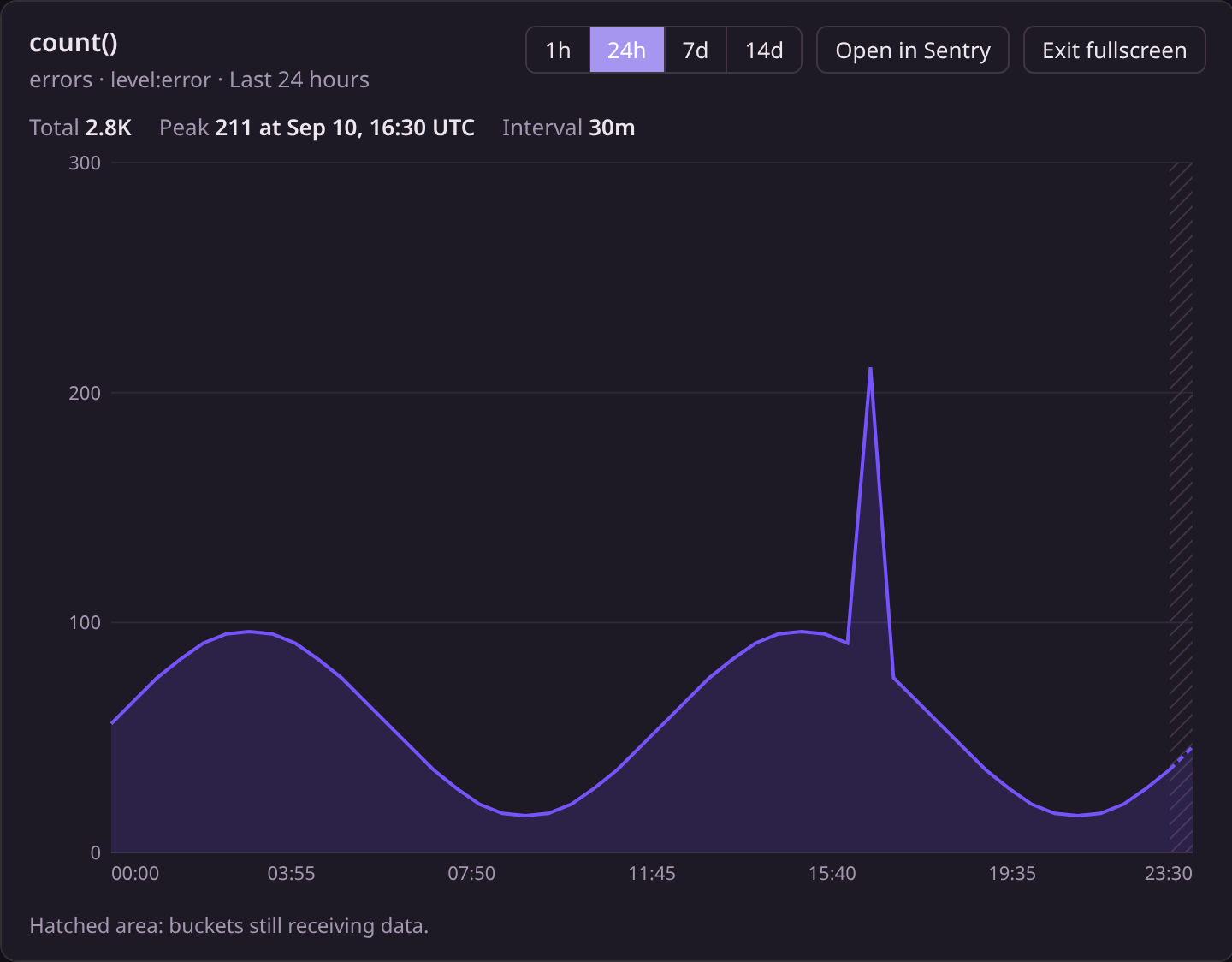
Hosts that offer fullscreen get a Fullscreen button. In fullscreen the
chart fills the height the host gives it instead of a fixed 220px.

The view uses both only when the host advertises them in hostCapabilities
or availableDisplayModes, and declares the display modes it supports.

The title param now tells the model to leave out the time range, since a
model-written "last 24h" title stayed put after the user picked 7d.

|
The latest updates on your projects. Learn more about Vercel for GitHub.
|




📊 MCP Server Token Cost ReportSummary
Per-Tool Breakdown
Note: This measures the static overhead of tool definitions sent to LLM clients with every request. Lower is better. MCP Apps viewsEach
The budget applies to raw bytes, and the view's generator fails over it. |

|
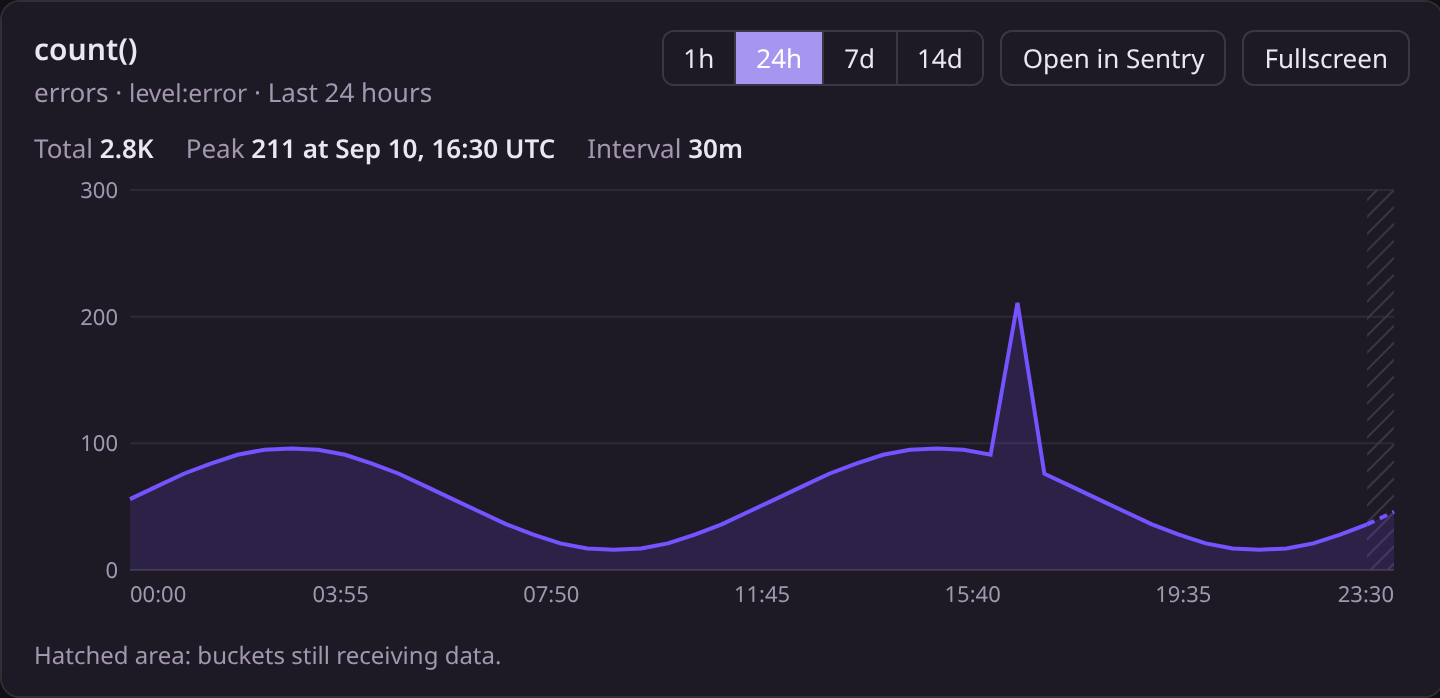
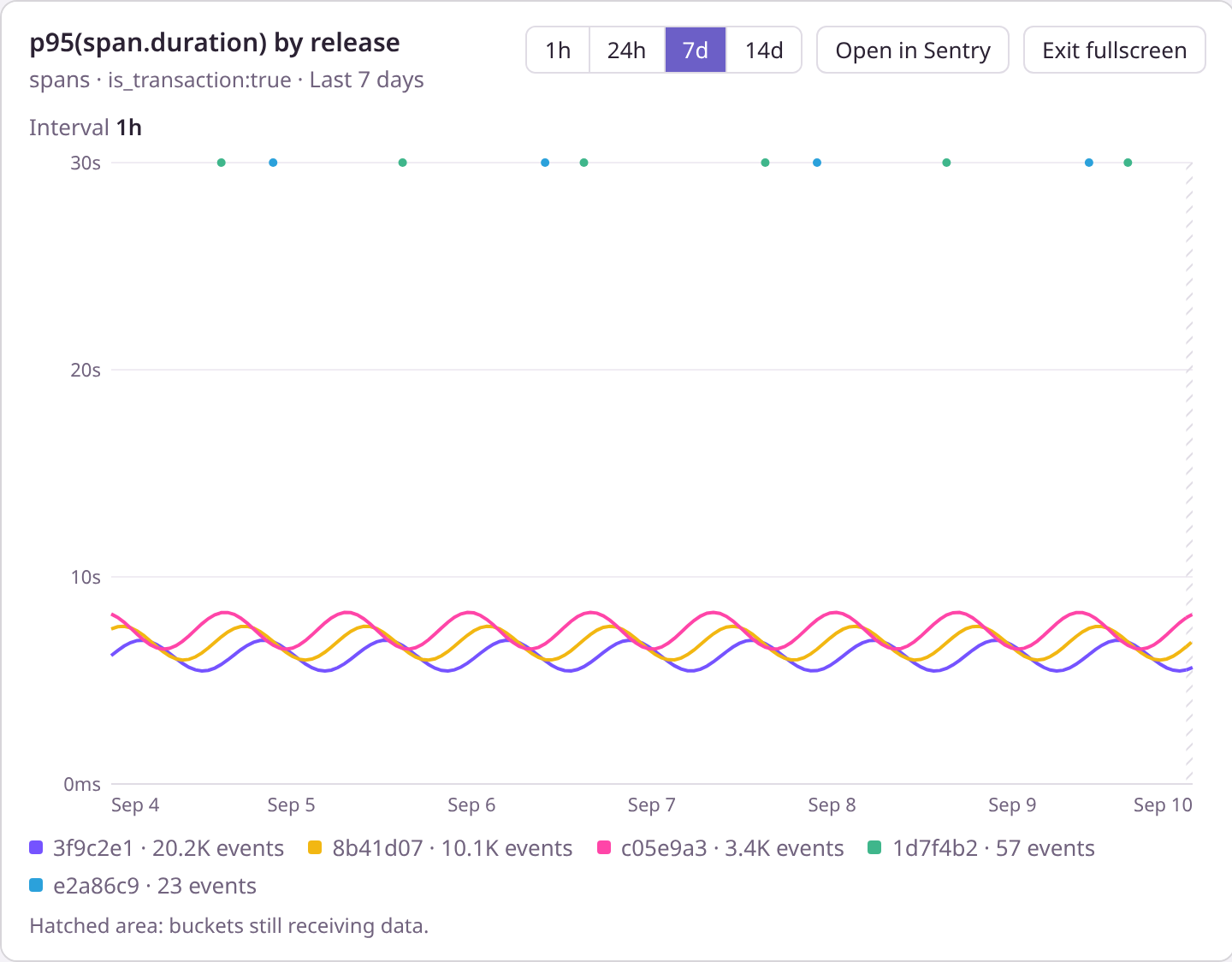
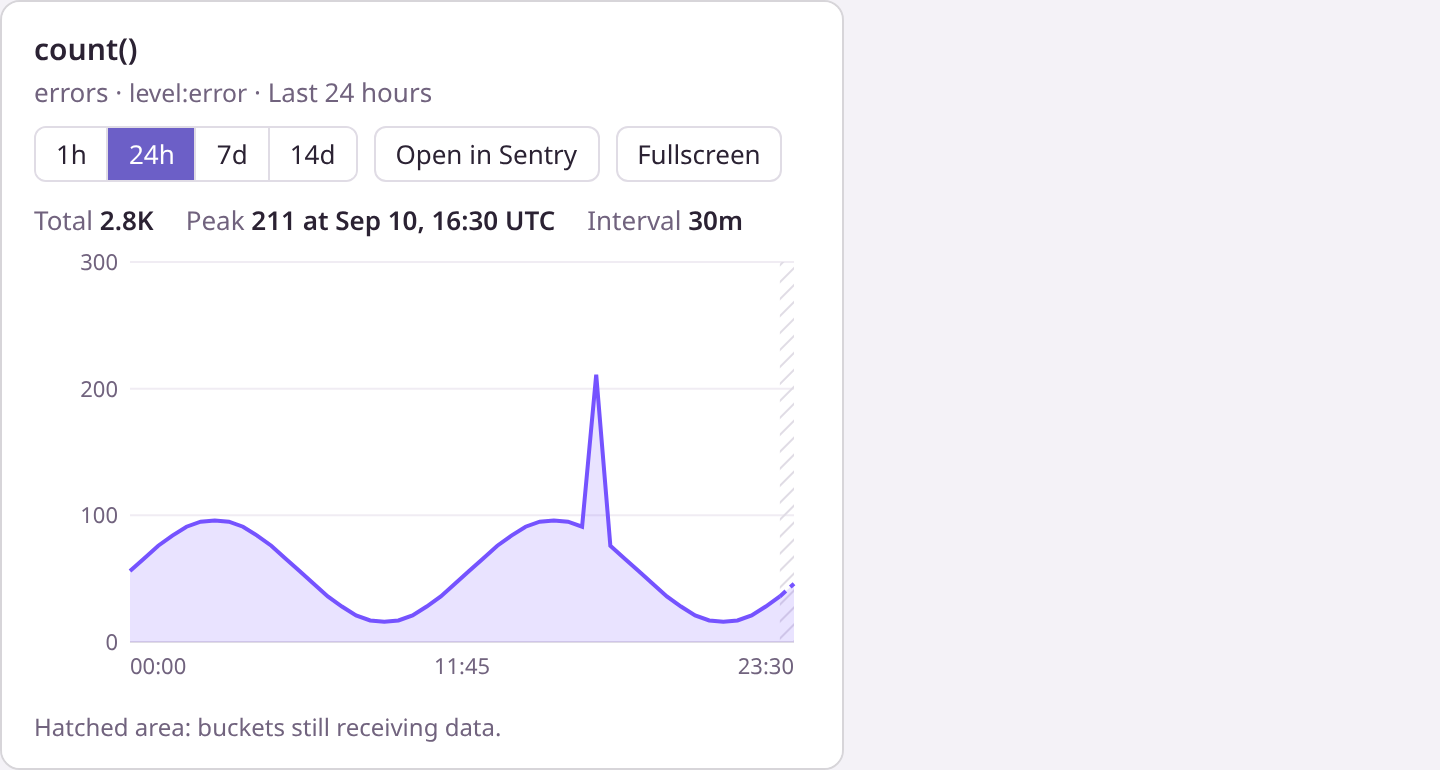
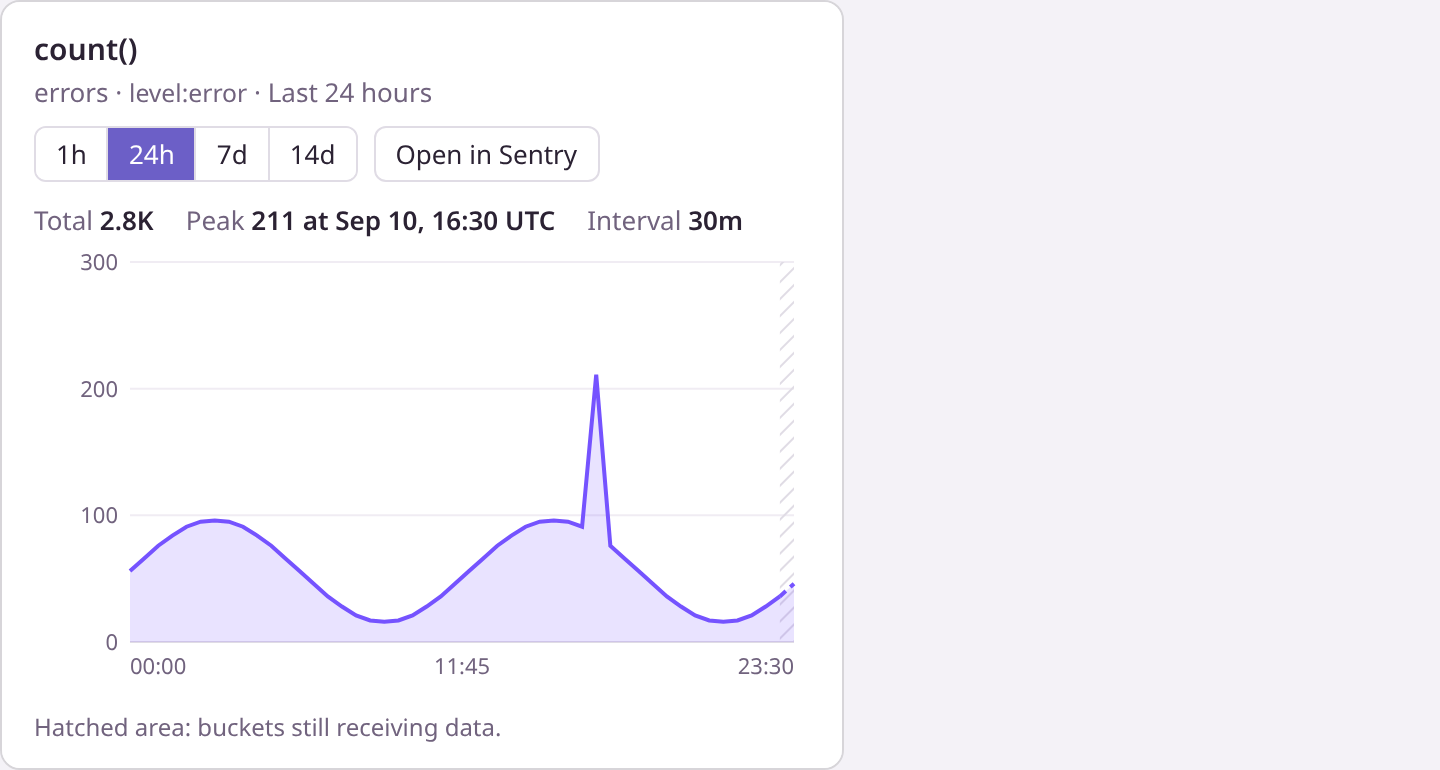
Visual QA on fba68ba: pass. The view was rendered from the PR's built Inline, dark, host offers fullscreen (720px). The Fullscreen button sits next to Open in Sentry and matches its style. Fullscreen, dark (host gives 720×560). The chart grows from 220px to fill the height under the header. The button reads Exit fullscreen, and the axes, hatched band and note stay in place. Fullscreen, grouped, light (p95 by release, 7d). The legend wraps under the taller chart, and nothing overlaps. Narrow inline (420px), light. The controls wrap under the heading, and the Fullscreen button still fits on one row. Narrow inline, host without fullscreen. There is no Fullscreen button, and the layout matches the previous view. The view logged no console errors under the spec's default CSP. Exit fullscreen returns the chart to exactly 220px. The Limitations:
|


…2455)

Adds an experimental `render_issue_chart` tool. It charts one issue's
events and affected users over time, like the graph on the issue page,
and renders in the same MCP Apps chart view as `render_sentry_chart`.

**Issue charts**
- Input is the issue, given as a short ID, numeric ID, or URL, the same
way `get_issue_details` takes it. A period or start/end is optional and
defaults to 14d, which is what the issue page uses.
- The server picks everything else:
- Dataset: `errors` for error issues and `issuePlatform` for every other
issue type. This is the issue page's `usesIssuePlatform` split, now in a
shared `isErrorIssue` helper.
  - Aggregates: `count()` and `count_unique(user)`.
- Bucket size: from the issue page's fidelity ladder. At 14d that's 4h
buckets, about 85, instead of the 337 one-hour buckets the API picks by
default.
- The result has an Events series, a Users series (no total, because
unique counts can't be summed), the Events peak, and a link to the issue
page for the same range.
- In experimental sessions, `get_issue_details` suggests a pre-filled
`render_issue_chart` call.

**Fake-zero guard**
On the `errors` dataset, an `issue.id:` filter for an issue-platform
issue returns HTTP 200 with every bucket 0, and an agent reads that as a
real answer. `render_sentry_chart` now rejects any positive `issue:` or
`issue.id:` filter, lists included, with a repairable error that points
to `render_issue_chart`. Negated filters (`!issue:`) still work.
`search_events` no longer suggests a `render_sentry_chart` call for
issue-filtered queries.

**Shared view**
- Series building, time ranges, and interval formatting moved into
`tools/support/chart/series.ts`, which both tools use.
- The chart output schema has a new `tool` field, and the view's range
picker calls whichever tool drew the chart. The view accepts only the
two chart tool names, so a result can't point it at a tool that changes
data. A result without the field is treated as `render_sentry_chart`'s.
- The view now ships as `ui://sentry/chart/v5.html`, on top of
#2456's v4. The model context that view sends after a
range change names the tool that drew the chart too.
- `getEventsTimeSeries` accepts several yAxes and
`dataset=issuePlatform`. `PUBLIC_EVENTS_DATASETS` is unchanged.

Co-Authored-By: Claude <noreply@anthropic.com>

<!-- junior-request-attribution:start -->
via @dcramer.
<!-- junior-request-attribution:end -->

<!-- junior-session-footer:start -->
<!-- junior-conversation-id:slack%3AC08J1NSPU6S%3A1795226206.866739 -->

--

[View
Session](https://junior-prod.sentry.dev/conversations/slack%3AC08J1NSPU6S%3A1795226206.866739)
[[Sentry]](https://sentry.sentry.io/explore/conversations/slack%3AC08J1NSPU6S%3A1795226206.866739/?project=4510944073809921)

<!-- junior-session-footer:end -->

---------

Co-authored-by: sentry-junior[bot] <264270552+sentry-junior[bot]@users.noreply.github.com>
Co-authored-by: David Cramer <23610+dcramer@users.noreply.github.com>

The
render_sentry_chartview now uses more of the MCP Apps protocol:ui/update-model-contextand display modes. It also fixes a stale heading.Model context after a range change. When the user picks a new range, the view redraws, but the model still only has the first tool result. If the user then asks about the chart, the model answers about a range they no longer see. After each successful range change, the view now sends
ui/update-model-contextwith:structuredContent:{ tool, arguments, chart }It sends only the parts the host advertises in
hostCapabilities.updateModelContext, and nothing when the host advertises neither.Fullscreen. The view declares
appCapabilities.availableDisplayModes: ["inline", "fullscreen"]. A Fullscreen / Exit fullscreen button shows only when the host'savailableDisplayModesincludesfullscreen, and it callsui/request-display-mode. In fullscreen, the chart fills the height left under the header instead of the fixed 220px. The view followsdisplayModefromhost-context-changed, so it adjusts when the host leaves fullscreen on its own.Title. The heading comes from the model's
titleargument, and the range picker keeps that argument. So a model-written title like "Errors in the last 24h" stayed after the user picked 7d. Thetitleparam description now tells the model to leave out the time range, because the subtitle shows it and the user can change it.The view bumps to
ui://sentry/chart/v4.htmland is about 19 KB of its 24 KiB budget. #2455 also bumps to v4 and editschart-app/main.ts. Whichever lands second needs a rebase and v5.design/mcp-apps.mdgains two rules: a view uses a host feature only when the host advertises it, and a view tells the model when the user changes what it shows. The verify-toolkit MCP Apps host now advertises these capabilities and checksmodel-context,fullscreen, andcapability-gated(a host without either gets no Fullscreen button and no context update).Drill-downs through
ui/messageare not included. They would put Sentry-sourced labels, such as transaction names and releases, into a user-role message, so they need their own design for quoting.via @dcramer.
--
View Session [Sentry]