


Nexora is a Java execution engine that turns a high-level goal into a set of steps and runs them. You tell it what you want to happen, and it figures out the order, runs independent steps in parallel, and gives you back a result.
The idea is that you shouldn't have to hard-code execution logic. You declare capabilities (things the system can do), define which steps map to which goal keywords, and Nexora handles the rest: planning, scheduling, retrying on failure, and tracing what happened.
Three things set it apart from every other workflow engine:
- Pluggable planner SPI - the planner itself is a plugin. Swap in an LLM, a constraint solver, or your own rule engine. The built-in keyword matcher is just the default.
- Reactive plan amendment - a step can reshape the remaining plan based on what it produced. Inject new steps, skip pending ones, or override inputs for downstream steps, all at runtime without touching the planner.
- Capability contracts with automatic fallback - capabilities declare their expected latency and error rate. The engine monitors live call metrics and silently reroutes to a fallback capability when the primary starts breaching its contract.
When you call engine.execute("process order payment", context):
- The planner matches the goal against registered step definitions and builds a DAG
- The scheduler walks the DAG and starts every step whose dependencies are already done; independent steps run in parallel on virtual threads. If a dependency failed, the step is skipped (
DEPENDENCY_FAILED) instead of run, and so is everything downstream of it - Each step flows through an interceptor pipeline (tracing -> retry -> timeout) before hitting the actual capability
- If a step returns plan amendments, the scheduler applies them before any dependent step begins
- The contract monitor tracks every call outcome; if a capability breaches its declared SLA, traffic is rerouted to its fallback
- Events fire as steps start, complete, fail, or when the plan is amended; you can subscribe to any of them
A concrete example: four steps, two run in parallel.
validate_order --+
                 +--> charge_card --> send_receipt
fetch_inventory -+
validate_order and fetch_inventory start at the same time. charge_card waits for validate_order. send_receipt waits for both. Nexora works all of this out from the dependsOn declarations. You don't schedule anything manually.
At runtime, validate_order can inject a new audit_log step into that DAG without the planner being involved at all.
- Java 21
- Maven 3.9+
From 0.5.0 the library modules are on Maven Central under the group me.virul.nexora. Import the BOM, nexora-all, so every Nexora module resolves to the same version, then add nexora-api, which brings in the engine:
<dependencyManagement>
    <dependencies>
        <dependency>
            <groupId>me.virul.nexora</groupId>
            <artifactId>nexora-all</artifactId>
            <version>0.5.0</version>
            <type>pom</type>
            <scope>import</scope>
        </dependency>
    </dependencies>
</dependencyManagement>

<dependencies>
    <dependency>
        <groupId>me.virul.nexora</groupId>
        <artifactId>nexora-api</artifactId>
    </dependency>
</dependencies>
Gradle (Kotlin DSL):
dependencies {
    implementation(platform("me.virul.nexora:nexora-all:0.5.0"))
    implementation("me.virul.nexora:nexora-api")
}
Add nexora-tracing-otel for OpenTelemetry tracing. A plugin built as its own JAR needs only nexora-plugin-spi, as provided (Gradle: compileOnly), since the engine supplies it at runtime. The Java packages are me.virul.nexora.*. The CLI (nexora.jar) and the LLM planner plugin JAR are not on Maven Central; download them from the GitHub Releases.
mvn install -DskipTestsThe CLI fat JAR ends up at nexora-cli/target/nexora.jar.
Java code is formatted with palantir-java-format through Spotless. mvn verify (and CI) fails on unformatted code; fix it with:
mvn spotless:applyIn IntelliJ, install the palantir-java-format plugin and enable it in Settings > palantir-java-format, so Reformat Code and format-on-save produce the same result.
No config file needed. The demo command showcases all three differentiating features in a single run:
java -jar nexora-cli/target/nexora.jar demoNexora Feature Demo
===================
Features demonstrated:
1. Pluggable planner SPI - rule-based planner wired via CompositePlanner
2. Reactive plan amendment - validate_order injects audit_log at runtime
3. Capability contracts - charge_card declares p99 SLA + fallback
Initial DAG (from planner):
validate_order --+
+--> charge_card --> send_receipt
fetch_inventory -+
validate_order will amend the plan at runtime, injecting:
--> audit_log (runs after validate_order, before send_receipt)
Execution:
✓ validate_order 37ms
~ plan amended: ADD_STEP -> audit_log
~ plan amended: MODIFY_INPUT -> send_receipt
✓ fetch_inventory 54ms
✓ audit_log 16ms
✓ charge_card 86ms
✓ send_receipt 22ms
Result: COMPLETED
Steps: 5 executed
Contract health (charge_card):
samples=1 error-rate=0% p99=86ms
The plan started with 4 steps and finished with 5. validate_order injected audit_log mid-run. charge_card was monitored against its declared p99=200ms SLA throughout.
nexora [--config <file>] <command>
| Command | What it does |
|---|---|
nexora run -g "<goal>" |
Execute an intent and stream step results |
nexora plan -g "<goal>" |
Dry run: show the DAG without executing anything |
nexora caps |
List all registered capabilities |
nexora plugins |
List active plugins |
nexora observe |
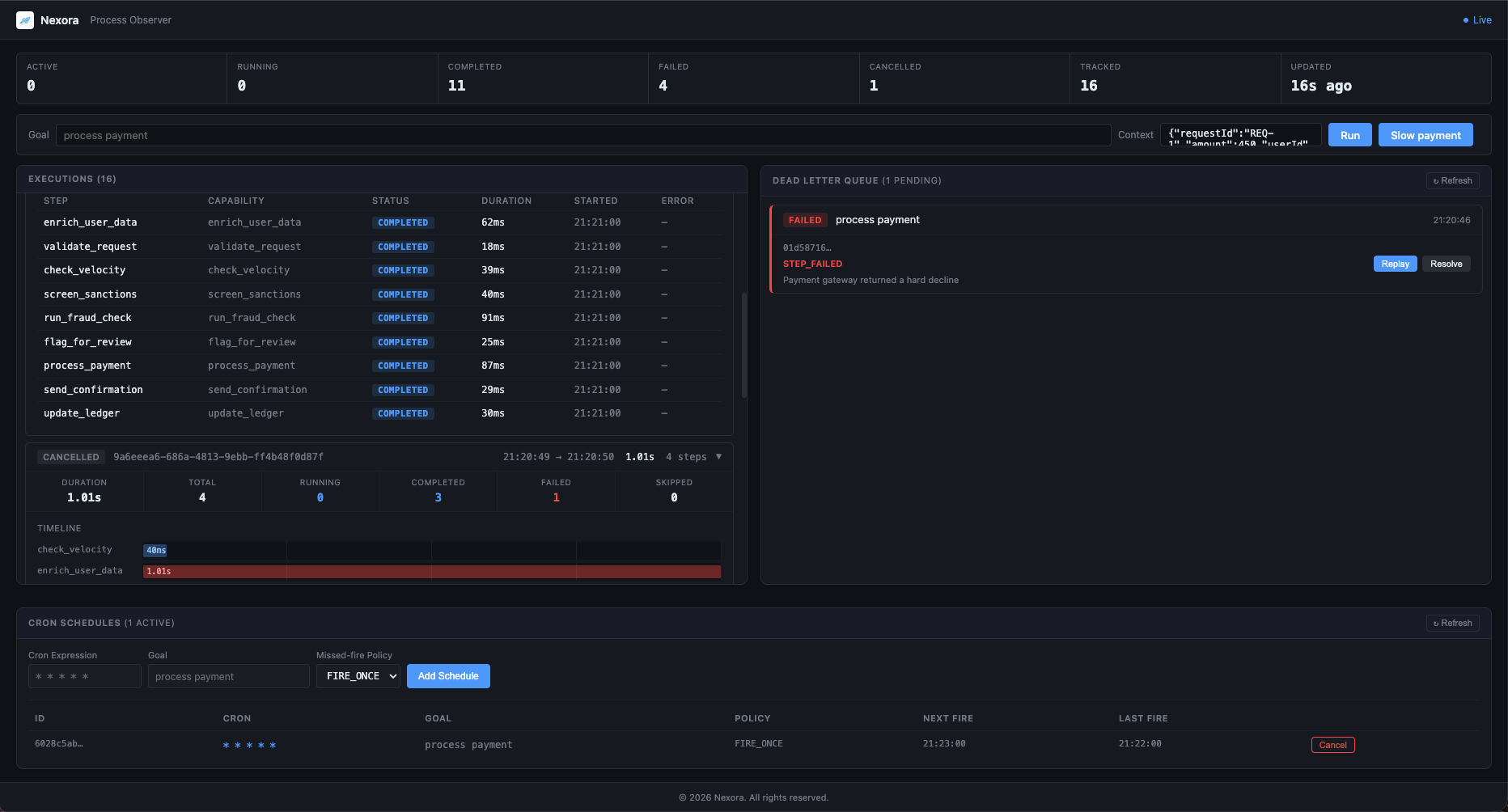
Start UI/API/metrics server for live process observability |
nexora demo |
Run the built-in feature demo |
nexora dlq list |
List dead letter queue entries (default: PENDING) |
nexora dlq replay <id> |
Replay a dead-lettered execution |
nexora dlq resolve <id> |
Mark a dead letter as resolved |
nexora schedule add |
Register a recurring cron-based execution |
nexora schedule list |
List schedules and next fire times |
nexora schedule remove <id> |
Cancel a schedule immediately |
nexora cancel <executionId> |
Cancel an execution running in the observe server |
nexora replay <executionId> |
Replay a failed, timed-out, cancelled or compensated execution through the observe server |
nexora user add <username> |
Create a dashboard user (also passwd, remove, list) |
nexora login |
Sign in with a username and password; saves a user API key for cancel / replay |
nexora logout |
Revoke and delete the saved user API key |
nexora tls-gen |
Write a development CA and server certificate for HTTPS on localhost |
Pass -c '{"key":"value"}' to run to inject context values that steps can reference.
By default Nexora looks for nexora.json in the working directory. Point to a different one with --config.
{
  "executionStore": "./nexora-data",
  "steps": [
    {
      "id": "validate_order",
      "capabilityId": "validate_order",
      "matchesGoalContains": "order"
    },
    {
      "id": "charge_card",
      "capabilityId": "charge_card",
      "matchesGoalContains": "payment"
    }
  ],
  "retry": {
    "maxAttempts": 3,
    "initialDelayMs": 200,
    "multiplier": 2.0,
    "maxDelayMs": 10000
  },
  "persistence": {
    "pool": {
      "maximumPoolSize": 10,
      "minimumIdle": 2,
      "connectionTimeoutMs": 30000,
      "idleTimeoutMs": 600000,
      "probeTimeoutMs": 1000
    },
    "stepOutputMaxBytes": 65536
  },
  "observe": {
    "rateLimit": {
      "enabled": true,
      "globalRpm": 60,
      "executeRpm": 10,
      "trustedProxies": []
    }
  }
}
persistence.pool sizes the HikariCP connection pool behind executionStore. Every key is optional and the values above are the defaults (minimumIdle defaults to 2, or to maximumPoolSize if that is smaller). connectionTimeoutMs must be at least 250 and idleTimeoutMs must be 0 (never retire idle connections) or at least 10000; out-of-range values fail at startup. probeTimeoutMs (at least 100) bounds each database check behind /health/ready on its own, so a saturated pool reports DOWN within it while normal work still waits up to connectionTimeoutMs. A readiness probe runs two checks, so it takes at most about twice this value.
persistence.stepOutputMaxBytes caps the output stored for each completed step, in UTF-8 JSON bytes (default 65536). A larger output is stored as a truncated preview and logged at WARN; the step still completes, and later steps still receive the whole output. Values from 1 to 255 fail at startup. Set it to 0 to store no outputs, for example when steps return data that must not be written to the database.
observe.rateLimit limits each client of nexora observe to globalRpm API requests a minute, executeRpm of them to POST /api/execute; more get 429 with Retry-After. Set enabled to false when a reverse proxy rate limits instead, and list proxies in trustedProxies so clients behind them are told apart by X-Forwarded-For. See Rate limiting.
A step is included in the plan when its matchesGoalContains string appears in the goal. Dependencies between steps are declared in code using StepDefinition's dependsOn set.
executionStore names an embedded H2 file. To use a database server instead, set the NEXORA_JDBC_URL environment variable to its JDBC URL, credentials included, for example jdbc:postgresql://db:5432/nexora?user=nexora&password=... (PostgreSQL 15 or later; URL-encode special characters in the password). It is read only from the environment, so it can come from a secret, and setting it together with executionStore fails at startup.
NexoraEngine engine = NexoraEngine.builder()
    .withPlugin(myPlugin)
    .withStepDefinition(new StepDefinition(
        "validate_order", "validate_order",
        goal -> goal.contains("order")
    ))
    .build();

engine.subscribe(StepCompletedEvent.class, e ->
    System.out.printf("done: %s in %dms%n", e.stepId(), e.elapsed().toMillis()));

ExecutionResult result = engine
    .execute("process order payment", Map.of("orderId", "ORD-99"))
.get();nexora-spring-boot-starter auto-configures a NexoraEngine bean from application.yml and the Nexora beans your application declares. It targets Spring Boot 4 and is available from 0.6.0: import the nexora-all BOM (see Use it as a library) at 0.6.0 or later, since 0.5.0 does not include the starter.
<dependency>
    <groupId>me.virul.nexora</groupId>
    <artifactId>nexora-spring-boot-starter</artifactId>
</dependency>nexora:
tenant-id: acme # optional: bind the engine to one tenant
default-timeout: 5s # per-step timeout when a step sets none
default-plan-deadline: 30s # whole-execution deadline when the intent sets none
saga-enabled: true
webhook-secret: ${NEXORA_WEBHOOK_SECRET}
step-output-max-bytes: 65536
plugin-jars:
- /opt/nexora/plugins/payments.jar
retry: # default retry policy; no retries without max-attempts
max-attempts: 3
initial-delay: 200ms
multiplier: 2.0
max-delay: 10s
persistence: # JDBC store; no persistence without jdbc-url
jdbc-url: ${NEXORA_JDBC_URL}
pool:
maximum-pool-size: 10
minimum-idle: 2
probe-timeout: 1s # bound on each health check, separate from connection-timeoutThe H2 driver comes with the starter. For PostgreSQL 15 or later, add its driver as well; Spring Boot manages the version:
<dependency>
    <groupId>org.postgresql</groupId>
    <artifactId>postgresql</artifactId>
    <scope>runtime</scope>
</dependency>
Every key is optional; an unset key keeps the NexoraEngine.Builder default. An invalid value (a bad tenant id, a pool of 0 connections) fails application startup.
Beans are picked up automatically:
| Bean type | Effect |
|---|---|
NexoraPlugin |
Registered and activated, in @Order order (so required plugins go first) |
StepDefinition |
Added to the rule planner |
Planner |
Added ahead of the rule planner |
ExecutionStore |
Used instead of the store built from nexora.persistence.jdbc-url |
Tracer |
Used for step spans, for example an OtelTracer |
RetryPolicy |
Used instead of the policy built from nexora.retry.* |
NexoraEngineBuilderCustomizer |
Applied last, in @Order order, for anything without a property (such as a custom Executor) |
@Configuration
class NexoraConfig {

    // The engine owns the plugin lifecycle; destroyMethod = "" stops Spring calling shutdown() a second time.
    @Bean(destroyMethod = "")
    NexoraPlugin paymentPlugin() {
        return new PaymentPlugin();
    }

    @Bean
    StepDefinition chargeStep() {
        return StepDefinition.builder("charge", "charge_card")
                .withMatcher(goal -> goal.contains("payment"))
                .withInput("amount", InputBinding.fromContext("intent.context.amount"))
                .build();
    }
}
Define your own NexoraEngine bean to take over completely, or set nexora.enabled=false to turn the starter off. The engine is closed with the application context.
With Spring Boot Actuator on the classpath, the nexora health component reports NexoraEngine.readiness(): UP only when persistence, its migrations, plugins and the executor are all UP, with each check, the active plugin ids and the bound tenant as details. Add it to the readiness probe with management.endpoint.health.group.readiness.include=readinessState,nexora, or turn it off with management.health.nexora.enabled=false.
tests/spring-boot-demo is a runnable order API built this way: a plugin and two step definitions as beans, H2 persistence, retry, and the nexora check in the readiness probe.
mvn install -DskipTests -DskipITs
java -jar tests/spring-boot-demo/target/spring-boot-demo.jar
curl -s localhost:8080/v1/orders -H 'Content-Type: application/json' -d '{"orderId":"ORD-1","amount":42.50}'
curl -s localhost:8080/actuator/health/readinessThe planner that converts a goal string into a DAG is itself a plugin. Implement Planner and return it from plannerProviders() in your NexoraPlugin:
public class MySmartPlanner implements Planner {

    @Override
    public PlannerDescriptor descriptor() {
        return new PlannerDescriptor("my-planner", "LLM-backed planner", 100);
    }

    @Override
    public boolean canPlan(Intent intent, PlanningContext context) {
        return intent.getGoal().length() > 20; // handle complex goals
    }

    @Override
    public Plan plan(Intent intent, PlanningContext context) {
        // use context.availableCapabilities() to see what's registered
        // build and return a Plan
    }
}
The engine tries planners in descending priority order. The built-in rule-based planner always sits last as the fallback. Registering a planner with priority 100 means it runs first; if canPlan() returns false, the next one is tried.
You can also register a planner directly without a plugin:
NexoraEngine.builder()
    .withPlanner(new MySmartPlanner())
    .build();
A planner that accepted an intent but cannot plan it after all throws PlanningDeclinedException, and the engine moves on to the next planner, ending with the rule-based one.
nexora-planner-llm is a ready-made LLM planner plugin: it plans goals with Anthropic, OpenAI, Gemini or any OpenRouter model through the official SDKs, validates every answer, caches plans, and falls back to the rule-based planner when an answer cannot be used. Configure it with NEXORA_LLM_PROVIDER, the provider's API key and NEXORA_LLM_MODEL, and try it without a key: java -jar tests/llm-planner-demo/target/llm-planner-demo.jar --offline. See the nexora-planner-llm guide.
A capability can reshape the remaining plan by returning amendments alongside its result:
return CapabilityResult.success(
    Map.of("valid", true),
    List.of(
        // inject a new step that runs after this one
        new AddStepAmendment(new Step("audit_log", "audit_log",
            Map.of("orderId", InputBinding.literal(orderId)),
            null, Set.of("validate_order"), null, null)),

        // override an input for a downstream step
        new ModifyInputAmendment("send_receipt", "audited", true),

        // cancel a step that is no longer needed
        new SkipStepAmendment("legacy_check")
    )
);
Amendments are applied by the scheduler before any dependent step begins. A PlanAmendedEvent fires for each one so you can observe every mutation.
Note: Stateful circuit breaker options (
openDurationandprobeInterval) were added in v0.2.0.
Capabilities declare their expected operational behaviour. The engine monitors every call and reroutes traffic when a capability breaches its contract:
new CapabilityDescriptor(
    "charge_card", "Charges the customer card",
    List.of(), List.of(), false, false,
    CapabilityContract.builder()
        .p99Latency(Duration.ofMillis(200))
        .maxErrorRate(0.05)
        .windowSize(20)
        .openDuration(Duration.ofSeconds(30))
        .probeInterval(Duration.ofSeconds(10))
        .fallback("charge_card_fallback")
        .build()
)
If charge_card starts exceeding 200ms p99 or failing more than 5% of the time over the last 20 calls, the engine silently opens the circuit and routes new calls to charge_card_fallback. The circuit remains OPEN for 30 seconds before transitioning to HALF_OPEN, where it probes the primary capability every 10 seconds. When the primary recovers, the circuit closes and traffic returns automatically. The caller sees a normal result either way.
Query live health at any time:
NexoraEngine.HealthSnapshot health = NexoraEngine.HealthSnapshot.from(
    engine.capabilityHealth("charge_card"));
// health.state(), health.sampleCount(), health.errorRate(), health.p99Latency()A plugin is a JAR that implements NexoraPlugin and declares itself in META-INF/services/me.virul.nexora.spi.NexoraPlugin.
public class MyPlugin implements NexoraPlugin {

    @Override
    public PluginDescriptor descriptor() {
        return new PluginDescriptor("my-plugin", "1.0.0", "Does stuff", List.of(), null);
    }

    @Override
    public void initialize(PluginContext ctx) {}

    @Override
    public List<CapabilityProvider> capabilityProviders() {
        return List.of(
            new CapabilityProvider() {
                public CapabilityDescriptor descriptor() {
                    return new CapabilityDescriptor(
                        "my_capability", "My Capability",
                        List.of(), List.of(), true, false
                    );
                }
                public Capability create(PluginContext ctx) {
                    return request -> CapabilityResult.success(Map.of("result", "ok"));
                }
            }
        );
    }

    @Override
    public void shutdown() {}
}
Load a plugin JAR at runtime:
engine.loadPlugin(Path.of("my-plugin.jar"), "my-plugin");Or wire it directly without a JAR (useful in tests):
NexoraEngine.builder().withPlugin(new MyPlugin()).build();Subscribe to any event type:
engine.subscribe(StepStartedEvent.class,   e -> log.info("started: {}", e.stepId()));
engine.subscribe(StepCompletedEvent.class, e -> log.info("done: {}", e.stepId()));
engine.subscribe(StepFailedEvent.class,    e -> log.error("failed: {} {}", e.stepId(), e.failureMessage()));
engine.subscribe(PlanAmendedEvent.class,   e -> log.info("plan mutated: {} -> {}", e.amendmentType(), e.targetStepId()));
engine.subscribe(PlanCompletedEvent.class, e -> metrics.record(e.elapsed()));
Event handlers run on the engine's executor, not the caller's thread. A handler that throws does not affect execution or other handlers.
The default retry policy is no retry. Override it globally:
NexoraEngine.builder()
    .withDefaultRetryPolicy(
        ExponentialBackoffPolicy.builder()
            .maxAttempts(3)
            .initialDelay(Duration.ofMillis(200))
            .multiplier(2.0)
            .maxDelay(Duration.ofSeconds(10))
            .build()
    )
    .build();
Backoff includes ±25% jitter to avoid thundering herd on simultaneous failures.
Nexora allows you to set a plan-level wall-clock execution deadline. If the execution exceeds this duration, the entire plan is cancelled: running steps continue, but not-yet-started steps are suppressed, the terminal execution status is set to TIMED_OUT, and saga compensation is triggered for all successfully completed steps.
You can configure a global engine-wide default deadline using the builder:
NexoraEngine engine = NexoraEngine.builder()
    .withDefaultPlanDeadline(Duration.ofSeconds(5))
    .build();
You can also override the deadline per execution request:
// Sets a 2-second deadline specifically for this execution
CompletableFuture<ExecutionResult> future = engine.execute(
    "process order payment notification",
    Map.of("orderId", "ORD-42"),
    Duration.ofSeconds(2)
);
When a plan times out:
- The execution status resolves to
TIMED_OUT. - A
PlanTimedOutEventis published. - Saga compensation runs for completed steps if saga is enabled.
Nexora allows you to register webhook URLs to be notified asynchronously when an execution reaches a terminal state (COMPLETED, FAILED, or TIMED_OUT). This is particularly useful when triggering executions remotely via the API and awaiting their outcome.
To use webhooks securely, configure an HMAC-SHA256 signature secret in your nexora.json or via the NEXORA_WEBHOOK_SECRET environment variable:
{
  "webhookSecret": "your-secure-secret-here",
  "steps": []
}
When invoking an execution, supply the webhookUrl and optionally filter which terminal webhookEvents trigger a callback:
curl -H "Authorization: Bearer $NEXORA_API_KEY" -X POST http://localhost:9464/api/execute \
  -H "content-type: application/json" \
  -d '{
        "goal": "process order payment",
        "webhookUrl": "https://your-api.com/webhooks/nexora",
        "webhookEvents": ["COMPLETED", "FAILED", "TIMED_OUT"]
      }'
Nexora will dispatch a JSON payload to your endpoint with the execution outcome. It signs the payload using the configured secret and passes the signature in the nexora-signature HTTP header for validation. It also utilizes exponential backoff to retry deliveries up to 3 attempts. Delivery attempts are persisted in the nexora_webhook_deliveries database table and can be queried for auditability via the API.
When a execution fails after exhausting all retries, Nexora writes a record to the nexora_dead_letters table and fires an ExecutionDeadLetteredEvent on the event bus. This gives operators a structured audit trail of every permanently failed execution and a way to replay or resolve them without querying the database directly.
Each dead letter record carries:
| Field | Description |
|---|---|
id |
UUID of the dead letter record |
executionId |
The original failed execution |
goal |
The intent goal string |
context |
The intent context (JSON) |
failureCode |
Machine-readable failure code (e.g. STEP_FAILED) |
failureMessage |
Human-readable error detail |
failedAt |
When the failure occurred |
reviewState |
PENDING, RESOLVED, or REPLAYED |
Subscribe to the event for alerting:
engine.subscribe(ExecutionDeadLetteredEvent.class, e ->
    alerting.notify("Execution dead-lettered: " + e.executionId() + " code=" + e.failureCode()));
Inspect and remediate via CLI:
# list all pending dead letters
nexora dlq list

# replay a failed execution (creates a new execution with the same goal and context)
nexora dlq replay <dead-letter-id>

# mark as resolved when no replay is needed
nexora dlq resolve <dead-letter-id> --reason "Root cause fixed in deployment 1.2.3"
Or via the observability REST API:
# list PENDING (default)
curl -H "Authorization: Bearer $NEXORA_API_KEY" http://localhost:9464/api/dead-letters

# filter by state, paginate
curl -H "Authorization: Bearer $NEXORA_API_KEY" "http://localhost:9464/api/dead-letters?state=RESOLVED&page=0&size=10"

# replay
curl -H "Authorization: Bearer $NEXORA_API_KEY" -X POST http://localhost:9464/api/dead-letters/<id>/replay

# resolve
curl -H "Authorization: Bearer $NEXORA_API_KEY" -X POST http://localhost:9464/api/dead-letters/<id>/resolve \
  -H "content-type: application/json" \
-d '{"reason":"investigated and closed"}'Authentication: these endpoints require the API key. See Authentication.
Register recurring executions driven by standard 5-field UNIX cron expressions. Schedules are persisted to a nexora_schedules table and survive engine restarts. Requires executionStore to be configured.
NexoraEngine engine = NexoraEngine.builder()
    .withExecutionStore(JdbcExecutionStore.h2("./nexora-data"))
    .withPlugin(myPlugin)
    .build();

// Register a nightly job
ScheduledExecution handle = engine.schedule(
    "0 0 * * *",
    new Intent("nightly cleanup", Map.of())
);

System.out.println("Next fire: " + handle.nextFireTime());

// Cancel at any time
handle.cancel();

// List active schedules
engine.listActiveSchedules().forEach(s ->
    System.out.println(s.id() + " " + s.cronExpression() + " next=" + s.nextFireAt()));
Three missed-fire policies control what happens when the engine restarts after downtime:
| Policy | Behaviour |
|---|---|
FIRE_ONCE |
Fire once immediately to catch up, regardless of how many windows were missed (default) |
SKIP |
Drop all missed windows and wait for the next scheduled slot |
FIRE_ALL |
Fire once for each missed window |
engine.schedule("*/5 * * * *", intent, MissedFirePolicy.SKIP);Subscribe to scheduling events:
engine.subscribe(ScheduledExecutionFiredEvent.class, e ->
    log.info("fired scheduleId={} executionId={}", e.scheduleId(), e.executionId()));

engine.subscribe(ScheduledExecutionMissedEvent.class, e ->
    alerting.warn("missed {} windows for schedule {}", e.missedCount(), e.scheduleId()));
Manage via CLI:
nexora schedule add --goal "nightly cleanup" --cron "0 0 * * *"
nexora schedule add --goal "poll api" --cron "*/5 * * * *" --policy SKIP
nexora schedule list --active-only
nexora schedule remove <schedule-id>
Or via the observability REST API (also exposed in the dashboard Cron Schedules panel):
curl -H "Authorization: Bearer $NEXORA_API_KEY" http://localhost:9464/api/schedules

curl -H "Authorization: Bearer $NEXORA_API_KEY" -X POST http://localhost:9464/api/schedules \
  -H "content-type: application/json" \
  -d '{"cronExpression":"0 0 * * *","goal":"nightly cleanup","missedFirePolicy":"FIRE_ONCE"}'

curl -H "Authorization: Bearer $NEXORA_API_KEY" -X DELETE http://localhost:9464/api/schedules/<id>Every execution belongs to a tenant, default unless the intent names one. History, dead letters, schedules, replays and cancels are scoped by it, capabilities read it from their request, and execution metrics carry a tenant label.
engine.execute(new Intent("process order", Map.of("orderId", "123")).withTenantId("acme"));

// An engine that only ever runs and sees acme's work
NexoraEngine acme = NexoraEngine.builder()
        .withExecutionStore(new JdbcExecutionStore(sharedPool))
        .withTenantId("acme")
        .build();
nexora observe --multi-tenant scopes the API and dashboard: users are bound to a tenant (nexora user add alice --tenant acme), and the server key names one with X-Tenant-ID. Try the library side with java -jar tests/multi-tenant-demo/target/multi-tenant-demo.jar and the server side with the login demo. See the Multi-tenancy guide.
Start Nexora's built-in observability server:
java -jar nexora-cli/target/nexora.jar observe --port 9464The server's full HTTP API is described by an OpenAPI 3.1 document at GET /openapi.yaml, browsable with Swagger UI at /docs (served from bundled assets, no external requests). The document's info.version is the API's own version, separate from the Nexora release; the HTTP API docs page lists what changed in each version and renders the current reference.
It exposes these endpoints with no external dependencies:
| Endpoint | What it serves |
|---|---|
GET / |
Live process UI showing active executions, step timelines, and plan amendments |
GET /metrics |
Prometheus text format scrape endpoint |
GET /openapi.yaml |
OpenAPI 3.1 description of every endpoint |
GET /docs |
Swagger UI for that document |
GET /api/process |
Raw process snapshot as JSON |
POST /api/execute |
Trigger an execution remotely; returns 202 with the new executionId |
GET /health/live |
Liveness probe. Returns 200 while the process is serving HTTP |
GET /health/ready |
Readiness probe. Returns 200 when persistence, schema migrations, plugins, and the executor are all UP, 503 with a per-check breakdown otherwise |
GET /health |
Summary: overall status, Nexora version, readiness checks, and capability circuit states (informational) |
GET /api/webhook-deliveries/{id} |
Audit log of webhook delivery attempts for an execution |
GET /api/dead-letters |
List dead letter queue entries (paginated, filterable by ?state=PENDING|RESOLVED|REPLAYED|ALL) |
POST /api/dead-letters/{id}/replay |
Create a new execution from a dead letter and mark it as REPLAYED |
POST /api/dead-letters/{id}/resolve |
Mark a dead letter as RESOLVED with an optional {"reason":"..."} body |
GET /api/executions |
Execution history, newest first, cursor-paginated; filter by status, goal, from, to, limit |
GET /api/executions/{id} |
One execution with its step records (404 if unknown) |
DELETE /api/executions/{id} |
Cancel a running execution (200 cancelled, 404 unknown, 409 already finished) |
POST /api/executions/{id}/replay |
Replay a failed, timed-out, cancelled or compensated execution (202 with the new executionId, 409 otherwise) |
Note:
/health/liveand/healthwere added in v0.3.0. In v0.3.0/health/readychanged from reporting capability circuit state to reporting dependency readiness; circuit states are now undercapabilitiesinGET /health.
Every /api/* route and the live WebSocket require a key, sent as Authorization: Bearer <key>. /metrics, /health/*, the dashboard page, /openapi.yaml and /docs stay public for scrapers and probes.
- Server key (
nxk_...): printed once on first start (only its hash is saved), or set withNEXORA_API_KEYfor CI and containers. Rotate with--rotate-api-key. - User key (
nxu_...): minted when someone signs in with a username and password. The dashboard gets it as an HttpOnly cookie;nexora loginsaves it fornexora cancel/nexora replay. Valid 12 hours, logged under the user's name. Manage users withnexora user add/passwd/remove/list.
export NEXORA_API_KEY="$(openssl rand -base64 32)"
nexora observe
curl -H "Authorization: Bearer $NEXORA_API_KEY" http://localhost:9464/api/process
The payment pipeline demo prints a fresh server key in its console on every start and has no user accounts, so paste that key into its sign-in card. To try username and password sign-in, run the login demo: java -jar tests/login-demo/target/login-demo.jar (users alice / bob in tenants acme / globex, guided tour on its console).
See the Authentication guide for how each sign-in flow works, user management, the demo, and what 401 and 429 mean.
Without TLS the server logs a WARN on start, since keys, passwords and the session cookie cross the network in cleartext. To serve HTTPS (and WSS for the live stream) on your machine:
nexora tls-gen --out ./certs        # a dev CA plus a localhost certificate
nexora observe --tls-cert ./certs/server.pem --tls-key ./certs/server-key.pem
curl --cacert ./certs/ca.pem https://localhost:9464/health/live
nexora login --server https://localhost:9464 --cacert ./certs/ca.pem
Import certs/ca.pem as a trusted authority in your browser or OS to open the dashboard without warnings. In production, use a certificate from your CA or Let's Encrypt:
nexora observe \
  --tls-cert /etc/letsencrypt/live/nexora.example.com/fullchain.pem \
  --tls-key  /etc/letsencrypt/live/nexora.example.com/privkey.pem
A PKCS12 keystore works too: --keystore server.p12 with its password in NEXORA_KEYSTORE_PASSWORD. Only TLS 1.2 and 1.3 are accepted. The certificate is read at start, so restart after a renewal. See the HTTPS guide for trusting the CA per browser and OS, key formats, and troubleshooting.
Example execute request:
curl -H "Authorization: Bearer $NEXORA_API_KEY" -X POST http://localhost:9464/api/execute \
  -H "content-type: application/json" \
  -d '{"goal":"process order payment notification","context":{"orderId":"ORD-99"}}'
Metrics exposed include:
nexora_plan_started_total,nexora_plan_completed_total,nexora_plan_failed_total- by tenantnexora_plan_duration_seconds- histogram by status (completed/failed) and tenantnexora_step_started_total,nexora_step_completed_total,nexora_step_failed_total- all by capability ID and tenantnexora_step_duration_seconds- histogram by capability ID and terminal statusnexora_plan_amendments_total- by amendment type (ADD_STEP, SKIP_STEP, MODIFY_INPUT)nexora_active_executions- current in-flight count by tenant
Bring up Prometheus, Grafana, and Alertmanager with the prebuilt stack:
cd observability
docker compose up -d- Prometheus:
http://localhost:9090 - Alertmanager:
http://localhost:9093 - Grafana:
http://localhost:3000(login:admin/admin)
The Grafana dashboard and alert rules are provisioned automatically. Provisioned assets:
observability/prometheus/prometheus.ymlobservability/prometheus/alerts.ymlobservability/grafana/dashboards/nexora-overview.json
You can also attach observability to an engine in your own application without the HTTP server:
NexoraEngine engine = NexoraEngine.builder()...build();

try (NexoraObservability obs = NexoraObservability.attach(engine)) {
    engine.execute("process order", context).get();
    String metrics = obs.scrapePrometheus();           // Prometheus text format
    ProcessSnapshot snapshot = obs.processSnapshot();  // live execution state
}A Helm chart (deploy/helm/nexora) and plain manifests (deploy/k8s) run nexora observe on Kubernetes, from the ghcr.io/iamvirul/nexora image that each release publishes from 0.5.0 on. Before that release, build the image (below) and set image.repository and image.tag.
kubectl create namespace nexora
kubectl --namespace nexora create secret generic nexora-api-key \
  --from-literal=api-key="$(openssl rand -base64 36)"

helm install nexora deploy/helm/nexora --namespace nexora

kubectl --namespace nexora port-forward svc/nexora 9464 9465
open http://localhost:9464
By default it runs one pod with an embedded H2 store on a 1Gi PersistentVolumeClaim, with liveness and readiness probes on /health/live and /health/ready, and resource requests and limits set. For PostgreSQL, put the JDBC URL in a Secret and set persistence.mode=jdbc. HTTPS, a Prometheus ServiceMonitor, an HPA and a PodDisruptionBudget are options. See the chart README and the Kubernetes guide.
Without Helm: kubectl apply -f deploy/k8s/namespace.yaml && kubectl --namespace nexora apply -f deploy/k8s/nexora.yaml, after creating the Secret above.
To build the image yourself: mvn -pl nexora-cli -am package -DskipTests && docker build -t nexora:dev .
nexora-core           Domain types: Intent, Plan, Step, PlanAmendment, ExecutionContext
nexora-plugin-spi     Plugin contract: NexoraPlugin, Capability, Planner, CapabilityRegistry
nexora-registry       DefaultCapabilityRegistry (thread-safe, read-write locked)
nexora-tracing        Tracer/Span interfaces + no-op implementation
nexora-retry          RetryPolicy, ExponentialBackoffPolicy with jitter
nexora-event          ExecutionEvent sealed hierarchy, InProcessEventBus
nexora-executor       DAG scheduler with amendment support, interceptor pipeline, contract monitor
nexora-plugin-loader  PluginClassLoader, PluginManager, lifecycle FSM
nexora-planner        CompositePlanner, RulePlanner, StepDefinition, PlanRegistry
nexora-runtime        ExecutionEngine (ties planner + scheduler together)
nexora-api            NexoraEngine public facade, builder, NexoraObservability
nexora-cli            PicoCLI command-line interface + ObserveCommand HTTP server
nexora-spring-boot-starter  Spring Boot auto-configuration and Actuator health indicator
Dependencies always point inward. nexora-cli knows about nexora-api. nexora-api knows about nexora-runtime. Neither knows anything about the CLI.