



Menyoo PC - DOWNLOAD LATEST RELEASE
Menyoo PC - DOWNLOAD LATEST PRE-RELEASE
- OpenIV and its ASI Loader
- ScriptHookV by Alexander Blade
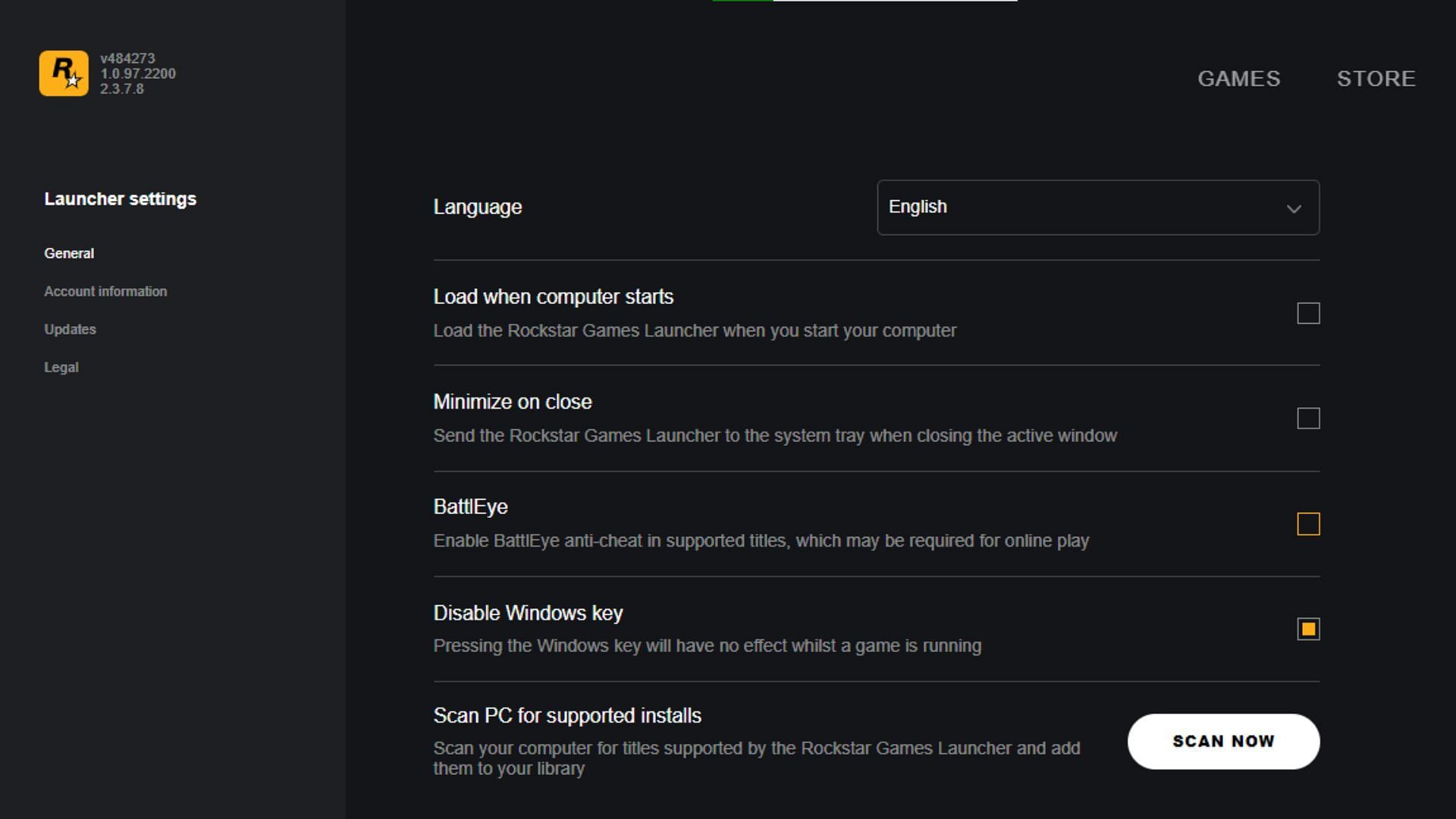
- Battleye disabled in the Rockstar Launcher Settings
- GTA V Legacy Version 3095.0 or newer OR GTA V Enhanced
- Visual Studio 2022 (tested with v17.14.19) with the Desktop development with C++ workload
- Windows 10/11 SDK (installed with the VS workload above)
- Git (for cloning with submodules)
The repo uses git submodules for pugixml, simpleini, dirent, and MinHook. Clone recursively so they're pulled in automatically:
git clone --recurse-submodules https://github.com/itsjustcurtis/MenyooSP.gitIf you already cloned without --recurse-submodules, pull the submodules in afterwards:
git submodule update --init --recursiveThe Visual Studio solution and project files are generated by Premake5 and are gitignored. From the repo root run:
generate.batThis produces Solution/Menyoo.sln, Solution/Menyoo.vcxproj, and Solution/Menyoo.vcxproj.filters. Re-run it whenever you edit premake5.lua or add new source files outside Solution/source/.
Open Solution/Menyoo.sln in Visual Studio 2022 and build the Release | x64 configuration, or from a Developer Command Prompt:
msbuild /m /p:Configuration=Release /p:Platform=x64 Solution\Menyoo.slnOutput:
- Release:
Solution/source/_Build/bin/Release/Menyoo.asi - Debug:
Solution/source/bin/Debug/Menyoo.asi
Menyoo links the dynamic Visual C++ runtime (/MD). Targets must have the Microsoft Visual C++ Redistributable (x64) installed — Steam-installed GTA V already ships it, so end users normally don't need to install anything extra.
Copy the Menyoo.asi file along with the menyooStuff folder to the Grand Theft Auto V game directory.
IMPORTANT: Please make sure that you have asiloader and ScriptHookV installed and that they are up to date.
Compiled binary material can be found at releases.
- Visual Studio 2022 (tested with v17.14.19) with the Desktop development with C++ workload
- Git (for cloning with submodules)
The repo uses git submodules for pugixml, simpleini, dirent, and MinHook. Clone recursively so they're pulled in automatically:
git clone --recurse-submodules https://github.com/itsjustcurtis/MenyooSP.gitIf you already cloned without --recurse-submodules, pull the submodules in afterwards:
git submodule update --init --recursiveThe Visual Studio solution and project files are generated by Premake5 and are gitignored. From the repo root run:
generate.batThis produces Solution/Menyoo.sln, Solution/Menyoo.vcxproj, Solution/Menyoo.vcxproj.filters and Solution/generated/*. Re-run it whenever you edit premake5.lua, add new source files outside Solution/source/ or if you want to update the displayed version (check "Versioning" below).
Open Solution/Menyoo.sln in Visual Studio 2022 and build the Release | x64 configuration, or from a Developer Command Prompt:
msbuild /m /p:Configuration=Release /p:Platform=x64 Solution\Menyoo.slnOutput:
- Release:
Solution/source/_Build/bin/Release/Menyoo.asi - Debug:
Solution/source/bin/Debug/Menyoo.asi
Versions come from Git tags. Do not edit a version string in the source tree or create an "up version" commit.
Tag releases with a v prefix and a SemVer version:
v2.5.0
v2.5.0-a1
v2.5.0-b1
v2.5.0-rc1
The build generates the version files from the nearest reachable version tag:
- Tagged
v2.4.0-a4:2.4.0-a4 - 13 commits after
v2.4.0-a4:2.4.0-a4.13 - Tagged
v2.4.0:2.4.0 - 13 commits after
v2.4.0:2.4.1-alpha.13
The numeric suffix is the number of commits since the tag. Stable development
builds increment the patch number and use alpha so the result remains valid
SemVer. The generated files are ignored and must not be committed.
To publish a release:
git tag v2.5.0
git push origin v2.5.0
The tag-triggered GitHub Actions workflow builds and publishes the release, regardless of which branch contains the tagged commit.
Only stable tags publish public GitHub releases. Pre-release tags build and upload a CI artifact but do not publish a public release:
v3.0.0,v2.5.0,v2.4.1, - builds and publishes a public release.v2.5.0-a1,v2.5.0-b1,v2.5.0-rc1- builds only.
Stable release tags must exactly match vMAJOR.MINOR.PATCH, with no leading
zeroes or build metadata. For example, v2.5.0 is valid on any branch, while
v2.05.0, v2.5, and v2.5.0+build build without publishing a release.
Version components use the following conventions:
M- Major: Changes to the core running of the script, and may not be compatible with older builds.m- Minor: Feature update that adds functionality to the.asionly.p- Patch: Bug fixes with no new features.aN- Alpha: Unstable pre-release with new features not fully tested.bN- Beta: Stable pre-release released for beta testing.rcN- Release Candidate: Stable pre-release with no planned changes ready for public release.- The numeric suffix is the pre-release iteration or development commit height.
The majority of the source code is licensed under the GNU GPL v3 license. Source content taken from other projects is tagged with the respective license(s) wherever found.
Modsfire Verification ID: AIFJh62h3jtgd$@5123w