



A CLI for optimizing test execution and manipulating coverage trace files. Optimize tests, validate coverage, transform trace files, and generate HTML reports.
Make coverde globally available with:
$ dart install coverdedart install requires Dart 3.10 or later. To run coverde directly from the terminal, add its bin directory to your PATH environment variable:
- macOS:
$HOME/Library/Application Support/Dart/install/bin - Linux:
$HOME/.local/share/dart/install/bin, or$XDG_DATA_HOME/dart/install/binwhenXDG_DATA_HOMEis set - Windows:
%LOCALAPPDATA%\Dart\install\bin
DART_DATA_HOME changes this location. The bin directory is then $DART_DATA_HOME/install/bin.
These directories are the defaults from Packaging and distributing Dart CLI tools.
Use `dart pub global activate` instead
[!NOTE]
dart installis preferred.
$ dart pub global activate coverdeThis installs a coverde executable in the pub cache bin directory:
- macOS or Linux:
$HOME/.pub-cache/bin - Windows:
%LOCALAPPDATA%\Pub\Cache\bin
PUB_CACHE changes this location. The bin directory is then $PUB_CACHE/bin.
- Optimize tests by gathering them.
- Check the coverage value (%) computed from a trace file.
- Transform a coverage trace file.
- Generate the coverage report from a trace file.
- Render a named coverage report from a trace file.
- Remove a set of files and folders.
- Compute the coverage value (%) of an info file.
Optimize tests by gathering them.
Note
Why use coverde optimize-tests?
The optimize-tests command gathers all your Dart test files into a single "optimized" test entry point. This can lead to much faster test execution, especially in CI/CD pipelines or large test suites. By reducing the Dart VM spawn overhead and centralizing test discovery, it enables more efficient use of resources.
For more information, see the flutter/flutter#90225.
-
--includeThe glob pattern for the tests files to include.
Default value:test/**_test.dart -
--excludeThe glob pattern for the tests files to exclude.
-
--outputThe path to the optimized tests file.
Default value:test/optimized_test.dart -
--total-shardsThe total number of shards to split tests across. Requires
--shard-indexto also be specified. -
--shard-indexThe index of the current shard (0-based). Requires
--total-shardsto also be specified.
-
--flutter-goldensWhether to use golden tests in case of a Flutter package.
Default value: Enabled
Basic usage
Given the following test files:
test/user_test.dart:
import 'package:test/test.dart';

void main() {
  test('user test', () {
    // test implementation
  });
}test/product_test.dart:
import 'package:test/test.dart';

void main() {
  test('product test', () {
    // test implementation
  });
}
Running:
$ coverde optimize-testsOutput: test/optimized_test.dart
// ignore_for_file: deprecated_member_use, type=lint

// ignore_for_file: no_leading_underscores_for_library_prefixes
import 'package:test_api/test_api.dart';

import 'product_test.dart' as _i1;
import 'user_test.dart' as _i2;

void main() {
  group(
    'product_test.dart',
    () {
      _i1.main();
    },
  );
  group(
    'user_test.dart',
    () {
      _i2.main();
    },
  );
}
Preserving Test Annotations
The command preserves test annotations from individual test files. Given the following test files with annotations:
test/slow_test.dart:
@Timeout(Duration(seconds: 45))
import 'package:test/test.dart';

void main() {
  test('slow test', () {
    // long-running test
  });
}test/skipped_test.dart:
@Skip('Temporarily disabled')
import 'package:test/test.dart';

void main() {
  test('skipped test', () {
    // test implementation
  });
}test/tagged_test.dart:
@Tags(['integration', 'slow'])
import 'package:test/test.dart';

void main() {
  test('tagged test', () {
    // test implementation
  });
}test/vm_only_test.dart:
@TestOn('vm')
import 'package:test/test.dart';

void main() {
  test('VM-only test', () {
    // test implementation
  });
}
Running:
$ coverde optimize-tests --no-flutter-goldensOutput: test/optimized_test.dart
// ignore_for_file: deprecated_member_use, type=lint

// ignore_for_file: no_leading_underscores_for_library_prefixes
import 'package:test_api/test_api.dart';

import 'skipped_test.dart' as _i1;
import 'slow_test.dart' as _i2;
import 'tagged_test.dart' as _i3;
import 'vm_only_test.dart' as _i4;

void main() {
  group(
    'skipped_test.dart',
    () {
      _i1.main();
    },
    skip: 'Temporarily disabled',
  );
  group(
    'slow_test.dart',
    () {
      _i2.main();
    },
    timeout: Timeout(Duration(seconds: 45)),
  );
  group(
    'tagged_test.dart',
    () {
      _i3.main();
    },
    tags: ['integration', 'slow'],
  );
  group(
    'vm_only_test.dart',
    () {
      _i4.main();
    },
    testOn: 'vm',
  );
}
The following annotations are supported and preserved:
@Skip()or@Skip('reason')→skip: trueorskip: 'reason'@Timeout(...)→timeout: Timeout(...)@Tags([...])→tags: [...]@TestOn('...')→testOn: '...'@OnPlatform({...})→onPlatform: {...}
Excluding Test Files
To exclude certain test files using a glob pattern:
$ coverde optimize-tests --exclude "**/*_integration_test.dart"This will gather all test files matching the default include pattern (test/**_test.dart) except those matching the exclude pattern.
Disabling Flutter Golden Tests
For non-Flutter packages or when golden tests are not needed:
$ coverde optimize-tests --no-flutter-goldensThis prevents the command from adding golden test setup code, which is only relevant for Flutter packages.
Sharding Tests
For large test suites, you can split tests across multiple shards to run them in parallel in different processes or CI jobs. Sharding requires both --total-shards and --shard-index options to be specified together.
Example: Splitting 4 test files across 2 shards
Given the following test files (sorted alphabetically):
test/auth_test.dart(index 0)test/order_test.dart(index 1)test/product_test.dart(index 2)test/user_test.dart(index 3)
Tests are distributed using round-robin assignment by index: index % <total shards> == <shard index>.
To run shard 0 (gets indices 0 and 2):
$ coverde optimize-tests --total-shards=2 --shard-index=0 --output=test/optimized_test_shard_0.dartOutput: test/optimized_test_shard_0.dart
// ignore_for_file: deprecated_member_use, type=lint

// ignore_for_file: no_leading_underscores_for_library_prefixes
import 'package:test_api/test_api.dart';

import 'auth_test.dart' as _i1;
import 'product_test.dart' as _i2;

void main() {
  group(
    'auth_test.dart',
    () {
      _i1.main();
    },
  );
  group(
    'product_test.dart',
    () {
      _i2.main();
    },
  );
}
To run shard 1 (gets indices 1 and 3):
$ coverde optimize-tests --total-shards=2 --shard-index=1 --output=test/optimized_test_shard_1.dartOutput: test/optimized_test_shard_1.dart
// ignore_for_file: deprecated_member_use, type=lint

// ignore_for_file: no_leading_underscores_for_library_prefixes
import 'package:test_api/test_api.dart';

import 'order_test.dart' as _i1;
import 'user_test.dart' as _i2;

void main() {
  group(
    'order_test.dart',
    () {
      _i1.main();
    },
  );
  group(
    'user_test.dart',
    () {
      _i2.main();
    },
  );
}
In a CI/CD pipeline, you could run both shards in parallel:
# Job 1
$ dart test test/optimized_test_shard_0.dart

# Job 2 (running concurrently)
$ dart test test/optimized_test_shard_1.dart
Sharding with 3 shards:
# Shard 0
$ coverde optimize-tests --total-shards=3 --shard-index=0 --output=test/optimized_test_0.dart

# Shard 1
$ coverde optimize-tests --total-shards=3 --shard-index=1 --output=test/optimized_test_1.dart

# Shard 2
$ coverde optimize-tests --total-shards=3 --shard-index=2 --output=test/optimized_test_2.dart
Notes:
- Shard indices are 0-based (start from 0)
- The
--shard-indexmust be less than--total-shards - Tests are distributed as evenly as possible across shards
- Both
--total-shardsand--shard-indexmust be provided together; specifying only one will result in an error
Check the coverage value (%) computed from a trace file.
The unique argument is a coverage threshold.
It is either a number between 0 and 100, or the name of a coverage entry in coverde.yaml.
-
--inputTrace file used for the coverage check.
Default value:coverage/lcov.info -
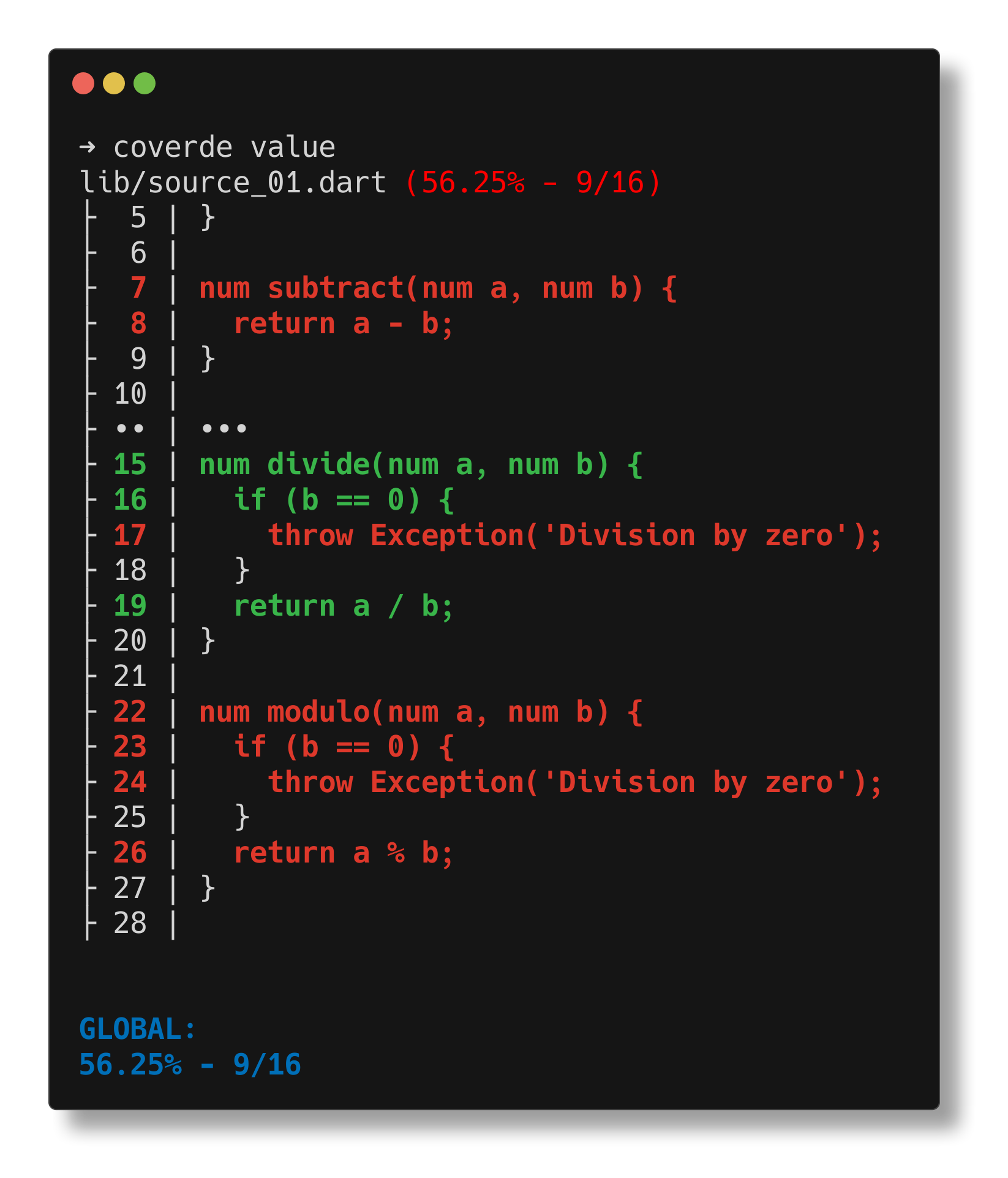
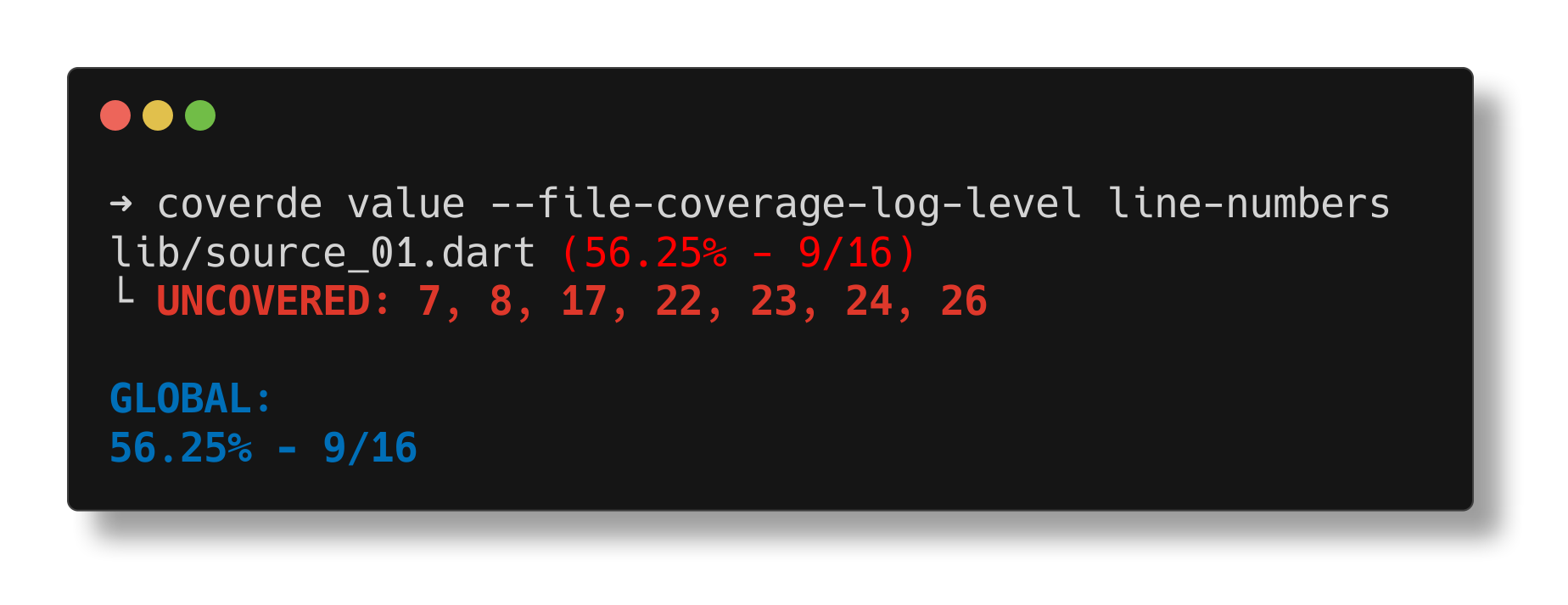
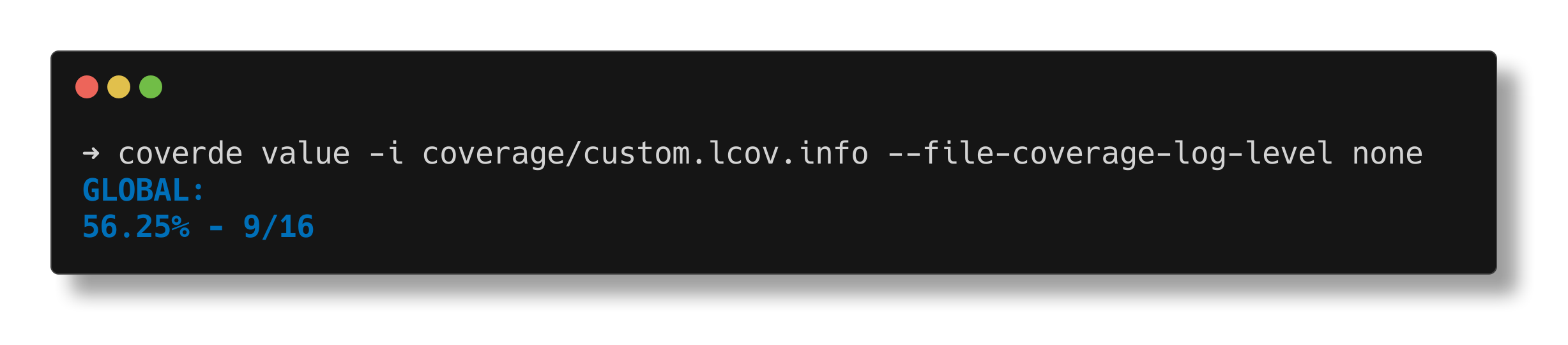
--file-coverage-log-levelThe log level for the coverage value for each source file listed in the
inputinfo file.
Default value:line-content
Allowed values:none: Log nothing.overview: Log the overview of the coverage value for the file.line-numbers: Log only the uncovered line numbers.line-content: Log the uncovered line numbers and their content.
-
min-coverageA number between 0 and 100, or the name of a
coverageentry in coverde.yaml.
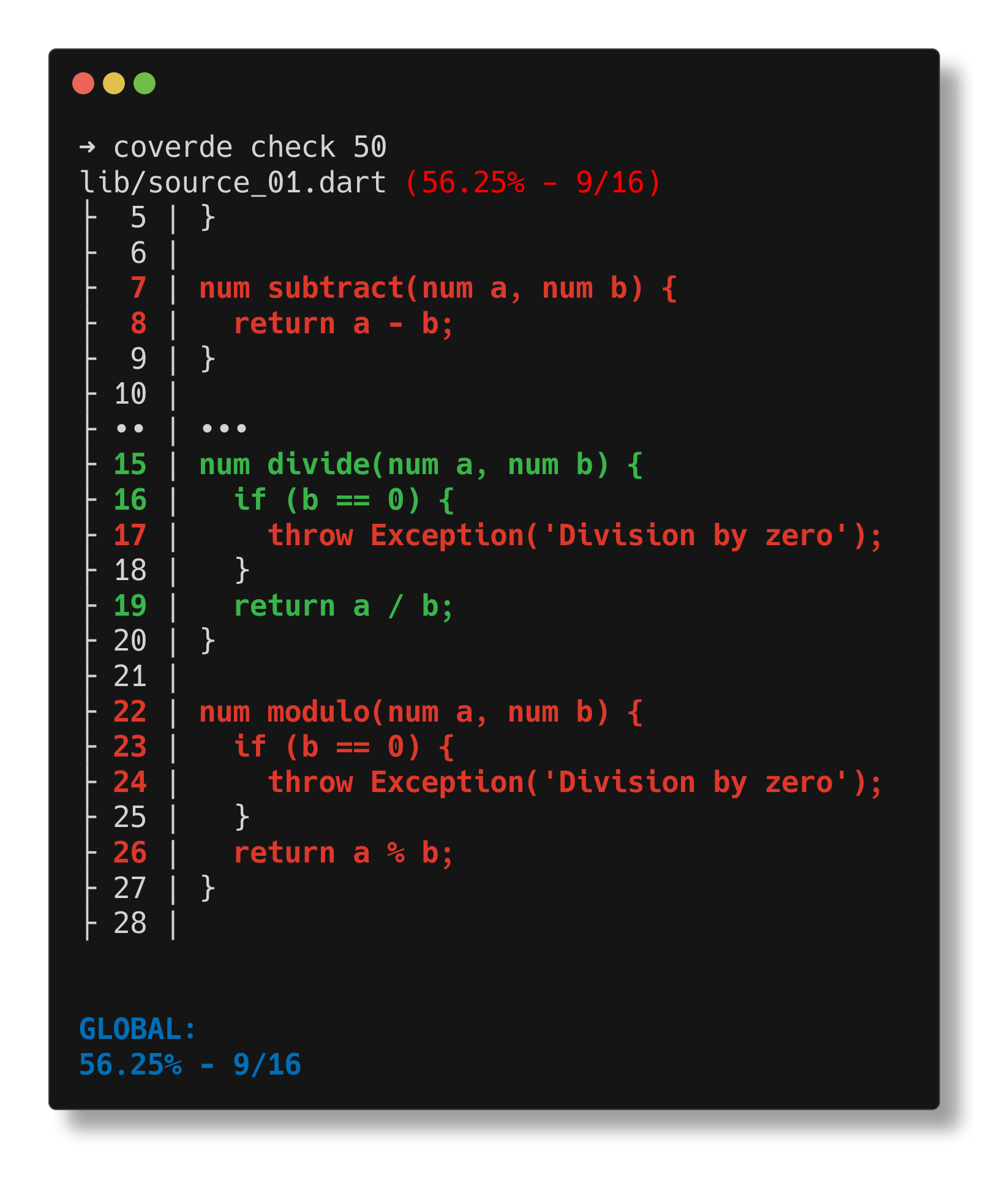
Show uncovered source
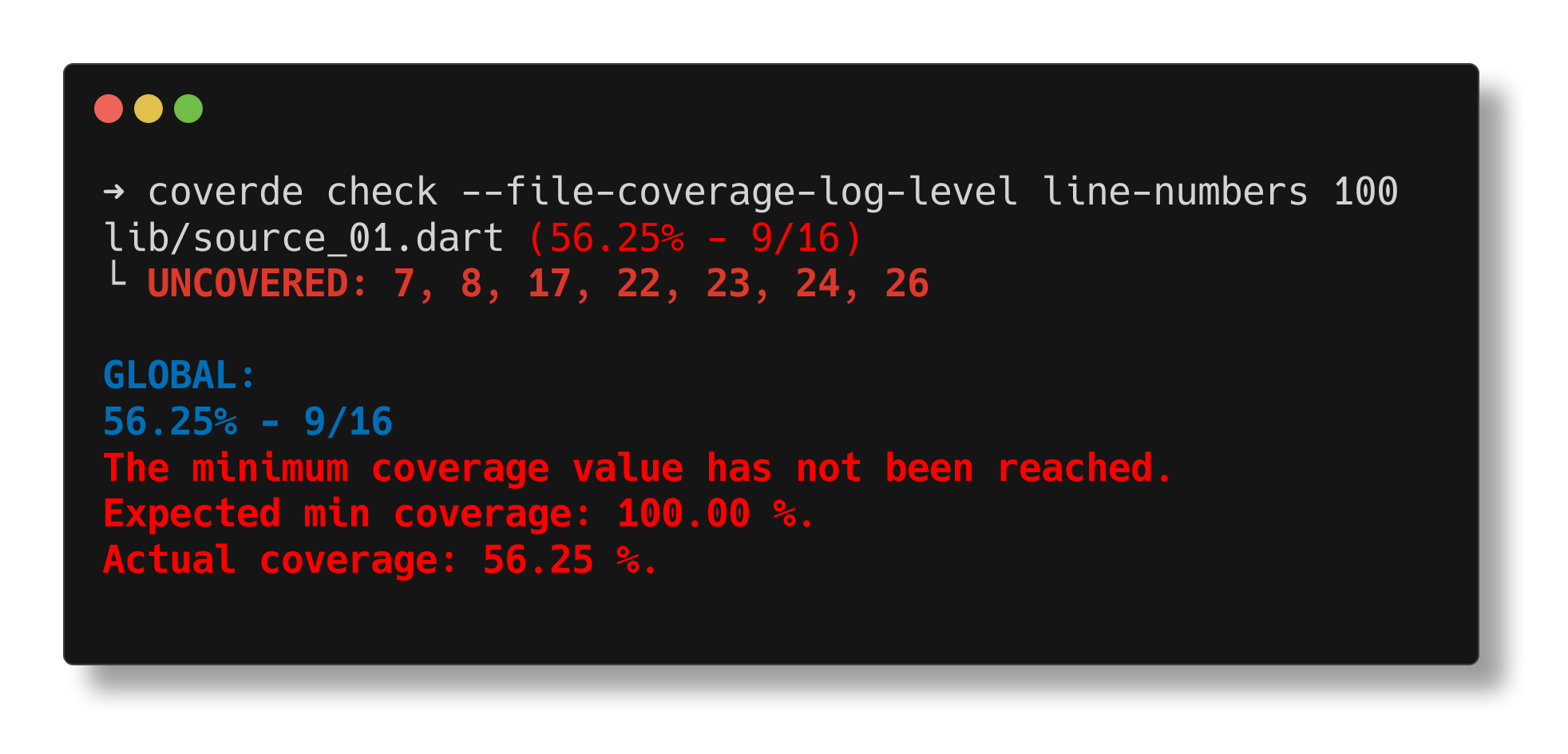
Show uncovered line numbers only
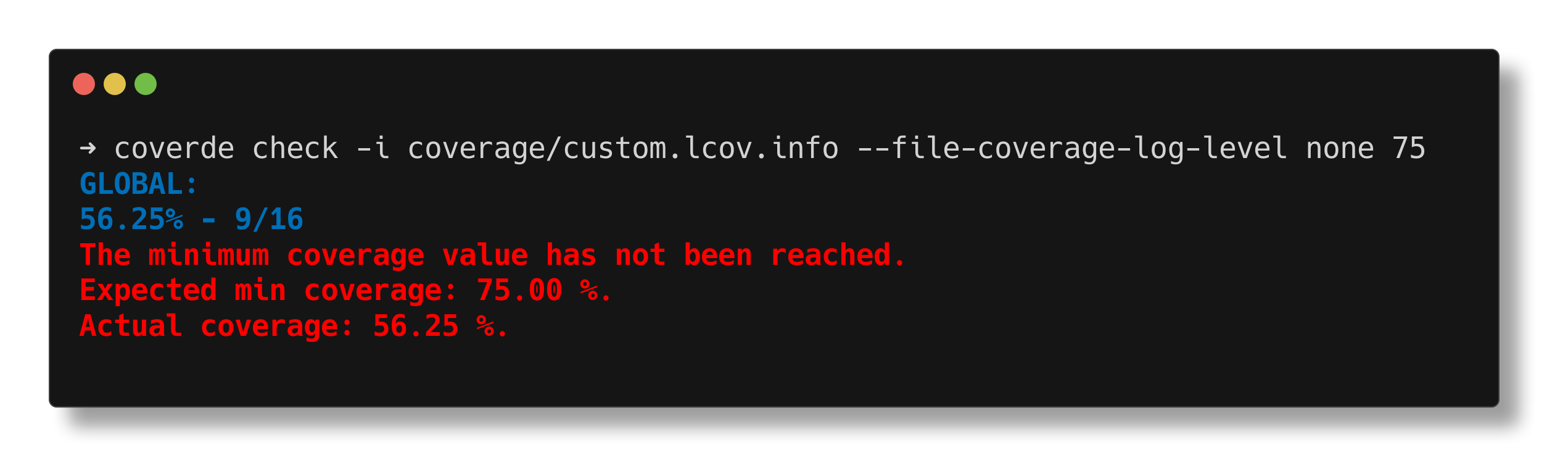
Show resulting coverage only
Transform a coverage trace file.
Apply a sequence of transformations to the coverage data.
The coverage data is taken from the INPUT_LCOV_FILE file and written to the OUTPUT_LCOV_FILE file.
Presets can be defined in coverde.yaml under the transformations key.
-
--inputOrigin coverage info file to transform.
Default value:coverage/lcov.info -
--outputDestination coverage info file to dump the transformed coverage data into.
Default value:coverage/transformed.lcov.info -
--modeThe mode in which the OUTPUT_LCOV_FILE can be generated.
Default value:a
Allowed values:a: Append transformed content to the OUTPUT_LCOV_FILE content, if any.w: Override the OUTPUT_LCOV_FILE content, if any, with the transformed content.
-
--transformationsTransformation steps to apply in order. Repeat this option for each step. A value may contain commas.
Default value: None
Allowed values:keep-by-regex=<regex>: Keep files that match the<regex>.skip-by-regex=<regex>: Skip files that match the<regex>.keep-by-glob=<glob>: Keep files that match the<glob>.skip-by-glob=<glob>: Skip files that match the<glob>.keep-by-coverage=<comparison>: Keep files that match the<comparison>(with reference values between 0 and 100).skip-by-coverage=<comparison>: Skip files that match the<comparison>(with reference values between 0 and 100).relative=<base-path>: Rewrite file paths to be relative to the<base-path>.preset=<name>: Expand the<name>preset fromcoverde.yaml.preset={name: <name>, file: <file>}: Expand the<name>preset from thecoverde.yamlat<file>.
-
--explainPrint the resolved transformation list and exit without modifying files.
Default value: Disabled
Inline Transformations
$ coverde transform \
  --transformations relative="/packages/my_package/" \
  --transformations keep-by-glob="lib/**" \
  --transformations skip-by-glob="**/*.g.dart" \
  --transformations keep-by-coverage="lte|80"
This transformation chain performs the following steps:
- Rewrite file paths to be relative to the
/packages/my_package/directory (useful for monorepos). - Keep files that match the
lib/**glob pattern, i.e. implementation files. - Skip files that match the
**/*.g.dartglob pattern, i.e. generated files. - Keep files that have a coverage value less than or equal to 80%.
Preset Usage
Given the following coverde.yaml configuration:
# coverde.yaml

transformations:
  implementation-without-generated:
    - type: keep-by-glob
      glob: "lib/**"
    - type: skip-by-glob
      glob: "**/*.g.dart"
Running:
$ coverde transform \
  --transformations relative="/packages/my_package/" \
  --transformations preset=implementation-without-generated \
  --transformations keep-by-coverage="lte|80"
Is equivalent to the Inline Transformations example.
Preset from another file
A plain preset value is a name in the working directory's coverde.yaml. A YAML map with file loads that name from another file. Quote a path or name that contains : or #.
$ coverde transform \
  --transformations 'preset={file: ../coverde.yaml, name: ci-workflow}'
The same preset can be cited from a package coverde.yaml. file is relative to the yaml file that contains the step:
# packages/my_package/coverde.yaml

transformations:
  package:
    - type: preset
      file: ../coverde.yaml
      name: ci-workflow
$ coverde transform --transformations preset=packageGenerate the coverage report from a trace file.
Generate the coverage report inside REPORT_DIR from the TRACE_FILE trace file.
-
--inputCoverage trace file to be used for the coverage report generation.
Default value:coverage/lcov.info -
--outputDestination directory where the generated coverage report will be stored.
Default value:coverage/html/ -
--mediumMedium threshold.
Must be a number between 0 and 100, and must be less than the high threshold.
Default value:75 -
--highHigh threshold.
Must be a number between 0 and 100, and must be greater than the medium threshold.
Default value:90
-
--launchLaunch the generated report in the default browser. This option is only supported on desktop platforms. (defaults to off)
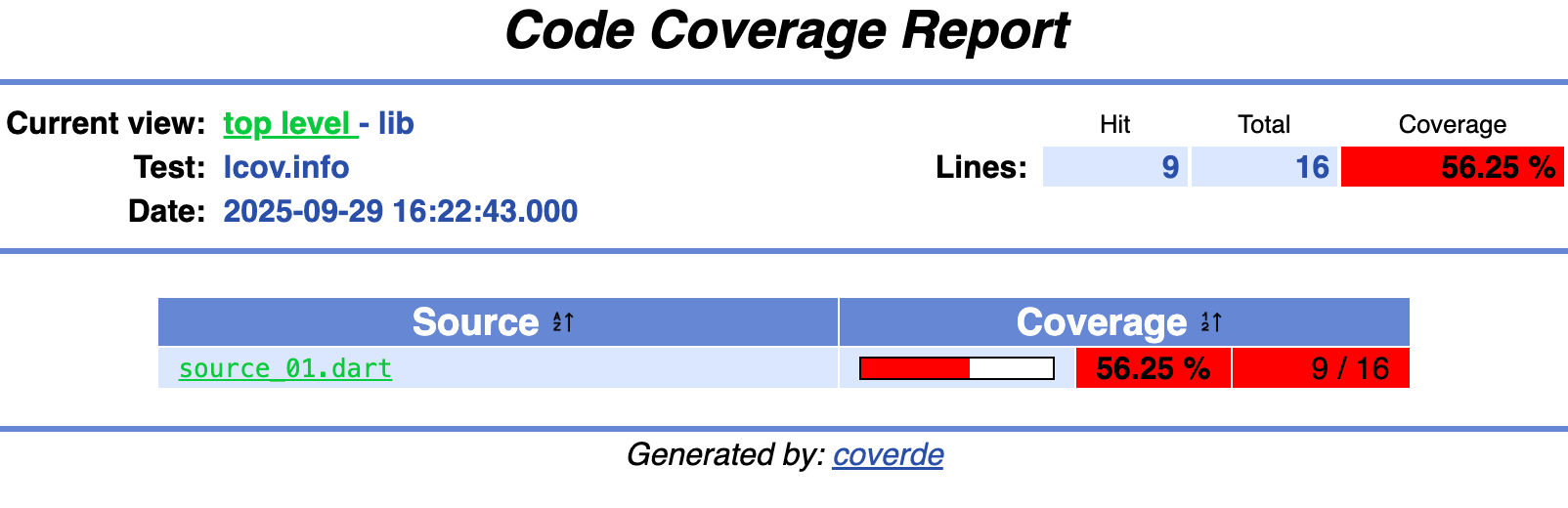
Default value: Disabled
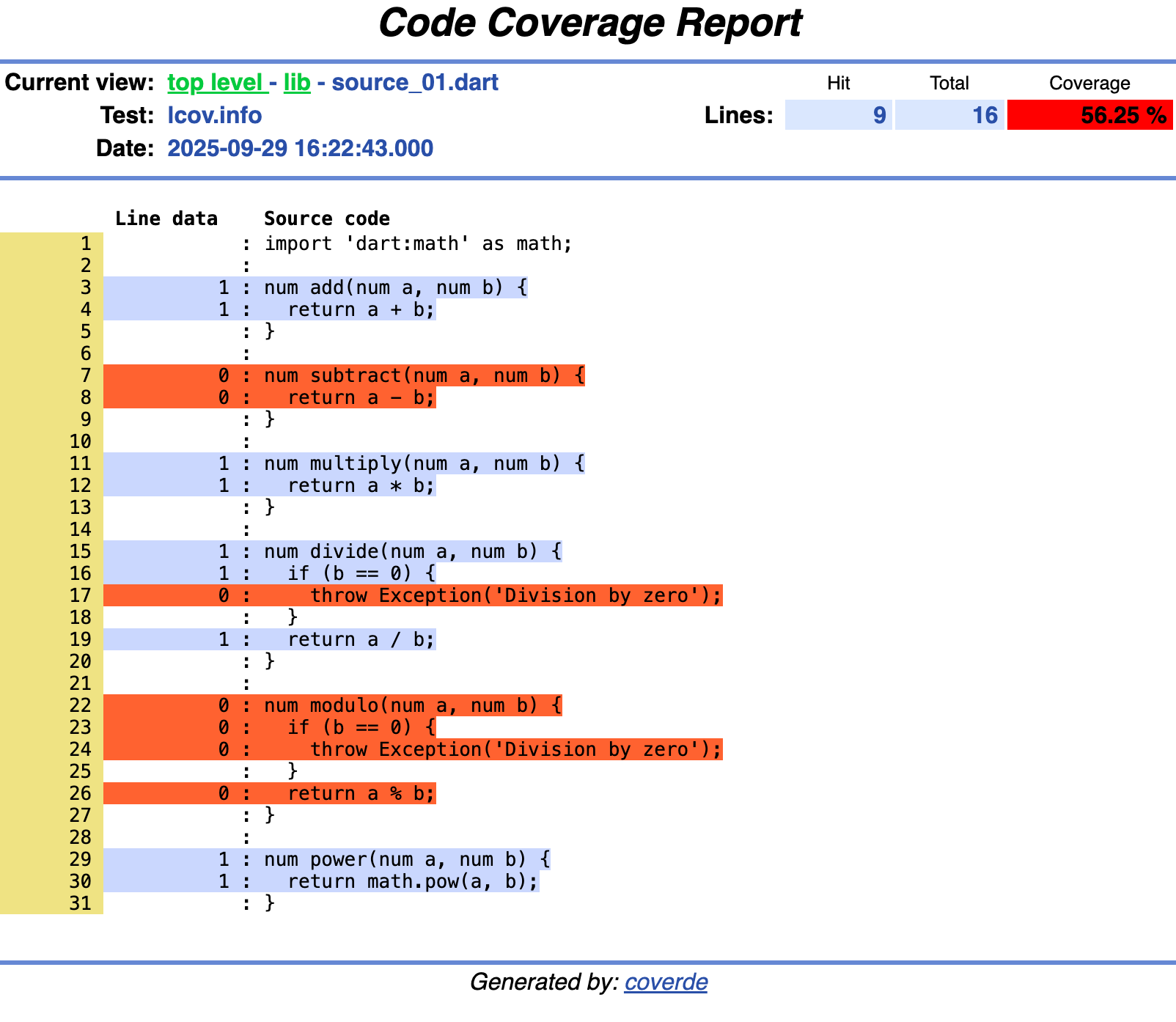
Render a named coverage report from a trace file.
The report is selected from the reports defined in coverde.yaml.
-
--inputCoverage trace file to render.
Repeat to merge traces. Records with the same path are merged. The trace time is the latest modification time.
Default value:coverage/lcov.info -
--variableA name=value pair exposed to the template as variables["name"].
Repeat to set more than one variable. A later copy of the same name wins.
Default value: None
-
--reportName of the report defined in coverde.yaml.
Required when coverde.yaml defines more than one report. When it defines one report, that report is used.
-
--configPath to the coverde.yaml file.
Relative report paths resolve from that file's directory.
Default value:coverde.yaml
Remove a set of files and folders.
-
--dry-runPreview what would be deleted without actually deleting. When enabled (default), the command will list what would be deleted but not perform the deletion. When disabled, the command will actually delete the specified files and folders.
Default value: Enabled -
--accept-absenceAccept absence of a file or folder. When an element is not present:
- If enabled, the command will continue.
- If disabled, the command will fail.
Default value: Enabled
-
pathsSet of file and/or directory paths to be removed.
Compute the coverage value (%) of an info file.
Compute the coverage value of the LCOV_FILE info file.
-
--inputCoverage info file to be used for the coverage value computation.
Default value:coverage/lcov.info -
--file-coverage-log-levelThe log level for the coverage value for each source file listed in the LCOV_FILE info file.
Default value:line-content
Allowed values:none: Log nothing.overview: Log the overview of the coverage value for the file.line-numbers: Log only the uncovered line numbers.line-content: Log the uncovered line numbers and their content.
Show uncovered source
Show uncovered line numbers only
Show resulting coverage only
The coverde.yaml file defines named coverage thresholds for coverde check, reusable transformation presets for coverde transform, and named reports for coverde render.
The file is optional. These commands read it from the current working directory. coverde transform can also load a preset from another file. See preset.
The configuration file uses YAML. Three keys are recognized at the root: coverage, transformations, and reports. Each key can be omitted.
coverage is a map of threshold names. transformations is a map of presets. Each preset is a named list of transformation steps. reports is a map of named reports.
# coverde.yaml

coverage:
  pkg-min: 100

transformations:
  preset-name:
    - type: <transformation-type>
      <parameter-1-name>: <value-1>
      <parameter-2-name>: <value-2>
    - type: <transformation-type>
<parameter-1-name>: <value-1>reports names the reports that coverde render can select. A missing reports key means there are no reports.
A console report prints one template. It sets template. It may set includeSource and destination. A relative destination resolves from the directory that contains coverde.yaml, and an absolute destination is used as given. Omitting destination prints the report. The template receives root, the coverage tree. outputPath on that tree is empty, because a console report does not write a page per node. directory.files are the files directly in that directory. Nested files are reached through directories. filesLinesHit, filesLinesFound, and filesLineRate (and the same for functions and branches) cover only those direct files. fileDirectories lists descendant directories that contain files, sorted by path. A console report, and a root or directory slot, may set includeSource. When it is true, that template's files include source text at every depth. Other templates in the same report keep the instrumented lines only.
A report collapses a single-child directory chain into one node. Set collapse: false on a console or files report to keep a page for each directory, such as lib, then src, then entities. coverde report keeps the collapsed tree. A files report writes into destination. A relative destination is resolved from the directory that contains coverde.yaml. The report sets at least one of root, directory, and file. Each slot sets template and path. path is a template for that node. A directory path can read a child outputPath, because child paths are assigned first. Page templates also see those paths. A slot may set variables and pages. Slot variables merge into the template variables map. Each pages entry sets another path and optional variables that reuse the same template. A file slot may set includeSource. When it is true, that file page includes source text. root and directory slots may set it too. assets copies static files into the destination after the templates render. Each asset sets from, relative to the configuration directory, and to, relative to the destination. An asset may set render: true. Its source is then a Liquid template with document, variables, thresholds, columns, and color. The default is a byte copy.
A file template can read function and branch detail, not only the rates. functionsHit, functionsFound, branchesHit, and branchesFound are null when the trace never recorded that measurement. A null rate is not 0%. minus, times, and round accept a numeric string, the same way plus does, so a --variable or a {% render %} argument can be used in arithmetic. round of an empty value stays empty. fixed: 2 prints 100.00 and also leaves an empty value empty. pad aligns text to a width, and a second argument of right aligns it to the right. truncate keeps the tail and prefixes ... when the text is longer. 0 is still empty in {% if %} and default. Compare hits == null and hits > 0. columns is the terminal width, or 80 when stdout is not a terminal. color is true only when the report is printed to a terminal. A destination file stays plain. colorize wraps text with light_red, light_green, red_bold, green_bold, or blue_bold, and returns the text unchanged when color is false. thresholds is the coverage map. {{ thresholds["pkg-min"] }} reads one number. sort_by_rate sorts files or directories by a rate. A null rate stays after every number. The direction is asc, the default, or desc. Without the filter, files stay in trace order. {% capture class %}covValue headerCovTableEntryLo{% endcapture %} keeps the space between those class names. {%- -%} would remove it. {% render %} still sees only the arguments it was given. Each file also has functions (name, line, hits) and branches (line, block, branch, taken). taken is null when LCOV recorded -. Each line has the branches that fall on that line, so a line that ran can still show a branch that did not. There is no statement count; a statement column uses the line hit and found counts. The document and each directory expose the same hit and found totals. document.traceModifiedAt is the trace file's modification time in ISO-8601, or empty when the caller did not provide one. The trace text itself has no timestamp. document.testNames lists distinct TN: names in trace order. Each file has testName, the first non-empty TN: in its record. A later TN: on the same path does not replace it. {{ file.path | report_path }} is that path relative to the report destination. A relative path stays as it is. A POSIX absolute path uses absolute, or absolute-2 when a file already occupies that name. A drive root uses drive-c, a drive-relative path uses drive-c-relative, and a UNC path uses unc-server-share. These are the same folder names coverde report writes. The path jail still rejects an output path that is absolute, empty, trailing-slash, or contains ... file.unrecognized lists trace lines the parser did not understand. Instrumented DA:, FN:, and BRDA: lines are not in that list. file.sourceAvailable is empty when the template did not ask for source, true when the source file was read, and false when it was requested and the file is missing. A missing file still renders, with instrumented lines and empty source text. A source file that exists but cannot be read still fails the report.
reports:
  summary:
    type: console
    template: templates/summary.liquid

  pages:
    type: files
    destination: build/coverage
    root:
      template: templates/root.liquid
      path: index.html
    directory:
      template: templates/directory.liquid
      path: "{{ directory.path | report_path }}/index.html"
    file:
      template: templates/file.liquid
      path: "{{ file.path | report_path }}.html"
      includeSource: true
    assets:
      - from: assets/style.css
to: style.cssA template does not get a separate statement count. A statement column uses the line hit and found counts.
directory.files are the files directly in that directory. Nested files stay under directories.
A files report cannot write the same output path twice.
An output path cannot be absolute, empty, or a trailing slash, and it cannot contain ...
{%- -%} and {{- -}} strip the whitespace around a tag, including a space between class names. {% render %} sees only the arguments it was given, not the names of the template that called it.
0 is empty in {% if %} and default. Compare hits == null and hits > 0.
--report is required when coverde.yaml defines more than one report. One report is used when the flag is omitted.
coverage names the thresholds that coverde check can select. A missing coverage key means there are no named thresholds.
Each name is a non-empty string that does not parse as a number. Each value is a finite number from 0 to 100 inclusive.
coverde check reads coverde.yaml from the working directory only when its threshold argument is a name. A numeric argument, such as coverde check 95, never opens the file, which is why a numeric name cannot be selected. coverde check pkg-min uses the pkg-min entry and logs the resolved percentage. An unknown name fails and lists the names defined in that file.
Each transformation step requires a type field and the corresponding parameters.
Keep files whose paths match the provided regular expression pattern.
type: keep-by-regex
regex: <regex-pattern> # Example: "^lib/.*\\.dart$"Skip (exclude) files whose paths match the provided regular expression pattern.
type: skip-by-regex
regex: <regex-pattern> # Example: "^test/.*_integration\\.dart$"Keep files whose paths match the provided glob pattern.
type: keep-by-glob
glob: <glob-pattern> # Example: "**/lib/**"Skip (exclude) files whose paths match the provided glob pattern.
type: skip-by-glob
glob: <glob-pattern> # Example: "**/*.g.dart"Keep files whose coverage meets the specified comparison.
type: keep-by-coverage
comparison: <comparison> # Example: "lte|80" (less than or equal to 80%)Skip (exclude) files whose coverage meets the specified comparison.
type: skip-by-coverage
comparison: <comparison>  # Example: "gt|50" (greater than 50%)
See Comparison Operators for the allowed comparison operators.
Rewrite file paths so that they are relative to the given base path.
type: relative
base-path: <base-path> # Example: "/path/to/project"Include transformations defined in another preset by name.
Caution
Circular references between presets are detected and will result in an error.
type: preset
name: <other-preset-name>  # Example: "production-only"
Add file to load that preset from another coverde.yaml. A relative file is resolved from the directory of the yaml file that contains the step. An absolute path is used as given.
A preset step inside the loaded file still looks up names in that file. A file inside it is relative to that file's directory. A cycle across files fails.
type: preset
file: <file>  # Example: "../coverde.yaml"
name: <preset-name>  # Example: "ci-workflow"
On the command line, a plain string is a preset in the working directory's coverde.yaml. A YAML map with file loads the preset from that file, relative to the working directory. Quote a path or name that contains : or #.
coverde transform --transformations 'preset={file: ../coverde.yaml, name: ci-workflow}'eq|<value>
Checks if the value is equal to <value>.
neq|<value>
Checks if the value is not equal to <value>.
gt|<value>
Checks if the value is greater than <value>.
gte|<value>
Checks if the value is greater than or equal to <value>.
lt|<value>
Checks if the value is less than <value>.
lte|<value>
Checks if the value is less than or equal to <value>.
in|<range>
Checks if the value is within the specified <range>.
The <range> can be one of the following:
[lowerValue,upperValue](lowerValue,upperValue][lowerValue,upperValue)(lowerValue,upperValue)
The [ and ] brackets indicate that the lower and upper bounds are inclusive, while the ( and ) parentheses indicate that the lower and upper bounds are exclusive.
Both lower and upper bounds should be between 0 and 100 inclusive, as they are coverage percentages.
# coverde.yaml

transformations:
  # Exclude generated code files
  exclude-generated:
    - type: skip-by-glob
      glob: "**/*.g.dart"
    - type: skip-by-glob
      glob: "**/*.freezed.dart"
    - type: skip-by-glob
      glob: "**/*.gen.dart"

  # Keep only production code (lib folder), excluding generated files
  production-only:
    - type: keep-by-glob
      glob: "**/lib/**"
    - type: preset
      name: exclude-generated

  # Filter to files with high coverage
  high-coverage-only:
    - type: keep-by-coverage
      comparison: "gte|80"

  # Common CI workflow preset
  ci-workflow:
    - type: preset
      name: production-only
    - type: relative
base-path: "/path/to/project"Once defined, presets can be used with the coverde transform command.
# Use a single preset
$ coverde transform --transformations preset=exclude-generated

# Combine presets with inline transformations
$ coverde transform \
  --transformations preset=production-only \
  --transformations skip-by-coverage="gt|50"

# Preview transformations without applying them
$ coverde transform --transformations preset=ci-workflow --explainIf coverde is installed via dart pub global activate --source=hosted, i.e. as a global package from the Pub.dev, it can prompt the user to update the package if a new compatible version is available.
This process verifies that the new release has a higher SemVer version than the current one, and that its environment constraints are met by the current Dart SDK.
--update-check
The update check mode to use.
Default value: enabled
Allowed values:
disabled: Disable the update check.enabled: Enable the update check with silent output, only prompting the user if an update is available, and ignoring any warnings and errors.enabled-verbose: Enable the update check with verbose output.
Run the per-package commands in each package directory. Run the merge and the report once at the repository root.
Named thresholds follow the rules in Coverage thresholds.
Commit the shared preset at the repository root. The glob is project-specific.
# coverde.yaml

transformations:
  drop-generated-code:
    - type: skip-by-glob
      glob: "**/*.g.dart"
Each package keeps its own threshold and points drop-generated-code at that root preset. file is relative to the package coverde.yaml. For a package at packages/<name>/, that path is ../../coverde.yaml. coverde reads the yaml in the working directory, so a root-only preset is invisible when the command runs inside a package.
# packages/my_package/coverde.yaml

coverage:
  pkg-min: 100

transformations:
  drop-generated-code:
    - type: preset
      file: ../../coverde.yaml
name: drop-generated-codeIn each package directory, gather the tests, then run that file with a package trace. --coverage-package attributes the trace to that package.
$ coverde optimize-tests \
  --include 'test/**_test.dart' \
  --output test/optimized_test.dart
$ dart test \
  --coverage-path coverage/lcov.info \
  --coverage-package <package name> \
  --test-randomize-ordering-seed random \
  test/optimized_test.dart
This example uses the Dart test runner. A Flutter package should run flutter test in its place.
In each package that has coverage/lcov.info, drop generated files into a new trace. --mode w replaces that file. The default mode is append, so a second run would duplicate the trace.
$ coverde transform \
  --input coverage/lcov.info \
  --output coverage/sanitized.lcov.info \
  --mode w \
--transformations preset=drop-generated-codeIn each package that has the sanitized trace, check it against the pkg-min entry in that package's coverde.yaml.
$ coverde check --input coverage/sanitized.lcov.info pkg-minOnce at the repository root, delete any previous merged trace. rm is an alias of remove. --no-dry-run is required because remove previews deletions unless that flag is set.
$ coverde rm --no-dry-run <root>/coverage/merged.lcov.infoThen, in each package that has coverage/sanitized.lcov.info, append that trace to the root file. Omit --mode w so each package appends. Deleting the root file first drops packages that no longer have a trace. relative rewrites paths from the repository root, so lib/ paths from different packages do not collide.
$ coverde transform \
  --input coverage/sanitized.lcov.info \
  --output <root>/coverage/merged.lcov.info \
--transformations relative=<root>Once at the repository root, generate the HTML report from the merged trace.
$ coverde report \
  --input <root>/coverage/merged.lcov.info \
  --output <root>/coverage/html/
Melos
The same steps as Melos scripts. Per-package scripts use exec, because Melos applies packageFilters to exec scripts. dirExists: test selects every package that has a test/ directory.
# scripts in melos.yaml (older Melos), or melos.scripts in the root pubspec.yaml

scripts:
  test:
    description: Run tests and generate a coverage trace for a package
    exec: >
      coverde optimize-tests
      --include 'test/**_test.dart'
      --output test/optimized_test.dart
      &&
      dart test
      --coverage-path coverage/lcov.info
      --coverage-package "$MELOS_PACKAGE_NAME"
      --test-randomize-ordering-seed random
      test/optimized_test.dart
    packageFilters:
      dirExists:
        - test

  coverage.sanitize:
    description: Remove generated files from a package coverage trace
    exec: >
      coverde transform
      --input coverage/lcov.info
      --output coverage/sanitized.lcov.info
      --mode w
      --transformations preset=drop-generated-code
    packageFilters:
      fileExists:
        - coverage/lcov.info

  coverage.check:
    description: Check a package coverage trace against its pkg-min threshold
    exec: >
      coverde check
      --input coverage/sanitized.lcov.info
      pkg-min
    packageFilters:
      fileExists:
        - coverage/sanitized.lcov.info

  coverage.merge:
    description: Merge sanitized package coverage traces into one root trace
    run: >
      coverde rm
      --no-dry-run
      "$MELOS_ROOT_PATH/coverage/merged.lcov.info"
      &&
      melos exec
      --file-exists coverage/sanitized.lcov.info
      --
      coverde transform
      --input coverage/sanitized.lcov.info
      --output "$MELOS_ROOT_PATH/coverage/merged.lcov.info"
      --transformations relative="$MELOS_ROOT_PATH"

  coverage.report:
    description: Generate an HTML coverage report
    run: >
      coverde report
      --input "$MELOS_ROOT_PATH/coverage/merged.lcov.info"
--output "$MELOS_ROOT_PATH/coverage/html/"If you encounter any problems or you believe the CLI is missing a feature, feel free to open an issue on GitHub.
Pull requests are also welcome. See CONTRIBUTING.md.