
Sublime Text plugin for working with SubRip/SRT subtitles.
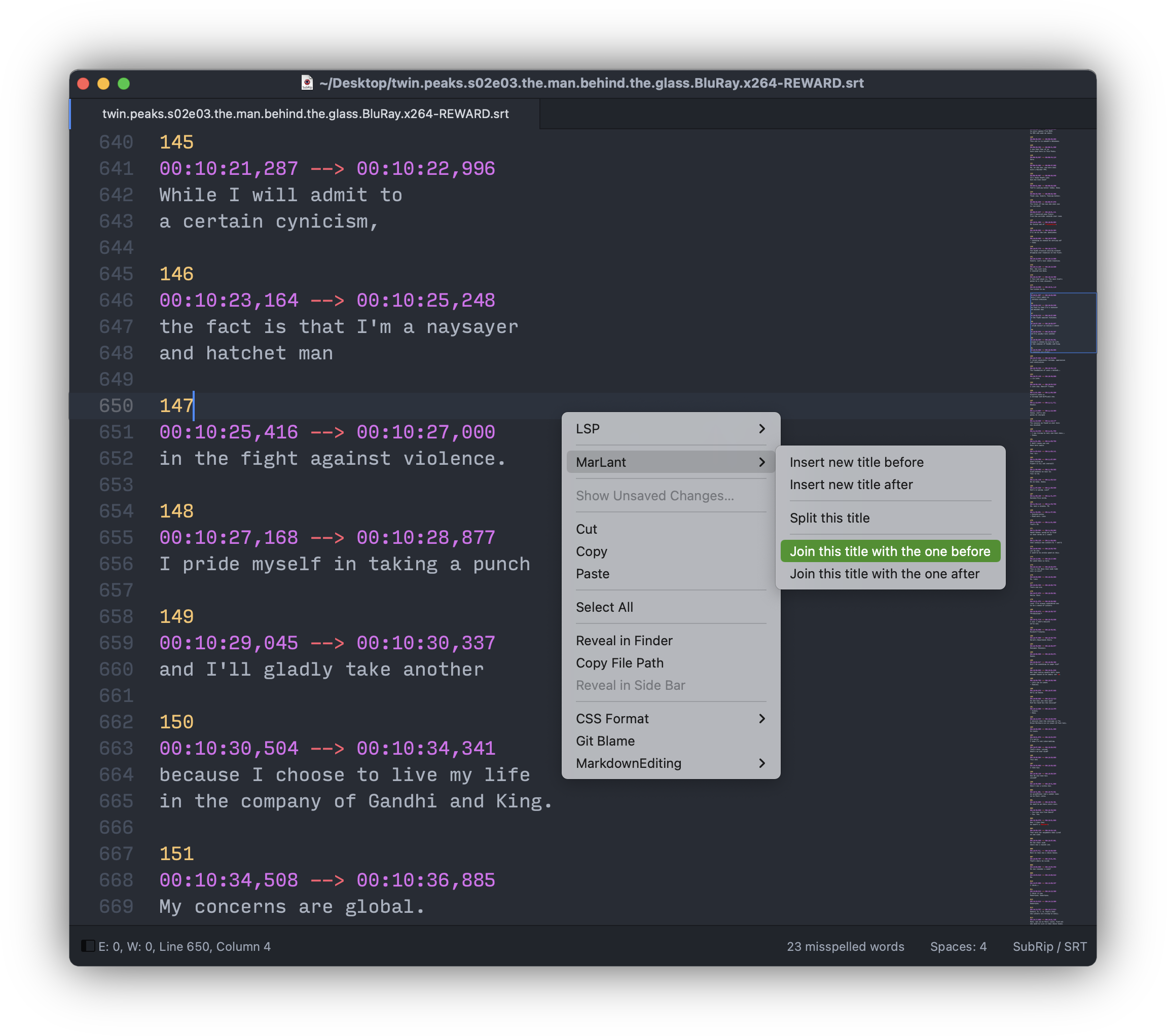
UI theme and color scheme used on the screenshot and demonstration videos below: One Dark.
- SubRip / SRT syntax highlighting
- various functions for working with subtitles:
- SubRip format validation and additional checks
- text lines length
- titles duration
- unclosed HTML tags
- etc
- titles management
- renumbering titles ordinals
- inserting new titles
- splitting a title in two
- joining two titles into one
- shifting all the timings
- translation
- opening a translation file in a split view
- generation of an empty translation file
- project dictionary
- SubRip format validation and additional checks
Commands can be called from:
- Command Palette (
CTRL/COMMAND + SHIFT + P) (all the commands) - tab context menu (translation file creation/opening)
- text area context menu (inserting, splitting and joining titles)
Validating the file:
validation.mp4
Joining and splitting titles:
join-and-split.mp4
Creating and openning a translation file:
openning-translation.mp4
- via Package Control:
CTRL/COMMAND + SHIFT + P→Package Control: Install Package→MarLant
- manually:
- clone the repository and copy its folder
marlantto/path/to/Sublime Text/Packages/but rename it to case-sensitiveMarLant- the exact path to packages can be opened with
CTRL/COMMAND + SHIFT + P→Preferences: Browse Packages - you might want to skip copying resources listed in
.gitattributesfile- or just download an archive attached to the latest tag
- the exact path to packages can be opened with
- clone the repository and copy its folder
- Sublime Text v4205 or newer
- Python plugin host v3.14
If your color scheme lacks syntax highlighting rules for text.srt scope, you can add those based on the following rules (these are meant for a dark color scheme) via Settings → Customize Color Scheme:
{
    "variables":
    {
    },
    "globals":
    {
    },
    "rules":
    [
        {
            "name": "SRT title ordinal",
            "scope": "text.srt variable.function markup.bold",
            "font_style": "bold",
            "foreground": "#efc778"
        },
        {
            "name": "SRT title timecode",
            "scope": "text.srt variable.function markup.italic",
            "font_style": "italic",
            "foreground": "#c56ddf"
        },
        {
            "name": "SRT title timecode divider",
            "scope": "text.srt variable.function",
            "foreground": "#c56ddf"
        },
        {
            "name": "SRT title HTML tags",
            "scope": "text.srt comment.srt markup.bold.srt",
            "foreground": "#5f697a"
        },
        {
            "name": "SRT title text in HTML tags",
            "scope": "text.srt markup.italic.srt",
            "font_style": "italic",
            "foreground": "#abb2bf"
        }
    ]
}
To get the scope value of a particular element, place a cursor on it and open Tools → Developer → Show Scope Name.
As you might know, Sublime Text has projects, and the plugin can and does use the project file for storing certain settings.
Here's an example of a project:
{
    "folders":
    [
        {
            "path": ".",
            "folder_exclude_patterns":
            [
                ".git"
            ]
        }
    ],
    "settings":
    {
        "marlant":
        {
            "dictionary":
            {
                "Sverre": "Сварре",
                "Thorvald": "Турвальд"
            },
            "validation":
            {
                "excluded-titles":
                {
                    "gutta-paa-skauen-s01e01-den-femte-mann.srt":
                    [
                        3,
                        5,
                        38
                    ],
                    "gutta-paa-skauen-s01e02-koppen.srt":
                    [
                        12,
                        25
                    ]
                }
            }
        }
    }
}
As you can see, translator/editor added some titles numbers to the list of excluded titles (per file, so the file needs to be saved first), and so now those will be excluded from most of the validation checks.
Another example is the project dictionary. It can help with maintaining the consistency of translation/spelling of certain things, such as characters names, so translator wouldn't need to go back looking for the way he spelled them before.
Check that the active file/view has the SubRip/SRT syntax/scope, as the plugin functionality is only enabled there.
Not out of the box, but you can certainly create your own keybinding for any plugin command. To get a command name and its arguments, enable commands logging (sublime.log_commands(True)) in Console.
For example, the following adds two keybindings: for inserting a new title before and after the current one:
{
    "keys": ["super+alt+i", "super+alt+b"],
    "command": "marlant_insert_new_title",
    "args": {"after_current_title": false }
},
{
    "keys": ["super+alt+i", "super+alt+a"],
    "command": "marlant_insert_new_title",
    "args": {"after_current_title": true }
}Because that's where Python plugin host v3.8 was replaced with v3.14, which is the one this plugin is tested with. Older Sublime Text versions don't know about v3.14 and would try to run the plugin with v3.3, which would fail. Note that Sublime Text 4205 is a dev build, and the first stable build with plugin host v3.14 was Sublime Text 4213.
The intention is that if you'd use this plugin sources to create something else, and/or redistribute it (as is or modified), then that would indeed be infected with GPLv3. But for the purpose of simply using the plugin in Sublime Text the GPLv3 terms shouldn't apply any restrictions/requirements.
One day, my log will have something to say about this.
- SubRip / SRT syntax definition is based on this implementation, converted to
.sublime-syntaxformat with SublimeSyntaxConvertor tool - timecode parsing and composing is based on the code from srt-shift
- thanks to:
- OdatNurd for his Plugin 101 - How to write Packages for Sublime video-course
- friendly and helpful Sublime Text community for answering my (sometimes stupid) questions