



SecureBank is a FinTech application which contains all OWASP TOP 10 2025 security vulnerabilities along with some other security flaws found in real-world applications.
You can read more about SecureBank and OWASP top 10 vulnerabilities here.
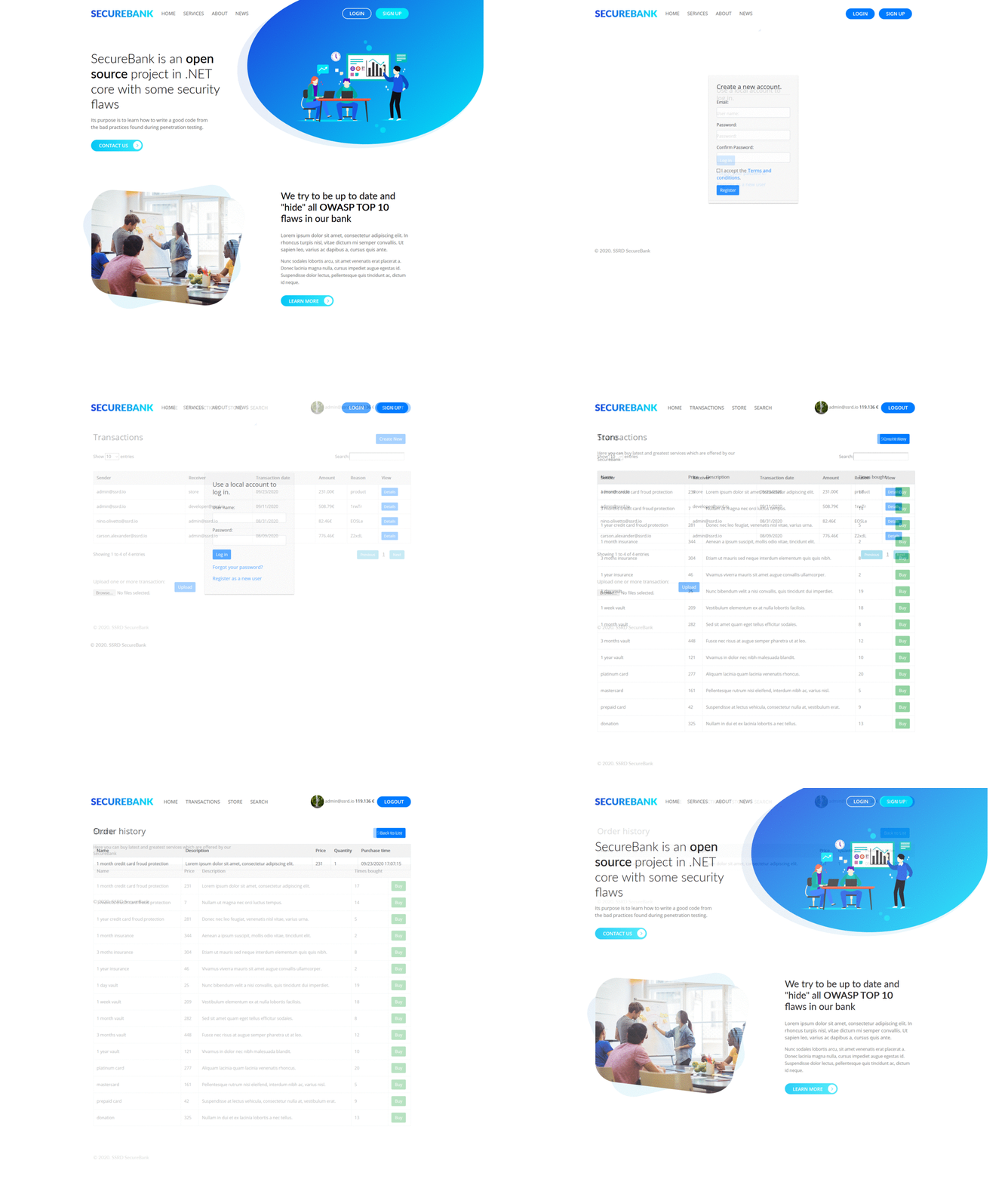
See where SecureBank is being used
You can setup SecureBank application from source code, or simply pull it from Docker Hub.
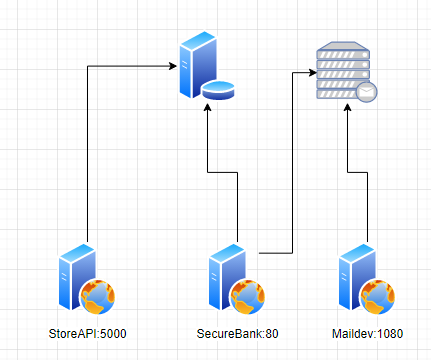
On the image below you can review how the application is built from the infrastructure point of view.
Make sure that you have PostgreSQL available. You can install or run it inside Docker.
- Install .NET 10.0 SDK
- Install Visual Studio 2026 or just run with Visual Studio Code
- Clone from GitHub
- Navigate to directory SecureBank -> src
dotnet runor open solution in IDE and run there
- Install Docker
- Execute
docker run -d -p 80:80 -p 5000:5000 -p 1080:1080 -e 'SeedingSettings:Admin=admin@ssrd.io' -e 'SeedingSettings:AdminPassword=admin' ssrd/securebank - Open http://localhost:80
- Install Docker
- Install Docker Compose
- Clone SecureBank
git clone https://github.com/ssrdio/SecureBank.git - Run
docker-compose up
- Install Docker
- Install Docker Compose
- Create
docker-compose.yml
services:
    securebank:
        image: ssrd/securebank
        environment:
          - AppSettings:BaseUrl=http://localhost:1337
          - AppSettings:StoreEndpoint:ApiUrl=http://storeapi:80/api/Store/
          - AppSettings:StoreEndpoint:ApiToken=
          - AppSettings:SmtpCredentials:Ip=maildev
          - AppSettings:SmtpCredentials:Port=25
          - AppSettings:SmtpCredentials:Username=
          - AppSettings:SmtpCredentials:Password=
          - AppSettings:Ctf:Enabled=false
          - AppSettings:Ctf:Seed=example
          - AppSettings:Ctf:GenerateCtfdExport=true
          - AppSettings:Ctf:FlagFormat=ctf{{{0}}}
          #- AppSettings:Ctf:FlagFormat=ctf{{{0}}}.challenge{1}"
          - AppSettings:Ctf:UseRealChallengeName=true
          - AppSettings:Ctf:Challenges:SqlInjection=true
          - AppSettings:Ctf:Challenges:WeakPassword=true
          - AppSettings:Ctf:Challenges:SensitiveDataExposureStore=true
          - AppSettings:Ctf:Challenges:SensitiveDataExposureBalance=true
          - AppSettings:Ctf:Challenges:SensitiveDataExposureProfileImage=true
          - AppSettings:Ctf:Challenges:ExceptionHandlingTransactionUpload=true
          - AppSettings:Ctf:Challenges:PathTraversal=true
          - AppSettings:Ctf:Challenges:Enumeration=true
          - AppSettings:Ctf:Challenges:XxeInjection=true
          - AppSettings:Ctf:Challenges:MissingAuthentication=true
          - AppSettings:Ctf:Challenges:RegistrationRoleSet=true
          - AppSettings:Ctf:Challenges:ChangeRoleInCookie=true
          - AppSettings:Ctf:Challenges:UnconfirmedLogin=true
          - AppSettings:Ctf:Challenges:ExceptionHandlingTransactionCreate=true
          - AppSettings:Ctf:Challenges:TableXss=true
          - AppSettings:Ctf:Challenges:PortalSearchXss=true
          - AppSettings:Ctf:Challenges:InvalidModelStore=true
          - AppSettings:Ctf:Challenges:InvalidModelTransaction=true
          - AppSettings:Ctf:Challenges:UnknownGeneration=true
          - AppSettings:Ctf:Challenges:HiddenPageRegisterAdmin=true
          - AppSettings:Ctf:Challenges:HiddenPageLoginAdmin=true
          - AppSettings:Ctf:Challenges:InvalidRedirect=true
          - AppSettings:Ctf:Challenges:DirectoryBrowsing=true
          - AppSettings:Ctf:Challenges:Swagger=true
          - AppSettings:Ctf:Challenges:Base2048Content=true
          - AppSettings:Ctf:Challenges:SimultaneousRequest=true
          - AppSettings:Ctf:Challenges:reDOS=true
          - AppSettings:Ctf:Challenges:FreeCredit=true
          - DatabaseConnections:SecureBankMSSQL:UserId=securebank
          - DatabaseConnections:SecureBankMSSQL:UserPass=Your_Password123
          - DatabaseConnections:SecureBankMSSQL:Server=postgres
          - DatabaseConnections:SecureBankMSSQL:ServerPort=5432
          - DatabaseConnections:SecureBankMSSQL:Database=securebank
          - SeedingSettings:Seed=true
          - SeedingSettings:Admin=admin@ssrd.io
          - SeedingSettings:AdminPassword=admin
          - SeedingSettings:UserPassword=test1
        ports:
            - 80:80
            - 1080:1080
        volumes:
            -  ./logs/securebank:/app/SecureBank/logs
            -  ./logs/storeapi:/app/StoreApi/logs
            - ./ctf:/SecureBank/Ctf
            - ./data:/var/opt/mssql/data
- Run
docker-compose up
admin@ssrd.io:admin
developer@ssrd.io:test
yoda@ssrd.io:test
tester@ssrd.io:test
- 80 on this port SecureBank is accessible
- 1080 is maildev server for user registration
- 5000 is hidden API
If you want to run SecureBank in CTF mode we have also prepared this option. It will create CTFd compatible export file.
Run docker run -d -p 80:80 -p 5000:5000 -p 1080:1080 -e 'AppSettings:Ctf:Enabled=true' -e 'AppSettings:Ctf:Seed=example' -e 'SeedingSettings:Admin=admin@ssrd.io' -e 'SeedingSettings:AdminPassword=admin' ssrd/securebank
For custom training you can contact us at training[at]ssrd.io
App uses a simple call to our server in order to provide number of installations worldwide. Approximate location is displayed from your public IP and put on the map. If you don't want to be part of our statistics, just set AppSettings:PingHome=false in docker-compose.yaml or appsettings.json files.