


Native macOS app for managing the JACK audio server, from your menu bar or as a standard window.
 Signed & notarized by Apple
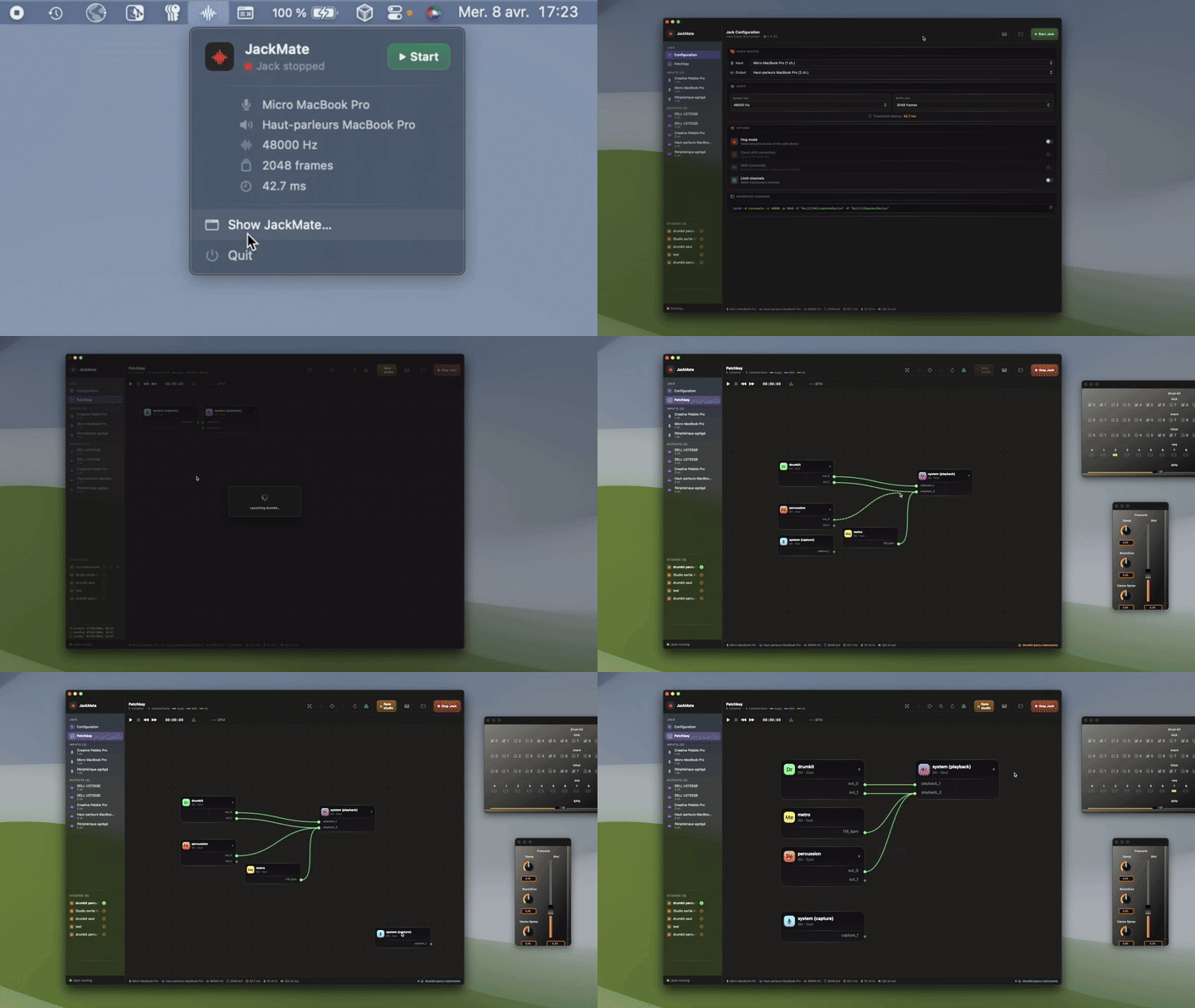
Since 2.0, JackMate drives JackMoebius, a bidirectional CoreAudio ↔ JACK bridge: any native macOS app (Safari, Music, FaceTime, QuickTime, a DAW's companion apps…) becomes a first-class JACK client, inputs and outputs, with no external setup. Per-app volumes, studios that save and restore the whole JackMoebius state, and one-click install of JackMoebius from JackMate come with it.
JackMate 2.1 follows the new device model of JackMoebius 1.1:
- Input and output set separately for each app: JackMoebius default (nothing to set in the app) or Dedicated, a virtual card "JackMoebius for <App>" of 1 to 64 channels. A small Apply panel explains the effect before anything changes.
- Shared input in the patchbay: every app that reads it gets a box with the two shared ports, and a cable drawn in one box shows in all of them.
- Your cables are kept when an app changes mode or channel count.
- Capacity gauges (254 input and 254 output channels shared by all apps), a warning strip, and a one-click way to free the channels a card keeps but no longer uses.
- Clear alerts in your language: Mac default devices that are no longer JackMoebius, transport problems, refused requests explained with their numbers.
JackMate 2.1 requires JackMoebius 1.1.0 or newer. JackMoebius is a separate driver (free 14-day trial, then a one-time purchase); JackMate detects the installed daemon automatically and offers to update it. Studios saved with JackMate 2.0 reload as best as possible: re-save them to use the new format.
- Start / stop jackd with full custom configuration (sample rate, buffer size, I/O device, hog mode, clock drift, channel selection)
- Real-time display of the generated command, with a one-click copy button
- Automatic detection of the Jack executable name (
jackdorjackdmp) - Reliable stop: if the server does not quit by itself, JackMate forces it after a few seconds and shows a waiting window
- MIDI via CoreMIDI (
-X coremidi), experimental: your MIDI ports appear as asystem_midiclient in the patchbay, with MIDI cables and ports in amber. With JACK 1.9.22, stopping Jack takes a few seconds longer while MIDI is on (jack2#1027, fix proposed in #1028) - Automatic switch between Configuration and Patchbay views based on Jack state
- Expose any CoreAudio app (Safari, Music, FaceTime, QuickTime…) as a JACK client: Output and Input, each either JackMoebius default or Dedicated (1 to 64 channels), with an Apply panel that shows the effect first
- Shared input drawn in every box that reads it; cables kept across mode and channel-count changes
- Capacity gauges, unused-channel release, refusals and Mac default-device alerts in your language
- Per-app volumes (follow the master or set independently)
- Live, event-driven daemon status; automatic restart if it stops while Jack is running
- Wrong-audio-device alerts on exposed, wired apps
- Install / update JackMoebius from within JackMate (with an in-app demo video); license status shown in the header
- Full session capture: Jack parameters, clients, connections, node positions
- Smart loading: full command comparison (all parameters, channel selection), restarts Jack only if necessary
- Graceful shutdown of all clients (GUI and CLI) before switching studios
- Automatic save and relaunch of CLI clients (full command with arguments)
- Restores the JackMoebius state too: exposed apps (backing and channels per direction) and per-app volumes (2.0, reworked in 2.1)
- Visual editor for Jack client connections
- Node drag & drop, group drag (move selected clients together)
- Node collapse/expand, meta-cables
- Drag between ports to connect, right-click a port or a client to disconnect
- Connect-All: bulk connection between two clients with canvas preview
- Automatic layout (Sugiyama / tidy algorithm)
- Multi-selection (Shift+click, ⌘A), selection overlay
- Out-of-view node indicators, zoom reset, haptic feedback
- Play / Pause / Stop / Seek
- BBT, HMS, Frames display
- Timebase master, BPM
- Menu bar mode and standard window mode
- Native macOS menus: View ⌘1/⌘2, Help with documentation link, custom About panel
- Automatic Jack detection at launch and on every app reactivation
- Jack version check: green ✓ badge if up to date, clickable amber ↑ badge if update available
- Aggregate warning sheet: when the device selection will cause Jack to silently create an aggregate, a modal shows a patchbay-accurate preview of the resulting channel layout before Jack starts, with a "don't show again" option per device combination
- Installation helper modal when Jack is absent (Homebrew or .pkg, with copyable command)
- 🇫🇷 French · 🇬🇧 English · 🇩🇪 German · 🇮🇹 Italian · 🇪🇸 Spanish. Want to add yours? See
i18n/
Full documentation at jackmate.app.
- macOS 15.0 (Sequoia) or later, Intel and Apple Silicon
- JACK2 installed (
/usr/local/lib/libjack.dylibor/opt/homebrew/lib/libjack.dylib)
Download the latest .dmg and drag JackMate to your Applications folder.
🛡️ Signed and notarized by Apple. JackMate is Developer ID signed and notarized, so it opens cleanly: no Gatekeeper warnings, no Terminal workarounds. Just drag it to Applications and launch.
See src/ for full build instructions, tech stack, and project structure.
Contributions are welcome:
- Localization: Copy
i18n/Localizable_template.strings, translate it, and open a pull request. Seei18n/for the full guide. - Bug reports: open an issue with your macOS version, JACK version, and steps to reproduce.
- Pull requests: please open an issue first to discuss significant changes.
JackMate is free, open source, and signed & notarized by Apple. If it saves you time or fits into your workflow, please consider buying me a coffee.
Contributions help cover the recurring Apple Developer account ($99/year) that keeps JackMate signed and notarized (a smooth, warning-free install for everyone) and support continued development.

JackMate source code is released under the MIT License.
JackMate dynamically loads libjack (JACK2) at runtime via dlopen. JACK2 is distributed under the LGPL 2.1 license. libjack is not bundled with JackMate; it must be installed separately by the user.